Info line automation values ignored when pressing enter

Cubase cant write automation when stopped…write…despite its absolute need for so many years (Pro Tools, Reaper no problem)
Cubase cant morph snapshots of plugin states
Cubase cant record change of presets (just writes mountains of data on change)

So I put up with it an simply need to change a freq on 1 band of ozone eq. How can it be this hard…yep frustrated…surely this should have been fixed decades ago instead of adding floss like the modulation controllers? They belong on the synth or generator NOT the daw…fix ARA so other vendors can do the heavy lifting with a solid DAW

Example:

  1. create automation point on lane for a 3rd party plugin
  2. type in numeric value in info line field
  3. hit enter
  4. Field closes, new value ignored and old value remains intact

Hmm
Really

Hi,

Which Cubase version exactly do you use? The tag mentioned cubase-12.

Which plug-in and and parameter exactly did you use?

Hi martin
As per tag 12
Atm just ozone eq
As per post freq(2)

Cheers

Im pretty blown away that no one else has noticed such critical issues to automation nor had any idea of how far behind things have got. Automation of mixes is…well i thought well ahead of any ear candy or bells and whistles?

Hi,

Can you change the value by mouse? Isn’t it locked out muted?

The value changes by dragging the node in the lane or dragging up and down or by clicking and dragging the value in the info line (although even with modifier, very coarsely)

Its a simple matter of rolling the HP filter from 45hz down to 30 to feature a triplet kick fill and then back to 45hz for next section…if you can figure out how to do it…well that would be amazing. No issues doing it in Live

I looked it up on chatgpt and it seems to be a well known issue, well before v12

EDIT: Its even more sinister…Cubase is not even picking up the moves from 30hz to 45…but can when it is 30hz to 4k…
Its just a complete mess…what is the point. I need to work…been tracking for quite a while and Im back on to mix jobs now. Ive settled on Ozone eq as my go to and now this issue?

While it’s true that automation parameters of some 3rd party plugins doesn’t allow you to change a node value from the info line by typing in a value and pressing enter, most do.
Your ChatGPT output above is just another example among many, that the information it provides should be treated with a fair amount of skepticism. “Works for some native parameters only” is undisputably wrong.

I don’t know what the root cause of this is but I wouldn’t be surprised if the issue lies with the plugin. Out of the iZotope plugins I own and tested just now, most of them are exhibiting this issue with typing in node values from the info line, but not all. I also wasn’t able to find a single plugin by any other vendor that exhibit these issues, but I obviously couldn’t try them all.

Chuck Norris did and then some. Ask ChatGPT :rofl:

Sorry, @Aurasphere , I couldn’t resist :wink:

Chatgpt is pretty much rubbish I know…but it was across it as an issue :slight_smile:

Fact: The same plugin (oz eq) doing exactly the same procedure works fine in Ableton. It records the movement from 30 > 45hz, I can type in a value etc…its not the plugins at fault here…very obviously.

Basically Cubase doesnt work. Its a show stopper for me…yet again. Like I said, I could not give a crap about new features when absolutely basic things just dont work. This is why I started the journey on reaper…but Im so done learning new stuff…I just want to do music. Reaper can do it…just so clunky to get there and days to work out stuff if no one is online on the forum…as well as having to sort through so many people who think they even know what Im actually talking about. There are a couple of quality help peeps there though.

I have some nicely paid mix jobs and want to do them in Cubase…and I cant; no workarounds, no fixes…just rubbish after me supporting Cubase since 1989

Since I wasn’t able to find a plugin by any other vendor than iZotope that has this particular issue, I don’t find it to be that obvious.

@mlib - is your testing in C14.? The OP is using C12 only…

@Aurasphere - sorry to say, Steinberg (very) recently have stopped tech support of C12.
Steinberg drops support for some products in July 2025 - Announcements - Steinberg Forums

No, in Cubase Pro 12.0.70.

Hi Aurashpere,

I can reproduce that with the plugin AmpliTube 5 in Cubase 14 as well. Within the plugin I have to assign a parameter to “Param 1” wich I can then choose to automate. In my case I chose the Mix of a delay. Typing in a value between 0 - 100 % using the Info Line “Value” field always results in the value “0.00 %”.

I can also reproduce with the plugin St James of Blackstar. Typing a value for a parameter ranging from 0.0 - 10.0 always results in 10.0.

Using the standard MonoDelay of Cubase typing in a value for automation works as expected.

So as far as I can conclude you are absolutely right. Personally I do not give it much thought because using the mouse up and down (or scroll wheel) while clicking in the value field or moving the node up and down with the mouse works as expected.

I’m sure using Reaper or any other DAW will have other issues or workflow annoyances. Both intended and unintended…

For the record, I spend about 10 minutes testing with plugins from Waves, Native Instruments, Eventide, Exponential Audio, Brainworx, Softube, Soundtoys and SSL. With all the plugins I tested I was able to change the value of an automation node by typing in a value via the info line.

Hi mlib,

I don’t have much plugins and mostly use the stock plugins which work fine. Only “third party” that I can try is the Voxengo CurveEQ which comes with Cubase. That one works perfectly fine :slight_smile:

I also tried EZdrummer 3 which also works fine :slight_smile:

So yeah… I would not be surprised if it is something related to the plugins themselves and interaction with Cubase. AmpliTube 5 hasn’t been a smooth ride in the past years so I would not be surprised if something is wrong with the plugin itself.

Still I can confirm Aurashpere’s findings. So it’s a grey area…

I just ran a few quick tests (Cubase 14.0.32, Win1022H2):

Bug reproduced:

iZotope Ozone 9
iZotope Ozone 11
iZotope Trash 2
Eventide CrushStation
Newfangled Audio Elevate

Works as expected:

MeldaProduction MCompressor
Arturia Tape Mellofi
Glitchmachines Convex


Who’s bug is it anyway?

So far I’m not seeing clear and obvious evidence that it’s necessarily a Steinberg bug vs. a bug in various plugins.

The observation that some of the problematic plugins seem to work as expected in other DAWs may or may not be good proof of much, since plugin vendors have implemented different code for different hosts.

And different plugin vendors have different hosts in their primary development/testing platforms and only fix things for other hosts as they get and prioritize bug reports from their users. So while there is the VST specification and SDK, there clearly are different interpretations/implementations that are specific to host and plugin combinations.

Good evidence exists when reading release notes from hosts and from plugins, where we can regularly find fixes for specific hosts or plugins.

So the practicality of the host/plugin code API relationship isn’t as clean as us users would like to assume. And that makes assigning “blame” for bugs a pretty difficult exercise to get right. Things are generally a lot more messy behind the scenes than outsiders assume (insert sausage factory analogy).

A lot of time the fixing of bugs is determined by the market power of the host vs the plugin vendor. If a tiny plugin vendor encounters a bug in a widely used host, they are much more likely to implement a work-around on their side.

But if the host is a small company and a very widely used plugin doesn’t work with that host, it’s more likely that the host will implement a workaround on their side.

Life often (mostly?) isn’t about what’s right or wrong, but about who has more power - but that’s a topic for the lounge. :slight_smile:


Using the mouse wheel seemed to be an ok workaround in my testing as well.

Of course that is unsatisfactory for anyone who is unsettled by the associated imprecision - even when that imprecision may not be audible.

Side note:
Being unsettled by (some) imperfections is a pretty personal thing. It happens to me on some topics, but generally I’ve been trying (with some success, but still have plenty of room for growth) to manage some of my frustration levels downwards over the years, simply because that makes life a lot easier. :slight_smile:

Hi Nico

This is my 2c

  • Since they are vst3 plugins and the automation framework must comply with that established standard; it would suggest that the system is fine but the implementations differ
  • Hosts with correct implementation, across the board, seem to work fine excepting Cubase by Steinberg, the creators of the VST plugin format.
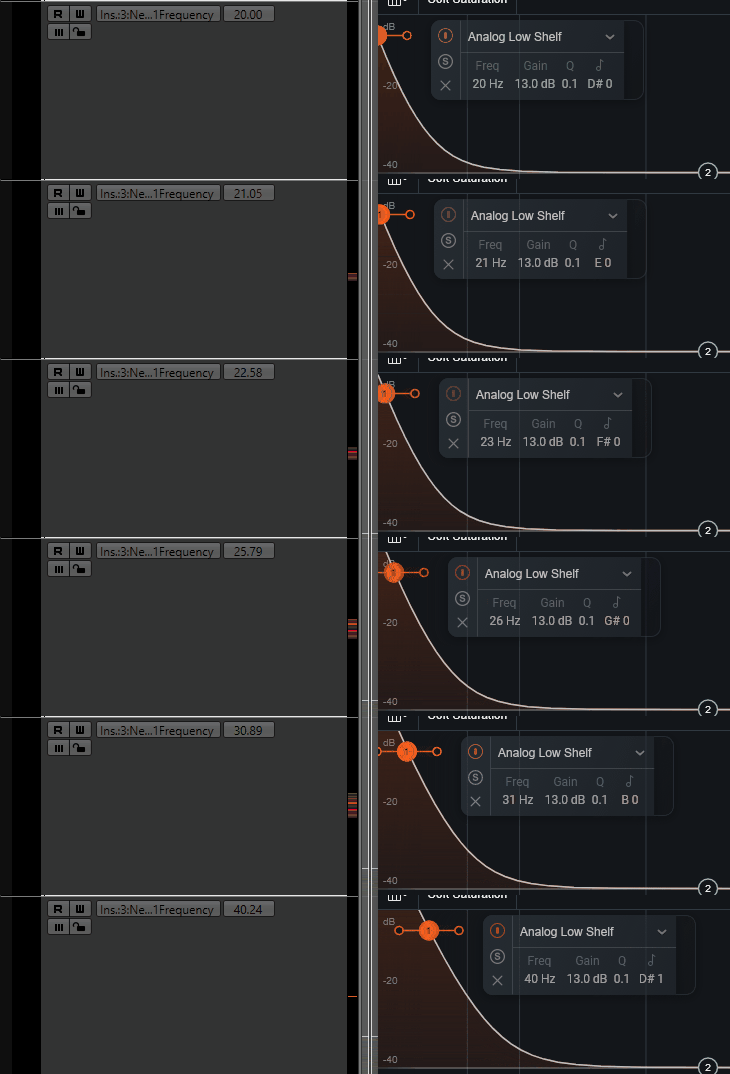
  • The resolution required to control some of these parameters is high…but its broken…I use 14bit controllers and Cubase cant even discern the diff between 20-45hz indicating that the res is outside the floating point precision to begin with since its such an old format and likely based on 128 levels. I would suggest since audio is logarithmic, and the automation framework seems to be linear, the issue is exacerbated when dealing especially with low freq.

Precision in this application is just audible, on my monitoring system it is felt very clearly…since it is a kinetic part of the spectrum.

I dont want to tell anyone how to mix…if you are far enough along the journey, the implications are obvious…what you will find is that Im particularly referring to action happening in the lowest registers. When this is blasted over kws of subs or played back on audiophile systems, this becomes really important and resolution is critical
Remember the area between 20-40 is a WHOLE octave and even expecting your “analog” processors (or dig) to really do the job there is a sign that you dont actually understand.
This is why experienced and knowledgeable companies like Sonnox (thanks to Paul Frindle actually) make specialist compressors eg Supresser HR (High Res) just for work in this area because of the increase in precision that is needed to do it well.

So while scrolling 10-12k with a mouse…I couldn’t really care too much about…but yeah sculpting the lowest 2 octaves is critical
At these registers as well, changing a value eg a hp from 30 up to 35 and the song is fundamental B0, you actually remove from B0-D1…get the idea?

Ive been spending the last year or 2 very focused on these low end areas because of prepping audiophile music…and it really matters.

lol…that was a whole long thread that we have already had…but yeah I dont ever use any stock plugins in any daw…if Cubase is the only thing you use and you dont mind particular things being dumped over time…after spending years using and loving them…sure…go ahead. Its not my experience though

Thanks for the confirmation peeps…esp that it still exists. Maybe the peeps that manage that critical path of automation left the company quite a while back now?

There is no quality control performed by Steinberg on 3rd party vendors. It’s been proven a myriad of times that 3rd party plugin developers stray from the guidelines provided by Steinberg with various results.

I’m not 100% sure what you’re trying to say here. You have a 14bit controller and can’t reach EQ frequencies between 20 and 40Hz?
Here’s an example of an EQ node’s frequency in iZotope Neutron Elements controlled by a rotary encoder set to 16,384 unique steps (14-bit resolution):
Neutron - 14bit

Definitely, but as a vendor…they must have complied because it works on other DAWs who seem to have it sorted. They dont write diff plugs for diff hosts (someone mentioned prior)…that would be pointless having a system

What version are you on for izo/cubase? Are you using remote midi? How is it mapped? Is it using QCs? etc You know remote editor cant handle relative 14bit (that I have tried and asked about)?

Could you try just using izo eq?

Cheers

You’re probably right but after messing around in almost every DAW on Mac except for Bitwig, I have to say Cubase is BY FAR the buggiest and most unreliable DAW I use. I still use it, cuz there are some features in it I absolutely love. But my frustration with Cubase reaches levels that I’ve never reached in any other DAW. It has some great things but as an overall it is a mess of a design with no real concept holding it together, and buggy beyond belief, which makes it unreliable in any professional collaborative setting where the clock is ticking. I will happily (and do) use Cubase/Nuendo for my own personal use but I would never DARE to use it in a professional setting where I need things to work as expected.

Because its by far the oldest…and many changes of staff/committees have long since come and gone…this happened at NI too. A lot more discipline is req to maintain esp direction with coders…and that costs a lot of money.