Changing the position of an instrumental pad does not affect the pad color in Groove Agent 6, but rather the instrumental pad’s semitone mapping position
Windows 11
Changing the position of an instrumental pad does not affect the pad color in Groove Agent 6, but rather the instrumental pad’s semitone mapping position
Windows 11
Hi Michiro_Sato,
Unfortunately, important information is missing. Please be more specific. Give us a step-by-step guide to be able to reproduce the issue.
Cheers,
Jan
Thanks for your reply! Jan
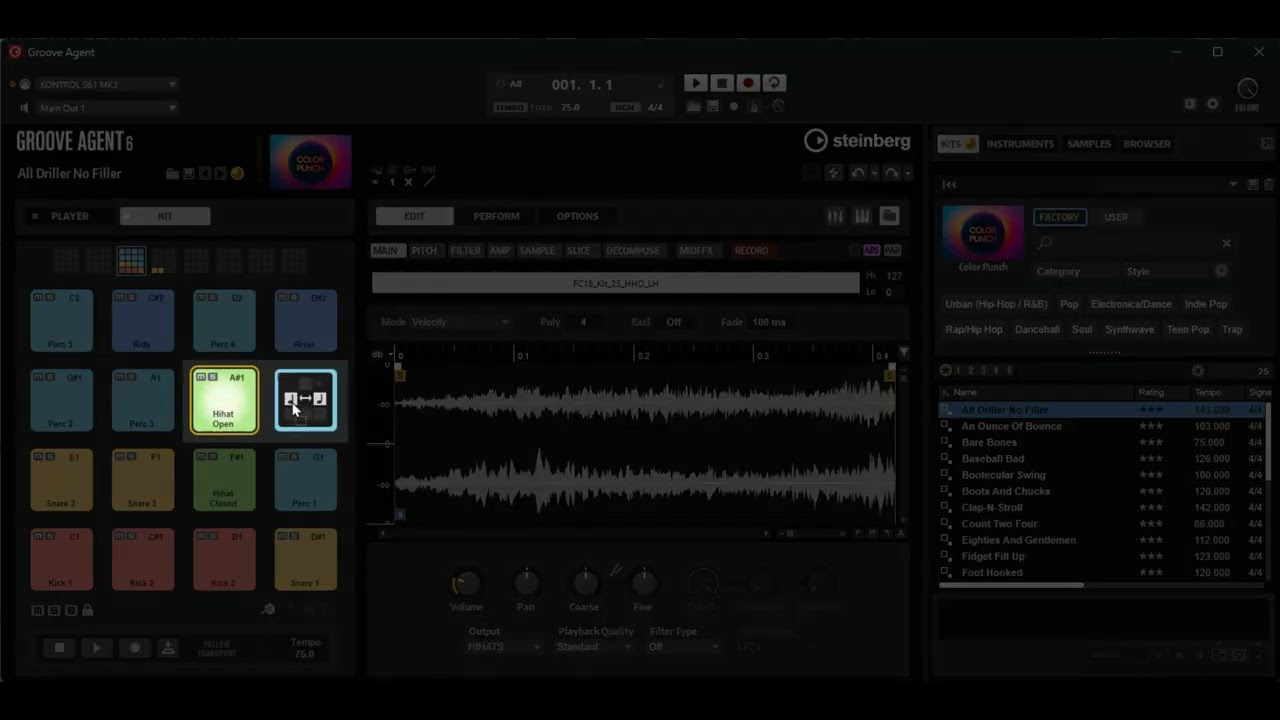
For example, select the top preset “All Driller No Filler” in “Color Punch” and try replacing the “Hihat Open -A#1-” pad from “Kit” with the “Perc 4 -B1-” pad on the right.
The “position” of each will change, but the “color” you set will remain in that position.
In previous versions, when you changed the position of an instrument pad, the color would also change.
It would also be extremely helpful if the color of the GA pad reflected in the event/midi part when dragged into instrument or midi tracks in the workspace window. Dragging pattern or single instrument hits now only shows in the track color which can be quite confusing and time consuming when trying to create.
Thanks to Wickham_Sky for your comment.
Are you experiencing the bug I’m talking about in your environment?
I uploaded a video to YouTube. I hope this helps improve my poor English a little.
Groove Agent allows you to change the order of the instrument pads (“Changing the Order of Pads”-described on page 128 of the Groove_Agent_6_0_Operation_manual-).
However, currently when you specify the color of the instrument pads and change the order, the colors are not moved.
Windows 11 Pro 25H2
Grovve Agent 6.0.20.1050(64 bit)
MOTU Ultralite mk5
Hi All. This is also an issue on Mac.
I changed the order of pads by swapping two pad positions. I held down Cmd when dragging a pad onto the middle drop icon of another pad.
After doing so, the “Set Color” menu no longer works on either of the swapped pads.
As can be seen in the image below, the pad is displaying “No Color” even though “Color 11” has a checkmark beside it. And there is no way to select another colour.
Hi Michiro_Sato, I’m now able to reproduce it here. It’s now in our Defect-Tracking-System and listed as Bug-ID “HALLY-11961”. I hope we can provide a fix for it soon. Thanks for your report and please accept my apologies for any inconvenience caused. Gerrit Junge
Thank you Gerrit Junge.
Hi Gerrit. Thanks for working on this. I just downloaded Groove Agent 6.0.30 and am still having this problem. I uninstalled the app and all related files then reinstalled it again, cleared the plug-in instance, reset the agent and removed the existing kit to start with a clean slate and the bug still exists. The version history for 6.0.30 says HALLY-11961 was fixed but it doesn’t appear to be fixed in the full version on Mac. In the attached screen shot you’ll see that the correct pad colour shows in the zone selector at the top but not on the pad itself:
It appears that the fix hasn’t been implemented in Windows environments either.
I contacted Japanese support, I received the following response:
Regarding your inquiry, we have confirmed with Steinberg in Germany that while the Version History indicates the issue was fixed in Groove Agent 6.0.30, this change is not currently reflected.
We have received a response that the issue is expected to be fixed in a future update.

