Investigating Media Bay - how to make your own categories?

HI all,
I am investigating MediaBay. I forgot a lot.

I am prepping for a big project involving lots of related stage numbers. We can call the project(s) Broken Bell.
What I want to do is to create a category called Broken Bell, then have sub categories under it - BrokenBell/Nature Sounds, Broken Bell/Pads, BrokenBell/Water.

Aim:
This way I can, if i wish work with only “established” Sounds or open up options for all of my media.

Not sure if I am getting my terms right when I say category or attribute here. I actually knew this stuff years ago but I am fumbling around at the moment.

Thank you all

Z

I assume you mean a new Attribute (database field), e.g. Broken Bells, to which you can then assign different values, e.g. Nature Sounds, Pads, etc. for tagging different objects, such as presets.

In MediaBay:

1 Like

Thank you and very helpful graphics
I have followed it and created an attribute called Broken Bell. I can see it as a yet empty column in the attributes pane (which I re-arranged a bit to suit), but in the attribute columns I cannot see it.
If Attributes is the global term here for all sound properties in MediaBay and Category is the major subspecies, I should like to see BrokenBell listed in my first column, which is a category column. Not sure how to acheive this.

TBH I am also not currently sure that even once I have the category Broken Bell, I can then achive subcategories of it, or label stuff on the fly for it.

Thank you

Z

If you have activated Broken Bells as an attribute, as shown in the lower half of the last image, you’ll get a column for it in the list. You can drag this column to the first position.

Don’t forget about the ability to create a Library project and folders within, which is essentially a dedicated Pool as its own project.

I use both. MediaBay for general tagging of sounds and exploring… and then Pools for organizing selected assets, revisions, etc.

The nice thing about the Pool is you can drag stuff from your actual project pools into it.

edit

I knew I had seen a post somewhere about this

Regions, Pools, and Libraries! (What you maybe didn’t know & how to utilize!) - Cubase - Steinberg Forums

Are you referring to the category/sub-category like Drums/Beats, Bass/Electric, Synth/Pad, that type of thing?? ASM’s posting will not do anything remotely like that.

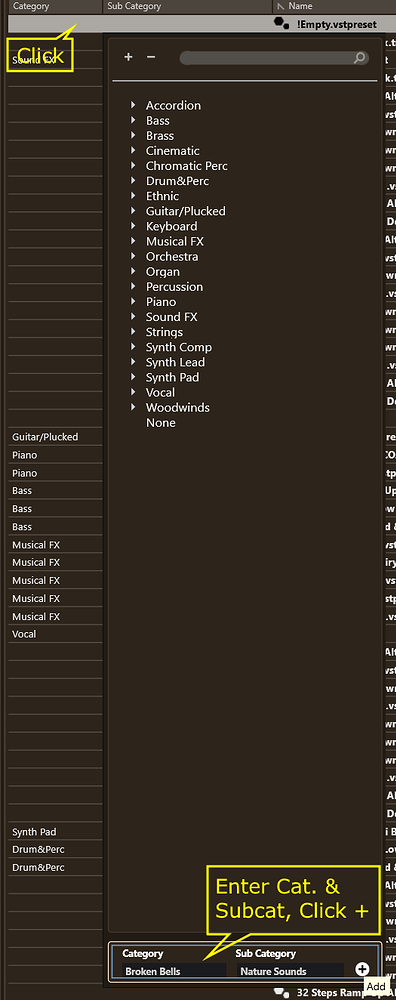
If that is your goal, click on a category or subcategory field. When the selection window opens, see the fields and +/- buttons at the top? Type in the category you want to create, enter in your sub category if needed, hit the + button.

Just remember, if you want to add a sub-category to an already existing category, you HAVE to also type in the Category name as well as the Sub or it wont work.

I have a whole bunch of these now like Basses/Reese, Basses/808 and whatnot..

@Monotremata I take it that some of these categories have probably been migrated at least once from one rig to another. Did you encounter any issues? Maybe I should give the Mediabay more credit with regard to reliability than I did in the past.

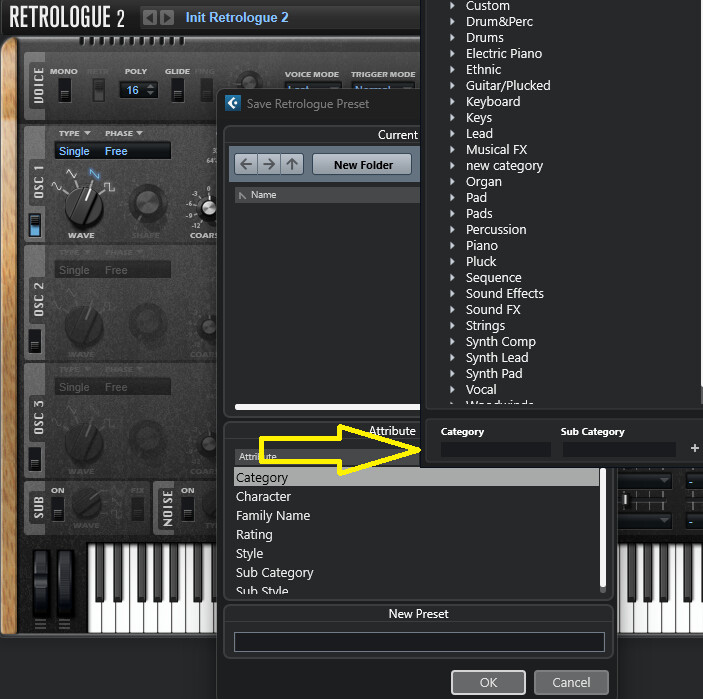
In Cb15, we can see the addition of category/subcategory when saving a preset, as shown here:

Thank you ASM. Not sure if we are talking the same concept probably my bad. What I want is to show Broken Bell as a Category in the First Column, along with all the other categories like Accordian, bass etc .
As you can see in the first image Broken Bell is created, and ticked but it’s not dragging anywhere from the ATTRIBUTE inspector. I presume this is where you want me to drag from, to the first column.

If I go to this first column’s header, drill down to Various and tick Broken Bell, then it does show up, but only on it’s own.

Here is an image with BrokenBell as the first column:

As you can see I have managed to associate two sounds with Broken Bell which I believe, but am in no way sure are subcategories of Broken Bell.
The way I did this appears to me to be super-clumsy. I went to the lower window Results and managed to find “Broken Bell” along the line of attributes at the top of this window - as the very last entry. I dragged this across to make it visible (or so I thought), I then entered two names for two sounds under the column for Broken Bell: Clock Sounds, and test subcategory.
I now have two entries appearing under Broken Bell, but I am no way sure they are genuine subcategories of Broken Bell or its just me falsley naming sounds subcategories ??

I don’t think I am really grasping this right.

Z

Hi MonoTremata,

Yes I think you understand what I want to do, but I have not been able to achieve it.

If that is your goal, click on a category or subcategory field. Where, specifcally, is this subcategory field?

What do you specifically mean by “a field” in Mediabay in this specific matter? I do understand the general concept of it inbdatabases ?

When the selection window opens, see the fields and +/- buttons at the top?

No I see no buttons anywhere - at the top of what? What do you mean by “Selection window”?

Type in the category you want to create, enter in your sub category if needed, hit the + button.

I have not been able to get this far.

Just remember, if you want to add a sub-category to an already existing category, you HAVE to also type in the Category name as well as the Sub or it wont work.

OK when I can get this far

Z

Thanks m.c, however I dont understand your reference to retrologue here. I am trying to make custom categories for all types of files in Media Bay.

Z

This was to show how we can do it when we want to save a new vstPreset.

Generally, the way it works in mediaBay, say for example for an audio file, is that you select it, go to the right tab, and after clicking in the category field, define a new category/subcategory the way shown earlier. Here’s a screenshot for an audio file, notice the Category/SubCategory fields and the add button at the bottom right of my screeenshot:

So, you can’t really add categories/subcategories on the fly without first selecting a media file for which you wish to add a new set of category/subcategory. Once you do this though for one media file, you will see it appear in your columns.

1 Like

Perhaps this has got me closer, but I still have issues. When I go as you instructed, to “category” in the RHS pane, I do see the box so typed in Broken Bell (my custom category) and as a test I typed in Percussion. The box seemed to like it, but within the Category attribute column, there is no entry called Broken Bell. It seems to have just vanished!
Further down, under Various, I have previously set up another entry which I called Broken Bell, but curiously and frustratingly the box that displays for Categories on the RHS Panel, is NOT there for Various. AAARGH!! :face_with_raised_eyebrow:
I am talking about this box:

:face_with_peeking_eye:

Here is a screen shot, as you can see there is no entry for Broken Bell:

You did something wrong because the file you have selected in that screenshot clearly shows it does not have Broken Bell assigned as its Category.

Did you remember to hit the + button after typing it?

Do you see your image below?? Broken Bell belongs in the Category/Sub Category field up above, not as a ‘Various’ extra tag.

@Reco29 - Aside from that lovely bug where the malformed BWAV headers would corrupt my samples, no trouble so far haha. I am pretty sure I figured out how to do that back in C12, which is when I bought Halion, and its migrated along to 15. IIRC, those boxes were not available in Mediabay itself until recently, like C14/C15. I added all of mine using the categories in Halion, and they showed up in Mediabay just fine, but I had to do it within Halion’s own Browser until they showed up in Cubase finally.

3 Likes

Okay, I think I’m starting to understand what you’re getting at. :star_struck:

You want to tag objects (e.g. presets) by assigning values ​​to the Category and Subcategory. The Category is now always Broken Bells (maybe others someday), and the Subcategory contains various values, such as Nature Sounds, Pads, or Water.

Forget all said before, because we DON’T need to create a new attribute for this purpose. We only need to define the Category/Subcategory value pairs so we can then assign them to our objects.

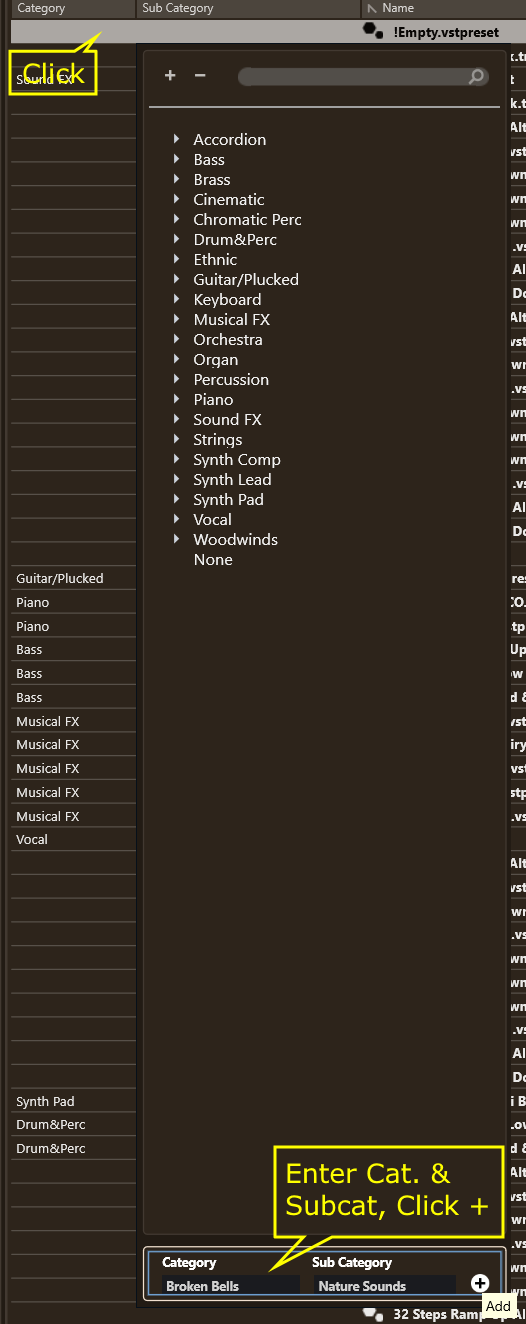
So, click on the Category column in an object row, and this dropdown menu will appear:

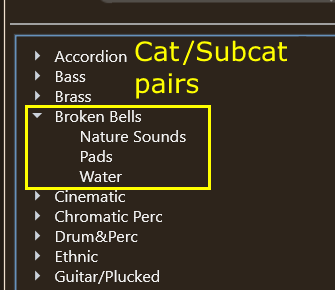
Enter the Category and Subcategory down in the box and click the Add (+) button. This Category/Subcategory pair is now created. Repeat this process for all desired Category/Subcategory pairs. Result:

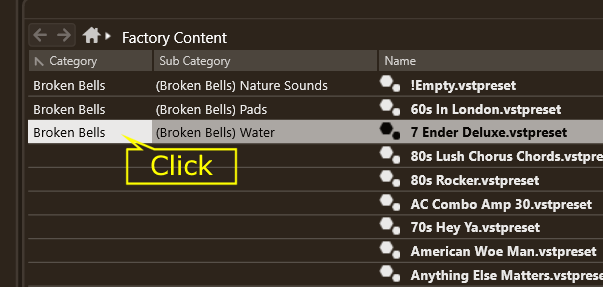
Now for the assignment: Click on the Category column in an object row again, then select the requested Category/Subcategory from the dropdown menu - done:

EDIT: I noticed that creating custom categories/subcategories isn’t supported the described way in versions prior to Cubase 15!

1 Like

First a thank you to you both. I will reply to ASM seperately but he may wish to read this.

Monotremata. I got further with your idea.

I repeated your steps, ensuring I hit that + button. I used the word Strings as a test subcategory.
The click seemed happy, but no entry in the category column under articulations. UNTIL I closed down and re-opened Media Bay. So for the first time, I now have a Category Entry For Broken Bell in the LHS. This has taken me (and you guys) days of effort!!! Thank you.

Not out of the woods yet though. I confess I am a bit bamboozled by all the rabbit warrens.

When I single click on this term in the LHS column, Category that now displays itself proudly, alone in the first column, with one Entry. The second column has only one entry which is Strings, clicking on this brings up the test sample (called Zoom) . This, so far seems correct behaviour. IMO.
I have had some general weirdness with this. At one time if I single clicked on Broken Bell BOTH Broken Bell and Strings remained in the LHS column with Strings showing the number 740. This behaviour seems to have vanished.
To me this means that I now have two fields for Strings. This might confuse, so I shall simply prefix every Broken Bell subcategory with BBStrings etc.

Does anyone know how to Delete? I have various false start names under Various,(this is what you spotted a previous false start) which I do not need. I can’t find any way to delete them. It’s not easy or intuitive! :roll_eyes:

I am going to try ascribing stuff , maybe it will work now

Hello ASM,
Thank you for sticking with me.

I tried to follow your last post but the box in your image does not come up for me. As you can see, in my image there is no box at all, even when I click all over the region where your yellow arrow points, in your image, nothing happens.
If I click on the heading, for this first Attributes Column, a drop down box appears, Starting "Audio Assets, Audio properties, Media, musical, Plugin Staff… I tried this drop down list before and got nowhere -there is no facility to add anything here.

I am pretty confident I have never seen your entry box (yellow pointer below). Also, you incidentally include a column to the left (outside of the Articulation columns - with “Synth Pad Drum&Perc, Drums&Perc” entries. I have The File Browser, to the left of the articulations column.
I do not have this column.

I am on PC are you on Mac?

If you look at my LHS Attribute column you will see that Monotremata has found a method to Show “Broken Bell” as an attribute!!! Progress!
I have probably spent a dozen or so hours on this issue, here, on tube, in the manual and I have never achieved this. At the moment, I feel like what was once terra firma, could now be quicks and, my confidence has gone. Is this a solution? Part of?

When browsing around sounds and incidentally spotting some desirable waveform, preset, etc, what is the “right” way to ascribe it to my new proud Category? Is it in teh RHS Attribute Inspector Panel?
Do you know anyway of deleting my mistakes. I have other Broken Bell entries, under Various, that are currently unticked, but still there? Iit would be good to eradicate these, but I fear this is a journey into App Data folders .

thank you again for your help. I shall sleep on things.

Z

That seems like a contradiction to me.

Is that image from your setup? Are you on Cubase 15? I noticed that creating custom categories/subcategories isn’t supported the described way in versions prior to C15:

Cubase 15.0.6, Windows 10 here.

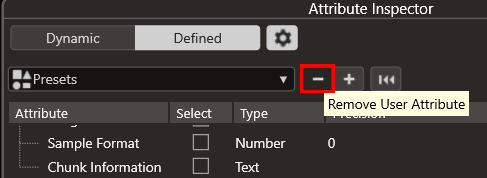
Select attribute and click - button.

Thank you for your persistences: My answers (in italics)

“It seems like a contradiction to me.”

No contradiction, the image I provided in my last post (also directly below) was from YOUR machine, as seen in YOUR post above.

No this is a clip from your image above.

"Are you on Cubase 15? "

Yes I am on Cubase 15

Windows 11 Build 25H2 (latest)

Incidentally both products have been freshly re-installed.

I shall include another pic with my whole MediaBay open in Current View, at the bottom of the thread, with everything showing. I shall put a circle around the area I think YOU mean. I do not see this button and have found no way of bringing it up. Really puzzling.

" I noticed that creating custom categories/subcategories isn’t supported the described way in versions prior to C15:"

OK, though I am not running any other versions of Cubase on this machine only C15.

This Image you included (directly above) - Accordian etc… I can see this too, but only this.

Not the other [remove/add user] box shown again below - from your system.

Deleting mistakes

You solved this problem. Fantastic! Thank you.
I had hunted for this function for hours!
*

I found this box where you indicated, but it was initially hidden, by no means easy to find!

Two rules to see it. First you must be in defined view, second the Gear Icon next to the Defined label, must be clicked.

Finding this gave me hope that I might find, by some similar wizardry a method for revealing the other buttons +/-, but no luck.

Could I ask you please to send me an image of your whole screen with the Attributes Column displaying the Category/Subcategory panel we have been discussing. I think your explanations are clear, but it may be some obscure thing…

Here is my system pic for the whole Media Bay. I indicate where I have been looking and not finding, the cited function box:

I think we might be talking about different locations?

Z

For the avoidance of all doubt, This is YOUR pic gthat I have been using to hunt down this elusive category box.
The clip does not show the whole of media bay so I am STILL not sure where it is

If this is the Results pane you are showing then I do not have the mild grey row with the decription “!empty.vstpreset” and the circle and small square. See the pic of my system here: