When saving a song and loading it in another project the layer’s input devices are not saved.
… their state is set to -nc-. Therefore it is needed to adapt every single layer individually, which is a lot of work…
ports are managed by the project. There is no context (different project) to restore those.
 So let me summarize: The input and output configurations for the tracks stay active if a song gets loaded in another project

… the input config for layers also remains when loading a song into a project but the output suddenly has to become -nc-?


I honestly cannot see the sense why tracks stay connected to their inputs and outputs (which I think is good and useful and don’t hope you to change this in the feature) but Layers shall not be supposed to do the same…
I honestly see no point why formerly connected Layers - especially to tracks as in my case -
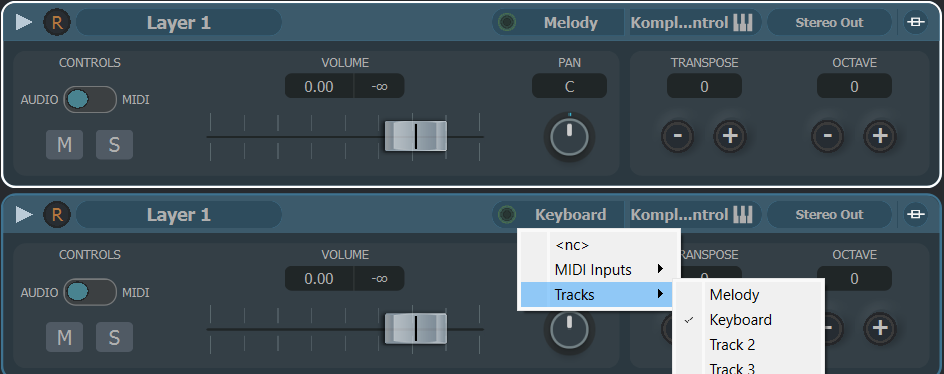
suddenly should become disconnected when they become loaded inside a new project… At least in my case I need them exactly as I had connected them before and it is much annoying and incorporated with a lot of additional work if I have to reconnect everything after loading a song inside a new project. I neither see a reason why MIDI inputs suddenly shouldn’t be restored and especially in the tracks they DO get restored and maintained…
Would like you to change this behaviour or at least add an option in the preferences that this behaviour can be changed…
It’s the same thing as much as I don’t understand and don’t need shared layers suddenly to become unshared as soon as they are being loaded in another project…
I have the same problem with some LAYER OUTPUTS (no matter which VSTi) …but I encountered this bug several VST Live versions ago, and still happens again across various updates … Sometimes when i re-open a saved project with all layer outs configured during saving… i check again and all (or some) Layer OUTs are set to NC … i’m in beta testing with VSTL and for this bug i don’t trust it for live use
1 Like
@ANDREA_KELLER I guess you’re talking about doing this with the same project (while Udo is exchanging songs between different projects). To You, Andrea, I might suggest
v2.2.54 and check if you still experience such (or any) problem with it
2 Likes
ok i’ll try again … thanks
2 Likes
The Song was saved with its Layers and Tracks and all connections between them. As @UdoBehm stated in the comment later:
On Song import from MediaBay the connections are lost.
I had the same situation many times. More from me:
I save Song with one layer and one stack and connected their own tracks in main window.
After importing song I have:
The Layer input is < nc >, the Layer Track (MIDI) output is < nc >.
The Stack input is < nc >, the Stack Track (Audio) output is correct Stack - it seems connected, but it lies.
@musicullum, if you said that ports are managed by project, then how is it possible that MIDI Track that should be connected to Layer of the imported song has the first MIDI port defined in connections as MIDI IN 1, but Audio Track that should be connected to Stack don’t have audio input connected? So anyway if project manages ports, always the first (in many cases the only) ports of MIDI and Audio could be connected by default.
I’m sure many of us use the same keyboard and the same audio device for all projects. This is where pseudo-intuition of software can be very helpful 
1 Like
UdoBehm: just a question: is it necesarry you to frequently share songs between projects?
I mean… there is the SETLIST editor and you can load hundreds of different setlists but working from the same song pool within the project.
@Andrea: that problem should not exists, at least not with recent versions (see vstliv.net). If you still experience it, feel free to report again.
1 Like
This is absolutely necessary!
I’ve just checked the Setlist editor. From there it is not even possible to load a song or to keep every song-specific settings as they were in the other projects where I created them…
Loading songs in another project and having the same functionality of them as in other projects before is crucial to me, as I always need to be able to add or remove songs from or to projects… They cannot suddenly behave different than how I have created them and wanted them to be like…
I’m not sure, I got it! There is SONG-A in your project and you can create multiple SETLIST’s using SONG-A (only) or amongst other songs. Each song preserves it’s (unique/specific) settings (of course the one state they were set to).
They don’t (as musicullum mentioned before) but you don’t want to accept that. (Your wish, importing a SONG to another project and expecting will grab all connections from nothing… is again reaching towards to nonsense)
1 Like
I don’t think I need more than one project. I keep all my songs (almost 100!) in one project and use different setlists. The only reason I see for exporting and importing songs is when I trade songs with other musicians.
1 Like
To nonsense? Please explain!
1 Like
Don’t see why there’s no context. I think I 've mentioned several contexts where I could use it and where it could be used
It’s just annoying if things are not maintained and restored as I’ve created them. VST Live anyway is using visual ports, so it’s neither making sense that the Layer connections and shared layers are not maintained as the user creates them. They anyway don’t have an impact on MIDI hardware as VST Live is designed now (which I find is good so far, the visual port functionality). But why does the user work become discarded? To me this is making no sense at all and leaves frustrated users like me
May I know whether I can expect any changes in the future here?
Pls try todays’ version to come, then if it persists open a new thread, we can’t keep up otherwise.
1 Like