Hi everyone,
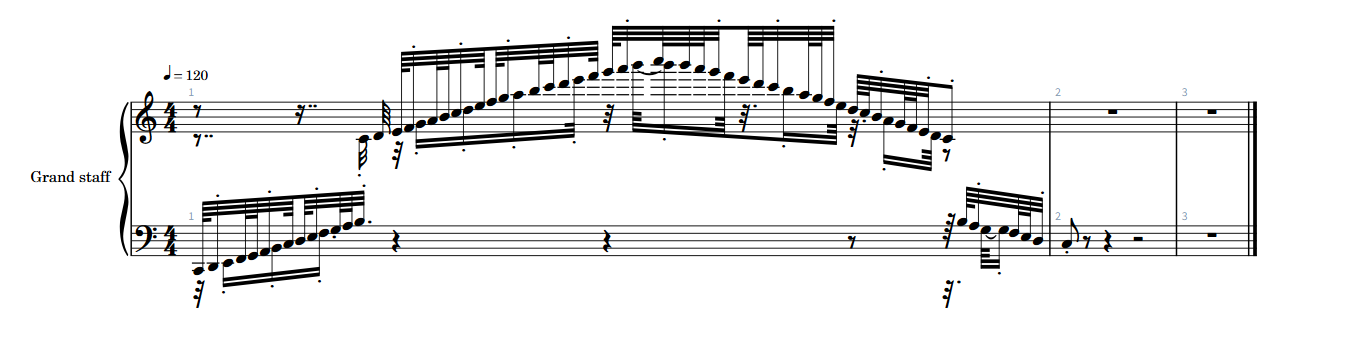
I’m experiencing significant challenges with the Score Editor in Cubase 14 while working on a piano track. The editor struggles to manage multiple quantization values, especially with 1/64 notes. Even when the MIDI is correctly quantized, the Score Editor often displays a mix of 1/64 and 1/32 and other notes despite there being only 1/64 notes. Additionally, using 1/64 triplets results in a very messy display, even when applying the DQ quantize preset of 1/64 triplet and starting on the triplet.
To make things more complicated, in a single bar, I have triplets occurring in the treble clef and normal notes in the bass clef. The bass clef notes simply do not appear on the score.
Has anyone encountered similar problems? How do you manage multiple quantization values and ensure that all notes are displayed correctly in the Score Editor? Any tips or solutions would be greatly appreciated!
Hi,
How is the Display Quantize (DQ) setup in your Score Editor, please?
Hello,
The auto option wasn’t doing anything for me so I was selecting the relevant notes and selecting the fixed option in DQ with either 1/64 or 1/64 triplets for example.
I’ve had lots of problems in this area in the new score editor and no playing around with quantisation, settings or DQ was able to fix it.
I’ve had some simple scores where I had say an 1/8th note followed by an 1/8 rest in midi yet despite any combination of settings or refreshing everything, all I ever see is a full 1/4 note on the stave. I’ve checked midi lengths in the Midi List Editor and tried all kinds of things and nothing helps. It happens intermittently which makes it quite confusing.
I’m holding out for the next maintenance release…
Thanks for your reply. That sounds very painful and frustrating. I thought someone might mention midi lengths in their response so I should have mentioned I even created a shortcut key to ensure there would be no problems with any of the midi lengths. This has been handy getting the midi nice and consistent but for the life of me I can’t understand why something so basic doesn’t work. What is really frustrating is even though I have the latest version of Dorico too and export as a Dorico file, even this doesn’t fix it…
As far as I can tell in C14 there are 2 versions of the music, 1) the midi, and 2) the midi + extra score data.
The extra score data is attempting to interpret the midi in a score friendly way. When you export to Dorico you are exporting the version of the score with the extra interpretations.
The midi you can view in detail in the key editor and list editor. The extra score data is hidden and can only be seen in it’s final form visually, with a few options to customise/override like DQ.
I’m doing the Dorico export and I see the same as you, but I’m also exporting the raw midi to another app and all midi lengths, etc in that are perfect.
1 Like
The C14 score editor does a lot of interpretation to try to convert the raw MIDI into clean notation. One thing that doesn’t work well at the moment is if you have notes that have pre-quantized into a 1/32 or 1/64 grid. Can you attach a cut-down project (or send me a DM) with a track that shows the problem?
Thanks a lot for that. I was kind of thinking that the raw midi + score notation with its own score interpretation data might be the case, as when you adjust the notes on the score editor with the DQ, the raw midi doesn’t change (thankfully!).
The part where you mentioned about exporting the raw midi as a solution does help with my issue somewhat. I exported the raw midi and then imported it into Dorico itself and it interpreted it differently to how the score editor in C14 does. Unfortunately it was still all over the place in general but the issue of all the notes appearing on the bass clef was resolved. I have tried a lot of troubleshooting steps in C14 and the VSTs and can’t find the solution to that problem.
Unfortunately I had to manually pencil in all the 1/64 notes. Interestingly though I found that the score editor in C14 seems to be more intuitive than Dorico for getting the basic piano stuff right. Maybe this is a settings issue in Dorico because its hard to believe that the C14 score editor could do this better. Having imported the raw midi into Dorico, I found I would need to edit it a lot for all the straight forward parts. Have you had this experience yourself?
Thanks Paul. I’m not at the right computer atm but just to say, the notes are very basic and quantised beginning and end lengths. I wouldn’t be sending you anything special. I am talking perfectly quantized single notes in a piano run. Either I have got a corrupted version of C14 or the feature simply doesn’t work. I even opened a new cubase project and used the stepwise function for the bar of 1/64 notes and the score results were a disaster. I suggest trying it yourself and you will see what I mean.
I write scores for choirs so I don’t tend to end up with too many 1/32 or 1/64 notes. When I do have issues I would edit in Dorico before export.
One thing I put lots of attention on is quantising the midi notes to the grid and make sure they are not overlapping unless I really intend that (I have a keyboard shortcut for Midi - Delete Overlaps Poly). That helps to keep the midi cleaner and nearer to what you actually see in the score editor. Otherwise you are kind of tricked into thinking your midi is cleaner than it is because the score view is doing the interpretations. It also makes it cleaner for export elsewhere if you need to.
1 Like
This example is working as expected for me:
Thanks Paul. It could be something on my end then with a setting maybe. That would make sense. Here is the result I am getting using the step input tool. I am going to attach a simple scale up and down and see what you think.
Score > Instrument Settings, change the default unit to Auto 1/64
Thanks…That definitely appears more pleasing visually but jumps between 1/16, 1/32 and 1/64 notes. A good bit of editing still needed each time, especially for parts that have things happening in both hands. Is that the best it can do currently do you think?
It’s because they are being split across two voices. Select all notes and press the ‘1’ button on the toolbar to move into a single voice.