@Michael Spork — Black window appears on startup in VST Live 2.2.53 and won’t close

Hi @Michael_Spork,
I’m experiencing a critical issue with VST Live 2, and I hope you or someone from the team can help.

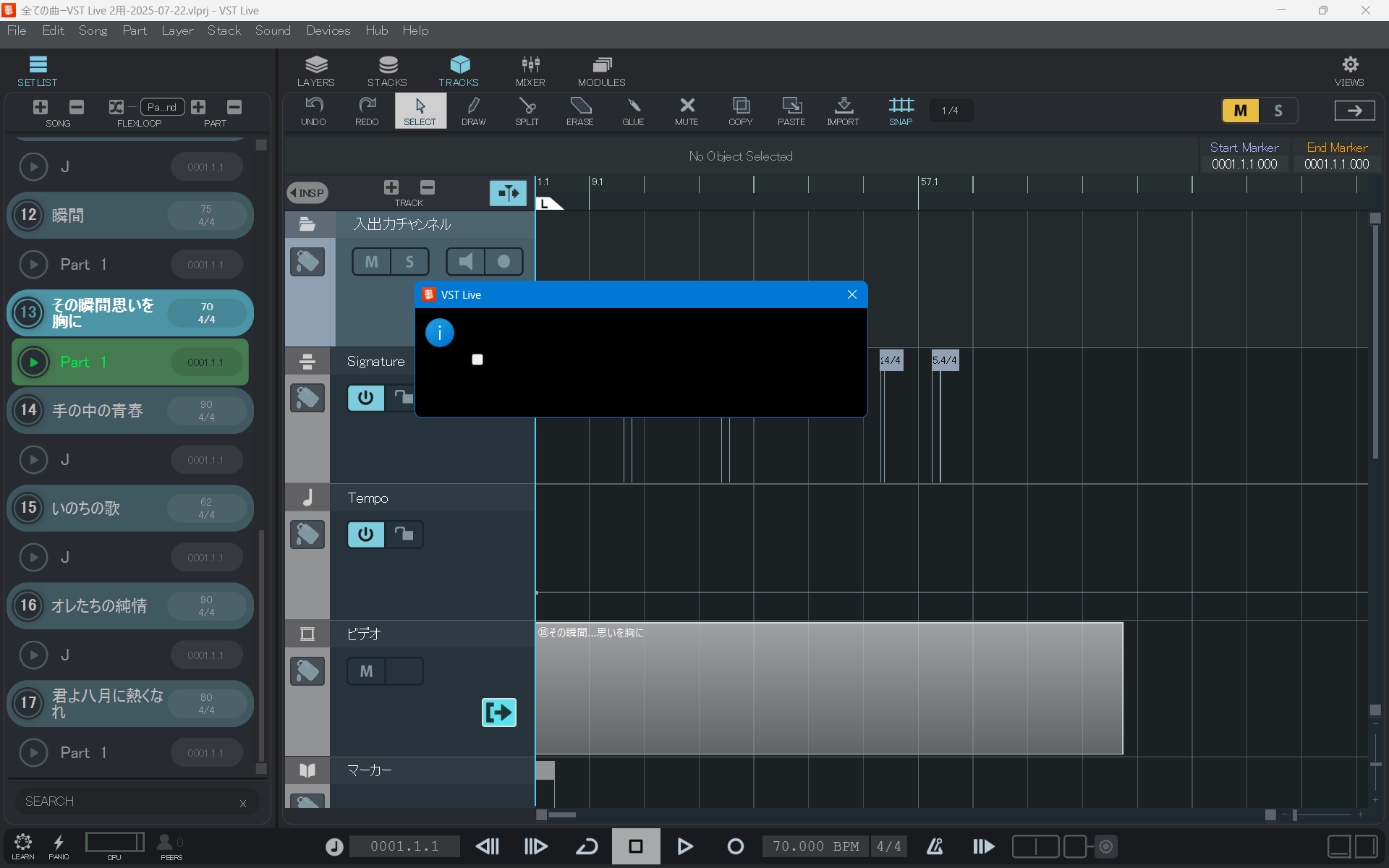
Since version 2.2.52, a strange black window appears every time I launch VST Live.
You can see it in the attached screenshot.

  • The window has a white button (clicking it shows a blue check mark)
  • The close (×) button doesn’t respond
  • Mouse input is completely unresponsive inside the window
  • Some shortcut keys work, but I cannot exit the app normally
  • I have to kill the app each time using Task Manager

I updated to 2.2.53 hoping this would be resolved, but the issue is still there.

I suspect this may be caused by the project that auto-loads at startup.

What I’d like to know:

  1. Is the project file extension .vlprj?
  2. How can I start without loading that project, or create a new one manually?

I’ve attached a screenshot showing the issue.
Also, I have a live show coming up very soon, so I really need to fix this as soon as possible.

My setup:

  • OS: Windows 10 Pro 64-bit
  • CPU: AMD Ryzen 9 3900X 3.80GHz
  • RAM: 64GB
  • Audio Interface: Steinberg UR44C (sometimes using RME UCX)
  • VST Live version: 2.2.53 (same issue in 2.2.52)

If anyone has a workaround or solution, I’d be grateful.
Thanks in advance!

—touchup1954
Yes, extension .vlprj is for the project file.

About your issue… Probably this is caused by a plugin.
I have similar setup - Ryzen 5, 20 GB, UR44C and 2.2.53 - and didn’t see such “black hole”.
I know how it is before live show. Cannot sleep & cannot eat :slight_smile: So if there is any way to help you, it could be done this way.

The “i” icon in the window means that this is informational. So probably one of your plugins don’t have ability to function or don’t have all resources available (files, libraries etc.). But VL thinks that it is critical warning and waits for your “Ok” button which isn’t presented here. The white button there is checkbox, probably with meaning “don’t ask me this again…” Anyway there should be button “Ok”.

BTW
Do you have all licenses available for plugins that are installed and previously used in a DAW? Can you run Cubase and insert all those plugins you have in your VL project? I have Cubase stuck on the VST scanner procedure if I don’t put a licence stick of plugins. I use laptop and desktop, but only one stick (Waves Audio don’t like users like Steinberg do).

Sometimes it can be iLok Cloud that isn’t opened for your computer, maybe it have lost your account credentials to keep it opened for longer or so…

Du you still use VST2 plugins? Not bad but no warranty that everything will go on the click.

Next step. Hide all VST3 plugins (just move them somewhere, don’t delete). And restore one by one only those you use in your project. I did that way and found that Waves Audio plugins sometimes hang up the whole system if WaveSchell isn’t updated.

Disconnect LAN or disable WAN! Yes, it hurts, but you won’t need the Internet on stage I guess, but there was some situations when software without any notice is searching for its updates.

Disable any software feeback to their provider/developer company.

And so on… There are hundreds of points to check, but start with plugins!
And share your success here.

4 Likes

That doesn’t sound good. The only way we might be able to reproduce the issue is by accessing your full project. Would it be possible for you to share it?

Please use the VST Live Archive function:

  1. Load your project
  2. Go to Menu > Save Archive…
  3. Choose an empty folder and create the archive

Once done, zip the folder and send me a private message with access to it.

See you,
Michael.

2 Likes

Hi ArthurNeeman, thank you very much!

I pressed the white button to add the blue checkmark, and then, just like you suggested, I clicked around inside the “black hole window” while searching for an “OK” button. Suddenly, the black window disappeared!

I own licenses for all Cubase plugins, and Cubase 14 launches with no issues.

By the way, I don’t use any plugins in VST Live 2 during my live performances.
So I’d like to ask: is there a way to prevent VST Live 2 from loading Cubase plugins at all?

After the black window disappeared, I saved the project in VST Live 2 and relaunched it. Thankfully, the black window has not appeared again.

I’m not sure what exactly caused the issue, but thanks to your help, it’s now resolved. I really appreciate it!

Next, I’ll move the data to my laptop.
If I run into more problems, I hope I can ask for your help again. Thanks again — your advice was a big help!

— touchup1954

3 Likes

Glad to know the black window is gone!
Sure, ask here.

I’m almost sure that the “black hole” window was trying to tell you something about your language settings. Therefore Windows cannot show something that VL is sending to Dialog Box while checkbox itself is without text even there is something like “Don’t show again…” that may be as a label right after checkbox and also not shown. Buttons also can be invisible because of conflicts with language settings. Better would be test this your project on a machine with English language active.

But if the window is gone because you checked that checkbox, then that “Don’t show again” message is listed in Preferences → Messages. What you see there? Maybe it was “Preload audio dropouts” if you have autoload of project and checked this to not show the warning? I’m just guessing.

4 Likes

Thank you again for all your help—it’s truly appreciated.

I checked the “Messages” section in Preferences, and under the “Don’t Show Again” list, I found a message titled “Missing layer inputs.”
I believe that must have been the window that disappeared earlier.

However, I’m not using MIDI, any inputs into VST Live 2, or plugins. (I’m planning to connect a piano and vocal mic to the UR44C, which will be used as the output device for VST Live 2.)
So I don’t really understand what “Missing layer inputs” means in this context.
In VST Live 2, does “layer” refer to a plugin?

1 Like

By default VL creates one Layer for each part in each song. By default the layer as an input has first MIDI that available in connections. So probably if you run VL without device attached or something else wrong in connections, it may show this message. But once you clicked not to show it again, it won’t hang up your machine.

You can set not to add default layer (Preferences → Layers) if you plan to use only mic and piano both routed through Stacks. But if you plan to use only tracks, remember to set options that remembers Monitor states for them (Preferences → Tracks). Okay, okay, I read your message second time more carefully and understood that you don’t route mic and line in to the VL, but use device’s mixer.

Anyway, do you have latest Yamaha driver for your UR44C? It’s version 2.1.9 (Win) and 3.1.7 (Mac). I also use UR44C and UR242 in studio, but never had such message. So maybe the driver don’t understand something in your connections? Just guessing. If it may be the case, update driver and remove disabled message (just click minus sign on the right) and test if it does the same with updated driver. What else? Don’t do anything if now it’s working and you have a gig soon :slight_smile: Don’t update anything before the show!

2 Likes

Thank you for your advice regarding the UR44C driver.
I will check the driver version and update it if necessary. If everything works fine now, I won’t update before my upcoming gig.

By the way, I have one more question about VST Live Pro 2.2.53.419
Currently, I create my projects on my desktop PC, but I want to transfer them to my laptop for live performances.

Since VST Live does not have a “Backup Project” feature like Cubase, could you please advise the best way to safely move a project, including all media files, to another computer?

Also, any tips on handling file path issues and avoiding missing files would be very helpful.

Thanks again for your support!

FILE / Save Archive…

3 Likes

fkalmus,
I understood FILE / Save Archive…—thank you very much.

However, I now have another issue I’d like to ask about.

In Activation Manager, VST Live Pro 2 is shown as “Trial Activated,” with an expiration date of August 18.
I’ve already purchased it—will it be automatically activated after the trial ends?
If not, how can I activate it?

Also, when I hover over VST Live Pro 2 in Activation Manager, a blue button appears, but clicking it shows “Page not found.”
What does this mean?

My live show is coming up soon, so I need to solve this quickly.
Thanks in advance.


Activate real / purchased license and
Deactivate DEMO license

2 Likes

Remove the expired trial license from your account, write to PM Profile - Ed_Doll - Steinberg Forums and it will remove all unnecessary trial versions from your account

sergeantt67,
I understood “Remove the expired trial license…” — thank you very much.