I like to remotely MIDI controll the QCs (2) on my active track (1).
I set the QC focus setting (4) to “track and plugin-window”
I still have no idea why it is not working and why section (3) is ony showing DEFAULT.
Can someone explain?

Hi,
You are mixing up the Track Quick Controls (in the Inspector) and the Fucus Quick Controls (in the plug-in window).

Take a look at this

Hi,
Each VST entity, be it an instrument or an effect (insert or member of the channel strip) has a list of parameters.
Here are some options that we have:
When we want to control parameters on the selected track (or even a track as member of a mixConsole bank), we can actually assign these, using the MIDI Remote to our controller’s elements (encoders, faders, buttons).
If we’re targeting the instrument, we need to make assignments to these:

Now, if we want to target the inserts, we have to go with this section:
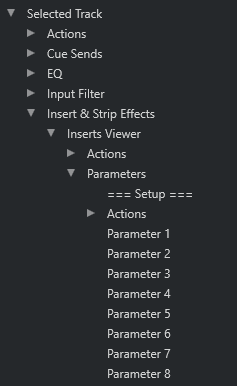
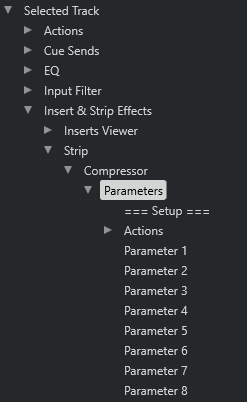
Channel Strip FX, say for example the Compressor one:
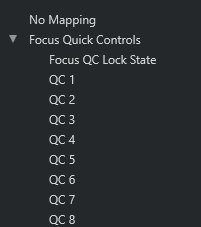
Now, when we don’t want to be that “strict” on our assignments, the good news is that instead of having all these different types, we can actually create assignments just for the FOCUSED Quick Controls (FQCs). This means that whenever we have a window of a plugin - be it an instrument or an effect - in focus, we can immediately control its first 8 parameters, just like we can see in @Dom_Sigalas 'video that @raino shared.
The FQCs are not bound to any track at all (even the selected one). When we navigate from one plugin window to another, the FQCs assignments will automatically be updated to the latter one.
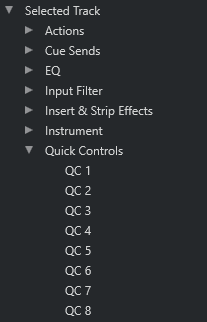
And then, we have the TRACK quick controls (TQCs). These are of a different purpose (in general) than the FQCs or IQCs etc, as pointed out by @Martin.Jirsak and @Johnny_Moneto earlier. The TQCs give us the ability to create a list of 8 parameters taken out from the whole “team” of the plugins on our selected track, be it the instrument, inserts, strips, whatever, in combination, i.e. we can have, say, 2 controls for our instrument’s cutoff and resonance, then 2 for our compressor’s threshold and ratio and so on.

Great explanation you have also solved my naivety! Scripting like a trouper now. Cheers
thanks all for deeper clarifying but I get the impression that the Track QCs (2) can’t be mapped like a FOCUS TRACK QC
I like to map those 8 QCs once, to work with every track lane.