I recently bought an Acer Predator Helios Neo 16s AI laptop. It runs Windows 11, has an Intel Ultra Core 9 processor, Nvidia Geforce RTX 5070Ti Laptop GPU, and 32GB of RAM. I run Cubase version 12.0.70 specifically. I use a MOTU 8 pre USB as my audio interface. I use all 8 channels to record my drum kit. Here’s the rundown of the issue: I load into the Cubase session and even without playing anything the Mono 8 analog channel peaks, which then causes Mono channels 6 and 7 to peak. One of two things follows: 1.) A loud, jarring distorted noise or 2.) a complete audio drop out. I monitor audio through cans. The Mono 8 channel is routed to my room mic, while the mono channels 6 and 7 are routed to my overheads. The overhead mics are AKG c214s which require phantom power. The room mic is an SM57. This issue is not accompanied by any spike in disk, CPU, RAM or GPU. I monitored this through the task manager and the audio performance meter. It should also be noted that this issue happens even when the mics aren’t plugged into the interface. I have videos and pictures of it happening that I will post on here. Here’s what I’ve done to troubleshoot:
Uninstalled and reinstalled the firmware for motu and downloaded the most recent version
Uninstalled and Reinstalled Cubase
Updated the Nvidia Studio Driver to its latest version
Updated the drivers on the laptop
Unconnected and reconnected all the audio inputs in cubase
Remade a new drum template, drum bus and rerouted all channels
Even restarting cubase and the laptop doesnt seem to make it go away.
Here’s the weird thing. I got this laptop about 3 weeks ago. The first week everything ran fine, then about 2 weeks ago this glitch started happening. Perhaps it was a buggy update that made this happen?? This never happened on my old laptop. A work around I discovered is just muting all the analog input faders while im listening back and mixing; however, this fix doesn’t work if I want to record something or simply monitor myself. This is incredibly frustrating especially since this is a brand new laptop. I don’t know where to go from here. Thanks for any input!
Interesting. It looks like you’ve done a good amount of troubleshooting. Just a few things to think about:
What audio driver are you using? Can you try another?
Are there any other applications running while you’re running Cubase (especially ones you weren’t running on you previous machine)?
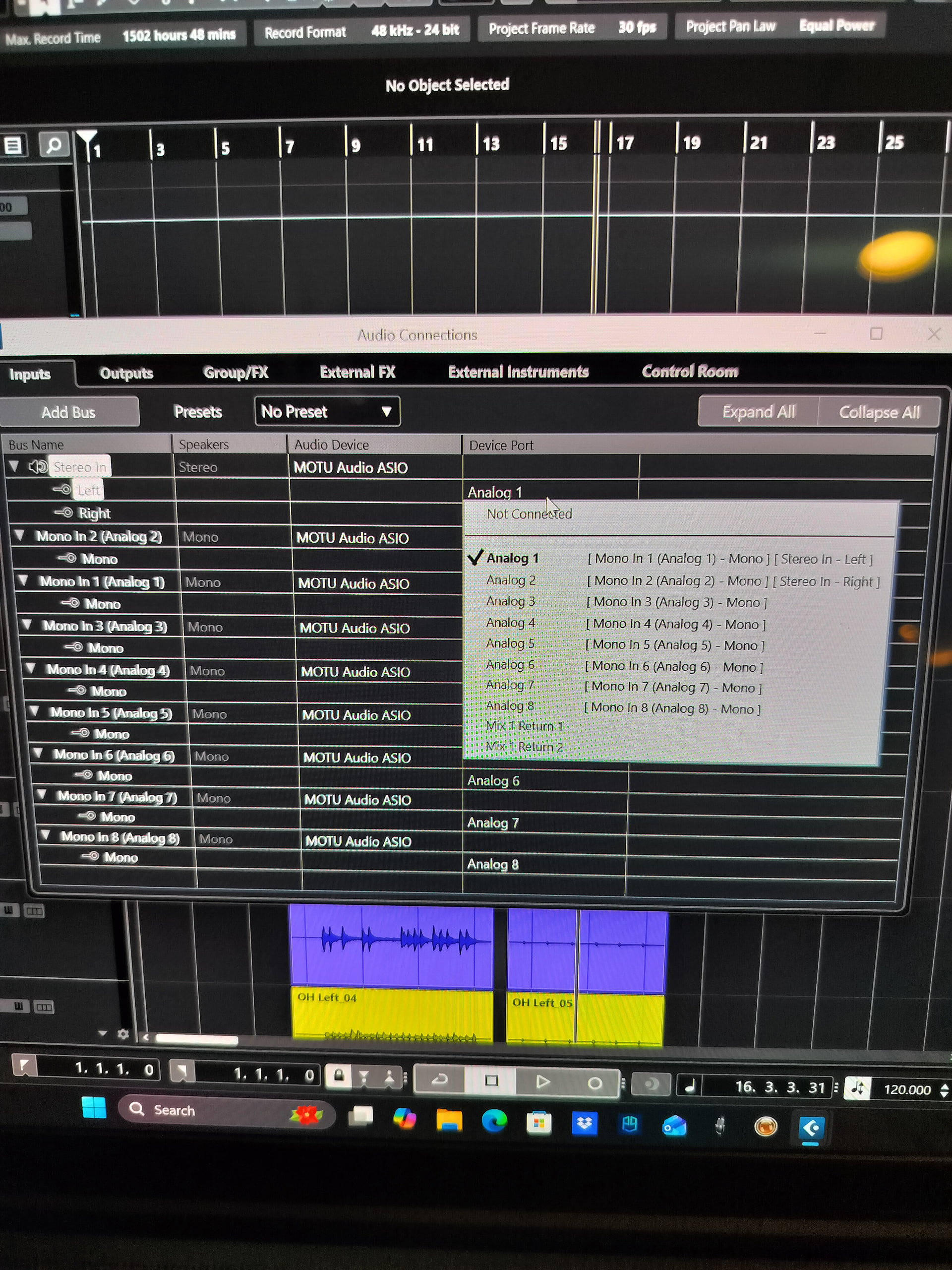
What happens if you go into Audio Connections and just add & test one mono input bus at a time?
Is there any change if you turn off the phantom power?
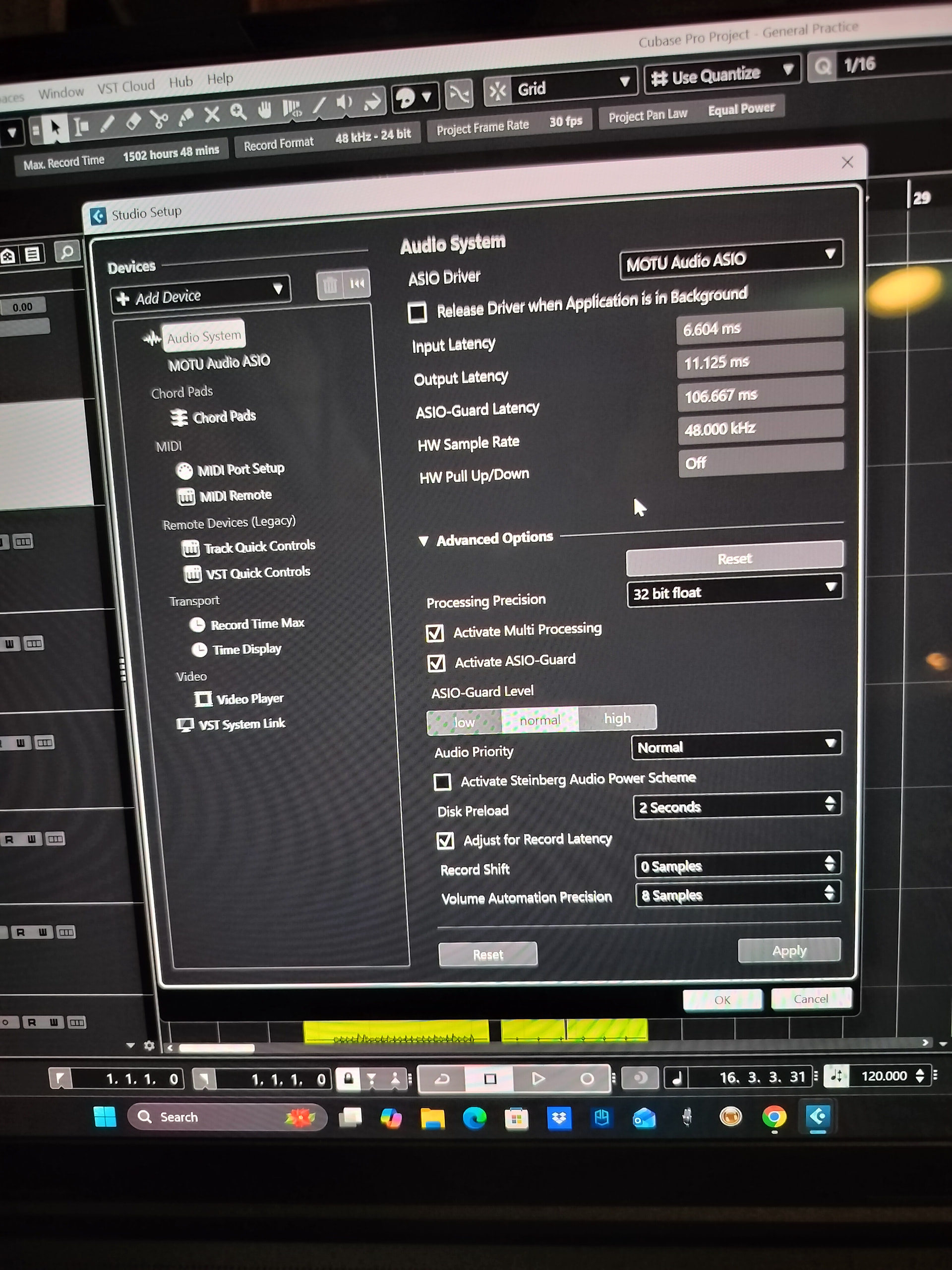
What are your Audio System settings in Studio Setup?
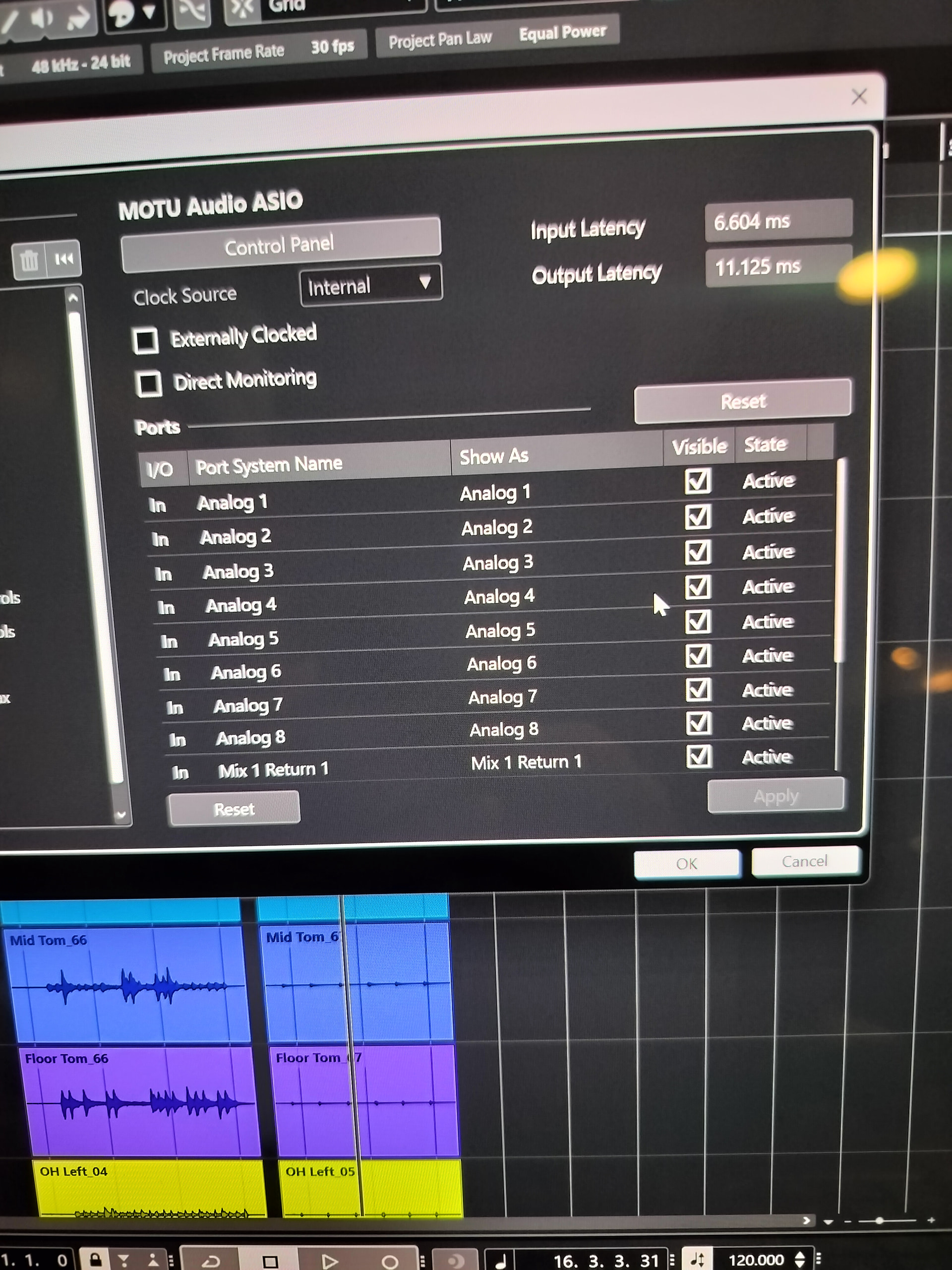
What ports are active in for your device in Studio Setup?
It’s probably either a configuration problem, a conflict with something else on your system, or (hopefully not) a problem with your audio interface. Try to simply everything you can, to see if you can pinpoint where it’s breaking. It seems like you’re on the right track with that.
Hey Man! Thanks for the reply. Ill answer all your questions in order.
1.) My laptop has many audio drivers and I’m not sure which one cubase is using or how to determine that. If you know how to check this then I’d love to know haha. All of them are up to date according to windows. When i go into the Device Manager and check Windows says they’re all at the latest versions. The ones I looked at were the Intel Smart Sound for USB Audio, NVIDIA High Definition Audio, NVIDIA Virtual Audio Device, and Realtek Audio.
2.) The 2 apps that are running on this laptop and not on my old one are Acer Predator Sense and Microsoft 365 Copilot. While Cubase is running theyre using about 450mb of RAM. However, no CPU, Disk, or Network consumption. I’m not a computer guy so sorry if my terminology is off haha.
3.) I haven’t tried this one yet, but I may have discovered a possible solution that Ill mention later.
4.) So when the glitch happened and I turned off phantom power that stopped the peaking in mono channels 6 and 7, but mono channel 8 was still freaking out
5.) I’ll post a picture of these. I do have my buffer size set to 256. This is the best setting I’ve found when monitoring myself. 512 and 1024 will create latency when I hit the drums. When I’m mixing I always increase the buffer size to 1024.
6.) I’ll post a picture of these as well. It should be noted the the 8pre USB also functions as an optical converter. As you’ll see in the photo the “mix 1 return 1 and mix 2 return 2 channels are active” I dont know where to route the stereo in channel to. Currently I have the stereo in left routed to the analog 1 channel and the stereo in 2 routed to the analog 2 channel. My kick drum is also routed to the analog 1 channel and my snare drum is also routed to the analog 2 channel. I think Ive always done it this way with out issue.
Heres the update, I did a factory reset on the Motu last night. I ran cubase for 3 hours trying everything to get it to glitch again. It did not. As I’m typing this nothing has happened in cubase. I don’t want to call it solved yet so I’ll keep this thread going but it seems I’m headed in the right direction.
The audio interface driver that’s being used by Cubase is this one:
Good
If you want lower-latency while recording, you could monitor directly through your audio interface. And since it supports ASIO Direct Monitoring, you can (if you check that box) control the direct monitoring through Cubase without having to do it through CueMix.
If it works–great–but I’m not so sure you need that top bus (Stereo In) enabled at all, since you already have all of the signals from your audio interface routed through the Mono In 1 - 8 busses.
To check, I suggest clicking on the MOTU Audio ASIO in that row and changing it to “Not Connected.” If you don’t lose any sound from your input channels (you shouldn’t)–leave it disconnected, because it’s going to reduce your chances of having audio issues.
Dare I say this issue is resolved, but this is day 3 without issue. I disconnected the stereo in channel and nothing bad happened. For the sake of science i routed the stereo in channel to the mix 1 return and mix 2 return channel. While i couldnt fully recreate the glitch, I was able to get some weird activity happening. I’m wondering if I accidentally changed some routing on that stereo in channel and that’s what caused it. The factory reset definitely helped along with re routing everything again. Thanks for your input! Fingers crossed everything stays happy.