
After setting the music symbol as shown in the first image, I close and reopen the window, and the font appears as shown in the second image below. The shape is clearly from a different font, but the font name doesn’t change. Is this normal behavior?

It is, but is less than obvious layout IMO. The font is listed at the top. The right panel is just the font of the next glyph you wish to add.

1 Like
Thanks.
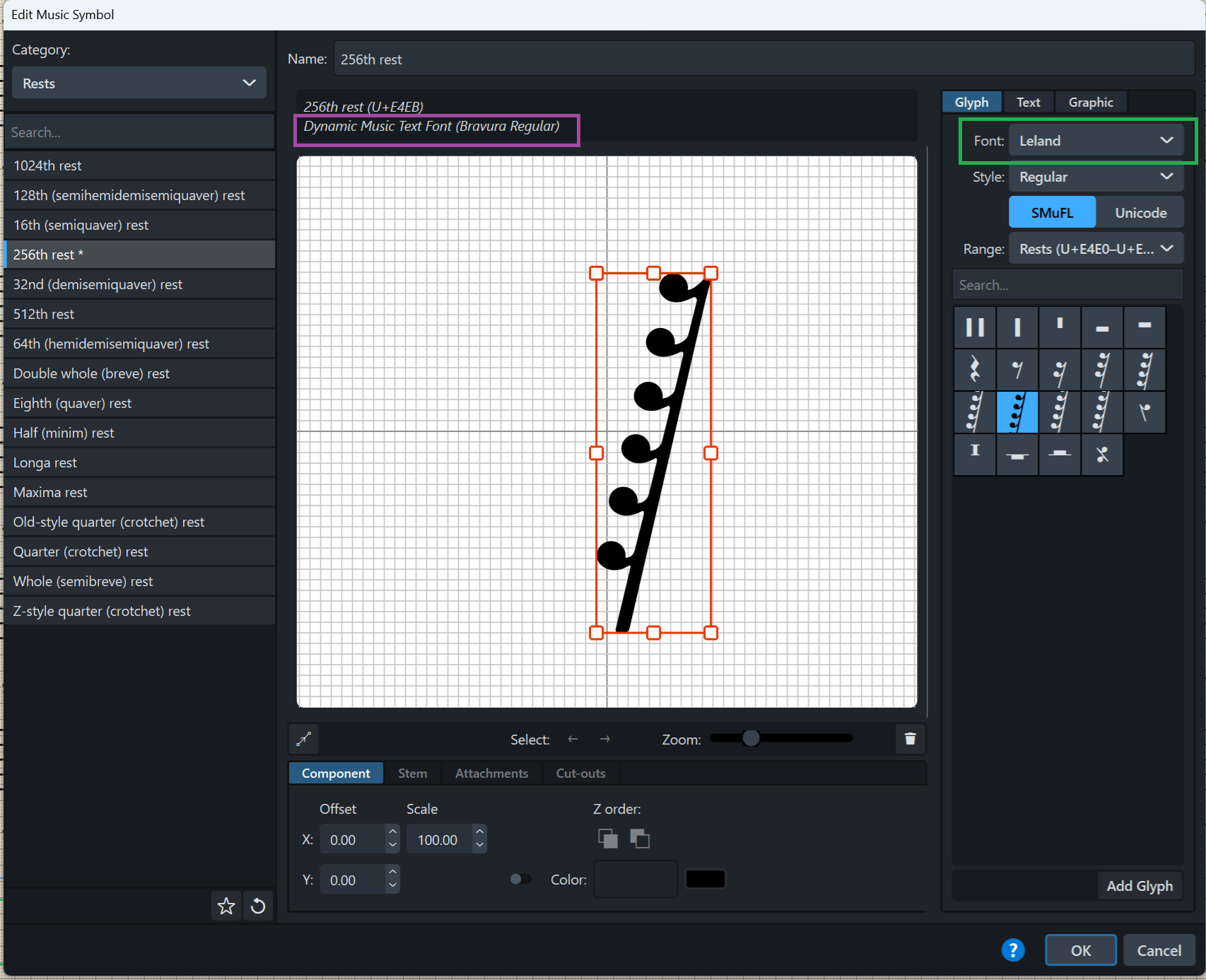
The font is supposed to switch to the one indicated in the green-highlighted area, but it consistently defaults to the one marked in purple. How can this be resolved?
When I try to change the font of a music symbol in Dorico, it doesn’t apply the font I selected. Instead, it automatically switches from the default to ‘Dynamics’, and I can’t get it to use the font I want.
Did you click on the trash can to delete the current symbol before clicking add glyph?
Jesper
Even though I did that, nothing changes.
I tried resetting to factory settings and applying it again, but it still doesn’t change.


The purple area still doesn’t change. I’m not sure where the problem is.
Perhaps I am stating the obvious that you already know, but the green selector area is never going to change the symbol in the window. To have a new symbol from the font you are selecting in green, you have to add one.
Then delete the old one (whose font is showing in the purple area).
1 Like
Even after adding the green section and removing the purple one, the name of the green section doesn’t appear.
Here’s what I get. Maybe there is some detail in this that you don’t do?

Example: If you want to change the quarter note rest to Leland.
Find the quarter note rest under Music Symbols->Rests.
Delete it by clicking the trash can.
Select Leland as font and the category rests and select the quarter note rest.
Click Add Glyph. It should now show that it uses the Leland font in the Music Symbols editor.
Click OK to close the Music Symbol Editor.
Now, the quarter note rest should be displayed in the score with the Leland glyph.
Jesper

1 Like
So it does not work for you as in my video. Dorico 5? Maybe this was changed in v. 6. What version are you on?
The name didn’t change, and the appearance didn’t change
The appearance isn’t going to change. As I mentioned earlier in the thread, the right panel is just the font of the next glyph you wish to add. Changing the font in the right panel does not change the font of the glyph you have selected in the editor. I realize this is different behavior than virtually all other DTP software, but it is what it is. You can’t change the font of a glyph that is already in the editing window. You can only add another glyph in a different font, then delete the first glyph.
Even though I added another glyph in a different font and then deleted the first glyph, the shape doesn’t change.
k.k, just to eliminate the obvious: have you actually deleted the right glyph afterwards?
When you add a new glyph, the old one is shifted to the side - if I remember correctly (I am not in front of the computer).
I don’t know wether it’s possible, but: can one delete the existing glyph before adding a new glyph from another font?
Yes.
Jesper
1 Like
It seems to work fine for me. Gif below:

It seems like it’s only not working with a specific font.