I con’t wait to try how it deals with fantastic vsl Duality strings… Since sordino and colours are available, it really looks like a perfectly versatile tool. And NP could make it workable in Dorico (I feel it’s still a DAW-oriented tool)
1 Like
So there’s no confusion, our engine only supports the baseline Duality Strings (with simulated sordino), not the special Duality sordino package.
1 Like
Ok, thanks for the details. Dealing with everything would probably lead to a very high RAM usage. I will try to use the provided expression maps to use the colours features then.
I’ve updated the Synchron engine but am not seeing Elite Strings as an option for me to choose but only Synchron Prime Elite strings. Anyone else experience this? I do only have Elite Strings Standard which I hope is supported.

Aha! Thank you Bill.
1 Like
It’s sounding very good with BBCSO core - many thanks Arne!
1 Like
Has anybody found a way to make Dorico’s Timpani sound via NotePerformer’s Iconica Sketch Timpani? Whatever I do, I never get it to be used, it’s always NotePerformer’s default instrument…
Yeah I have to say it keeps getting better and better with several of the libraries I use. We owe you a great debt of gratitude Arne!
4 Likes
Indeed!
Sorry. But it just works for me. Add the timp in Dorico Setup and it appears.

Thank You Mr @Wallander for this new release.
I hope a future release will support VSL SYnchron-ized SE Volumes 2 and 4 wich contains saxophones and euphoniums .
This would be a big step forward for wind music composers and arrangers.
4 Likes
Thank You, Arne!
Iconica Sketch and Dorico 5.1 were already a wonderful giftfrom our Dorico team, but your NPPE for it gives it a new level of usability in Dorico. 
3 Likes
I haven’t seen it mentioned, but Olympus Micro is also included in the Iconica Sketch engine
4 Likes
Hi @Wallander, and Happy New Year! 
I’m wishing you good health, good luck and happiness!
Thank you very much for the version 4.4 of NP and NPPE!
Finally NP allows me to make Iconica Sketch usable!
Still there are some problems that I’ve noticed and need your attention, Arne.
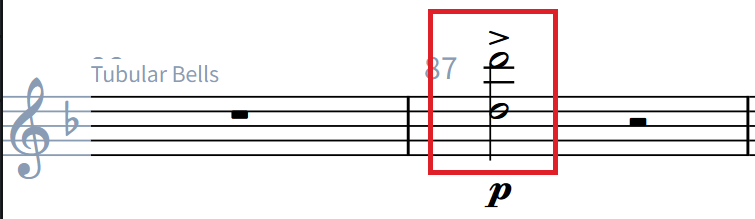
- The “Tubular Bells” perform octave below than written. They should perform the same pitch as written.
Both notes from the screenshot above sound octave lower. - When using “stopped” technique for the Horns, placed on the first note of a group, it doesn’t perform as continuous playback technique. It takes effect only on the first note. “stopped”, “con sord.”… are continuous techniques. “+” is a singular - per note basis.
- The grace notes like those:
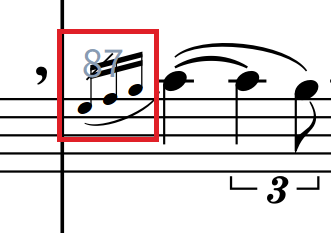
Need more attention, because they sound a bit disconnected from the forthcoming note and their appearance is way too audible. The grace notes should sound more connected to their home notes and “In the Mix”, not popping-up above the others.
You’ve done an amazing job, no doubt. Well done! Just it needs a small amount of polishing.
Best regards,
Thurisaz
P.S.: Would be pretty nice if we could apply Advanced Settings > Support More Voices to Instrument Family and All Instruments.
It’s a very time consuming procedure if we have to activate / deactivate per every single instrument.
1 Like
This is strange: I had to change the Timpani instrument within NPPE to accept “two staves”, although there is only one Timpani instrument in my score. It seems that Glockenspiel as well as Timpani count towards this. When I set it to “one staff”, only Glockenspiel gets connected, but when I set it to “two staves”, Glockenspiel and Timpani next to it get connected:

I’m new to NPPE now, and maybe this somehow makes sense, but currently I’m more confused than anything else. It looks as there is no way to control volume of Glockenspiel and Timpani separately, since they both land in the very same NotePerformer slot?
The whole point of NP (especially NPPE) is just to not touch stuff like that. Just write the dynamics in the score and let NP sort out exactly how to balance the samples.
I understand how confusing that looks. They’re not the same slot, they’re just both routed to NPPE.
You’re looking at the 4th NotePerformer instance. I think the problem is that you have a ghost timpani channel somewhere in NotePerformer 1-3 that’s the first timpani staff.
If you only use NotePerformer, I suggest reapplying the playback template to clear any redundant slots. The alternative is to manually locate that channel in the NotePerformer instance, click the name, and select the option to delete it.
This was it!!
There really was an empty Timpani slot in instance #3.
(I had started this project from Dorico’s wind band template and deleted some players including the Timpani. Later I added one back again, so this explains everything…)
Thank you so much for all your work and support!
1 Like
I fixed the transposition issue. Can you try deactivating the engine and re-download it? Here’s how to deactive the engine.
Regarding the stopped horn only applying to one note, try editing the technique and set it to “Direction” rather than “Attribute”. See my screenshot:

1 Like