There are already numerous posts like this, for both Cubase and Nuendo, so with this list, instead of granular feature requests, I will focus on a handful of high-level improvements, most of which already exists in other Steinberg products.
From DORICO: The “Jump Bar”. This would be, without any exaggeration, a life-changing workflow improvement. If you have used it in Dorico you know what I’m talking about. If you don’t know, the Jump Bar allows you to search & execute any command that exists within the software. At this point Nuendo’s menus are so labyrinthine and esoterically organized that it makes it impossible even for a seasoned user to remember where everything is (and there are only so many keys on the keyboard, especially if you want to have shortcut that makes sense—more on that later). The jump bar is a super elegant solution for this. Simply type and run the command you are looking for. In addition, in Dorico you can assign hotkeys within the Jump Bar, which is an incredible feature as well.
From DORICO: Key-sequences as shortcuts: In Dorico (and WaveLab) you can execute a series of key presses to run a command. To give an example, I have assigned the sequence “S->B” to split note beams. This is not pressing both at the same time, it’s pressing one after the other. This literally unlocks a gazillion natural key combos. Instead of struggling to remember which modifier key you have assigned, you just remember a sensible phrase (eg. split beams=S->B).
From WAVELAB: A robust plugin manager: If you have seen how WaveLab handles which plugins show up (and where) you know what I mean. Not going into details, just look it up. Nuendo and Cubase should absolutely have the best plugin manager Steinberg has on offer. Instead we have… whatever that is. We should also be able to rename plugins and assign categories. And there should be an “Export Session Plugin List” feature (even a stand-alone app). This is crucial for archiving and reviving sessions.
A modern UNIFIED GUI: This is my personal opinion and I know people might disagree, but I find the Nuendo/Cubase GUI uninviting. It might be ergonomic but it’s not inspiring. Take a look at Dorico (or DaVinci Resolve), which feels very slick and makes it a pleasure to work in. But ok, if modernizing it is too much work, at least bring it all together under one design. There are still many windows with legacy interfaces (eg. Preferences - still not searchable btw!!! and the Pool). I don’t think anyone will argue that Preferences or the Pool are ergonomically designed.
On the same topic but not as important: Maybe it’s time to introduce some modularity in the GUI. WaveLab can literally plug any window anywhere—or have it floating. Not saying this needs to be done for the entire GUI, but maybe some stuff could be a bit more flexible. Again, not a priority, but it does already exist in the Steinberg ecosystem.
Finally: Steinberg should add an open API so anyone who wants to can hook up an MCP in Nuendo / Cubase (Dorico already has this but I would love to see officially endorsed MCPs in the near future). I’m with you all the way when it comes to generative stuff (never even installed that Voice plugin they introduced), I’m with you all the way in the environmental impact. I’m talking about an absolutely optional feature. You can use it or not, all I’m asking for is the option. Every competitor will have it if they don’t already.
Thanks, and I would love to hear your (and Steinberg’s) thoughts on these.
We use Nuendo professionally for the restoration of analog audio recordings - and privately for music production.
We use hundreds of shortcuts and macros, most of which we have memorized or assigned to an Elgato Stream Deck.
Key-sequences as shortcuts: There are countless programs for Win/Mac on the market that allow you to automate all of this externally. For Windows you can use AutoHotKey / ATNSoft Keymanager .
You refer to WaveLab a lot. For me, WaveLab’s window handling is an absolute disaster - whereas I love the window handling in Nuendo.
Workspaces allow us to arrange multiple plugins on the desktop so that we can view them simultaneously in their proper positions. Different workspaces for different tasks.
There are a few neglected areas—such as naming audio Events - that could really use some attention, especially since the way they are handled isn’t working smoothly.
One person works on film sound, another on music, and a third restores analog audio recordings. Each of them has their own idea of what the GUI should be like.
With all due respect, maybe I’m wrong but I’m sensing a patronizing tone (maybe it’s just the internet so I apologize in advance if I misread this). I’ve been using Cubase ever since VST5/32 for professional music & post-production work. I know the software inside and out and I have fully tailored it to my own workflows.
I disagree but I hear you. As I said, it’s my opinion that the GUI is not the best. I have deliberately used the words “uninviting” and “not inspiring”, which are both subjective. I don’t see where we disagree honestly. All I’m asking for is more options. In any case, that was the lowest priority request here, I really don’t mind if they leave it as is, it is perfectly functional, as long as all windows are designed to look the same. (And bring search to Preferences, for crying out loud…)
As for AutoHotKeys and StreamDeck, I already use both. It is my opinion that a robust native hotkey system is much better workflow-wise than any workaround. In fact, Dorico’s combo of popovers, Jump Bar & flexible hotkeys has rendered the StreamDeck useless for me, it’s just too slow compared to what the software can do on its own. Regardless, Steinberg should not rely on 3rd party workarounds, nor use them as an excuse for not implementing improvements. When I’m buying Nuendo it does not come with a StreamDeck—which, btw, is an expensive piece of gear that not everyone can afford.
It would seem to be a massively neglected aspect of the application.
Upon looking in the data folder for the application(s), those files are in .xml format so therefore while there would be some preference entries, that would be specific to one or other application, i.e., Cubase/Nuendo; there should be enough commonality, between the programs, in order to be able to share or migrate some items and I believe it would be a great boon for Steinberg to implement this.
Already, Steinberg have synchronised the underlying codebase, so this would seem to be a logical next step.
Indeed, it’s actually very easy to do by simply copying 1.000.000.000 xml files :
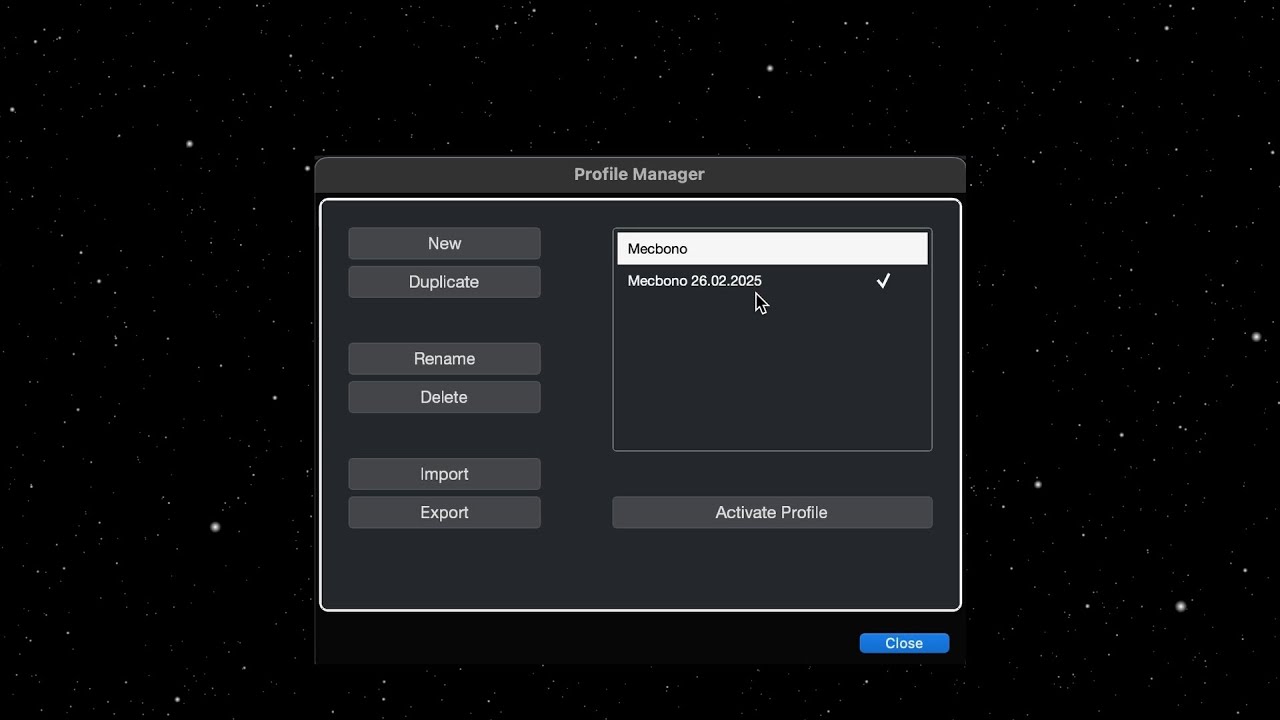
I’m kidding of course. While the above link is quite useful, you can actually transfer most of these settings in one go using the Profile Manager:
You should also check this out for an even more inclusive migration:
As for the looks of the Preferences window, it really mazes zero sense that it still looks like it does (same with Pool, Audio Connections, etc.). Prefs is literally the first thing that any new user will have to tackle with and it’s completely unintuitive and cumbersome to navigate.
That’s well and good but it comes back to a situation similar to when fxp/fxb was removed. I know you can go behind the scenes with .vst preset files but with preferences and audio connections you cannot, and it seems to make little sense given that the format is .xml, which at the time was ahead of its’ time but it isn’t being used to its’ fullest, in my view at least but I assume development resources would be needed to be able to save presets anywhere and corruption can occur, with plain text files.
My biggest time water using Elements 15 is the file handling tools that have been disabled (unless of course you got to the Pro version).
Having to jump thru numerous hoops and screens just to export one track, and THEN having to do it over and over is a time waster, when in Pro you just select the tracks and ‘Bob’s your Uncle’.
Yes yes I know …“Upgrade” but why? Why are all the simplest file handling tools disabled, and why should I spend $$$ for a terabyte of drum and dance samples I’ll never use, just to get simple file handling functionality that almost every other DAW offers in every form?
The software is so cheap, now days; the non-professional versions are just whar are bundled with the hardware of the parent company or else they exist just for testing purposes.
In terms of Cubase, if something isn’t in Artist, then that might be a marketing issue but otherwise, they are meant for novice users.
This is the problem, one look at that page and I’m like “no thank you”.
Fortunately, for myself in this life, I only need 2 preferences, those being:
Open Editor in a Window
and
ALT + SHIFT for velocity changes in MIDI Editors
I can say that I would hate to be an engineer and have to deal with that stuff. In all honesty, that is an IT persons’ role, and I remember in the early days learning about the internet, and networked audio, it was a big deal, and yet users of the original, and best DAW, still need to deal with arcane and uninteresting files, unless of course you are a developer or person who has a great amount of time on their hands, and wants to learn the more esoteric aspects of the application.
For me, I just want to load the program and go, in particular after some kind of system crash or anomaly because as we were all growing with the software, we were always asked, “have you deleted your preferences”. It is kind of getting old now, that question because it isn’t like Steinberg couldn’t provide a companion app, but then is it worth it, when there are so many world best apps that Steinberg make, and it could not cover them all due to individual complexities between the programs.
P.S. There was a time, once when both the aforementioned preferences did not need to be set, and with all the potential scenarios that can occur with software, I have to delete sometimes more often than not, even withstanding issues in the OS.
Today, Google-AI can write a batch script that backs up the settings in 5 seconds. Simply place it on the desktop as a script.
We need to synchronize 4 workstations - including shortcuts, effect presets, etc. across our setup.
There is certainly a way to set up these local folders as shared links on a NAS and create simple scripts to back up the XML files and copy them to the other workstations.
I don’t think Steinberg offers that because it would need to be too heavily customized to the user’s specific setup, and a lot of things could break if the hardware changes.
On the same topic but not as important: Maybe it’s time to introduce some modularity in the GUI.
This is a huge one for me and has me still looking at Reaper. Let me see my file manager and meter and VST rack at the same time without windows flying all over the place. Let me have the piano role and meter open at the same time and not flying around. Let me have the drum kit and pattern editor open at the same time.
Let me snap around at my heart’s content.
I know aim an edge case but I have one of those 57" 7k2k monitors (basically two 4k monitors in one) and I have to have all these floating windows competing for focus priority.
Personally I could never do 1 large monitor, I’d spend all day resizing and moving everything as I worked…I use a simple 3 monitor setup- 28" for Track View directly in front of me, 36" above for plugins and odds and ends, and a small 22" to the right of the main monitor for the Mixer( though sometimes I send it to the 36"). I used to work with a 4 monitor setup but 3 works good and I have ideal speaker placement on floorstands on either side of the 28" monitor
I find it easier to have dedicated “workspaces” for certain tasks…it lets you focus on the one thing you are working on at the moment instead of all the distractions from having everything showing all at once. If I had my choice I’d turn off the lower zone for people working with a desktop
+1 for Backup with handles or minimise file with handles. yes thanks for bringing this up, I’ve asked for it as well a few times. Since Nuendo does struggle with large projects with a lot of events/clips being able to shrink projects down at crucial milestones (and retain handles which is important) in a projects lifespan would be amazing. (For example it; Slows auto save, markers get very slow, zooming in and out sluggish, delay when opening automation lans or opening folders and more.)
-Also a true Destructive punch like PT would be very helpful when printing minor fixes. We can backup things accordingly to ensure no mistakes are made because the time it would save would be worth it.
-Multi-mono like support please. I think Wavelab already implemented something like this.
-more advance API scripting (maybe that’s what this AI integration may be about? or to offer something similar)
-being able to mirror automation drawing on different tracks would be great too.
-find similar in mediabay based on spectrum/waveform (similar to other sound library search apps)