I have no idea what this means. “arco technique has a fixed duration that is not explicitly shown”
Techniques come in two flavours: either they are on forever, until cancelled with some other technique; or they last for a duration, usually indicated by a dotted/dashed line.
I presume you’ve created an Arco technique by selecting a range of notes, thus creating a duration; but there’s no line to show how long it applies. Like this:
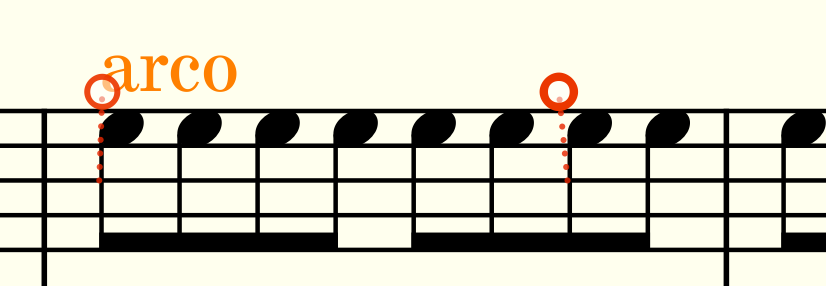
In short: you need to reduce the duration of the technique with Shift Alt Left until it has no duration. Or re-enter it, making sure that only one note is selected.
2 Likes
I still don’t get it. Any performer will play something let’s say sul pont. until it’s cancelled by another command like ord. It doesn’t need anything else.
There’s a difference between live performers and computer performers (and yes, Dorico’s behaviour with this frustrates me at times).
Playing techniques can be either Attribute (apply this technique to this note) or Direction (apply this technique for all notes until countermanded).
Unfortunately, if you select more than one note, when adding any technique, that distinction is ignored (for computer playback) and the technique only applies to the selected notes. For attributes visually you end up with a copy of the technique of every note (which can look very odd), but for Directions you just get a start direction followed by nothing. (Though you can usually you can activate the continuation line property)
Just make sure, when creating direction techniques like pizz or con sord, you only have one note selected.
6 Likes
This is another ex. tho that doesn’t seem necessary to mention although I do admit they can just be ignored.
“Downbow technique has a fixed duration that is not specifically shown” when it really doesn’t mean anything as the downbow glyph says it all.
Thanks for the replies btw
The same applies to pizzicato by the way. You get the same proofreading message in many cases.
In general I can make the proof reading comment go away by deleting the Arco or Pizz. I had entered on the first note of a phrase and highlighting it once more and adding the articulation with shift+p. Sometimes although only one note is highlighted the articulation takes “the second flavour” to quote @benwiggy and you get this message.
Another small proofreading related to these technique changes is that when a flow ends with a Pizz. note defined in the last bar of the flow (there is just one note in that bar in my case), the proof reading suggests to put an Arco at the start of the next flow. So only when the Pizz. note is defined as Pizz. in the last bar of a flow. If the instrument was already playing pizzicato before the last bar you do not get this suggestion.
Highly annoying when (as I am now), orchestrating multiple songs with multiple flows where most are incomplete.
As I see (and use) it: While a piece is not done-ish, it doesn’t make too much sense to look at the proof-reading tool too much.
5 Likes
My method is to click ignore. Then when I’m done, I show ignored and go over the list.
edit: I guess I could probably just turn it off until I’m done.
2 Likes
Of course you can ignore recommendations or use ignore filters to hide them but in a long score you work on with longer time intervals, it often leads to a number of inconsistent decisions. Especially if you also use a general filter and start making changes in parts where you ignored recommendations. In the end I always end up doing the whole score ones more with only a general filter to get all consistent.
(I always deactivate the instrument range check as it is probably a bit too conservative. It gives comments on ranges being uncomfortable for many very well known pieces.)