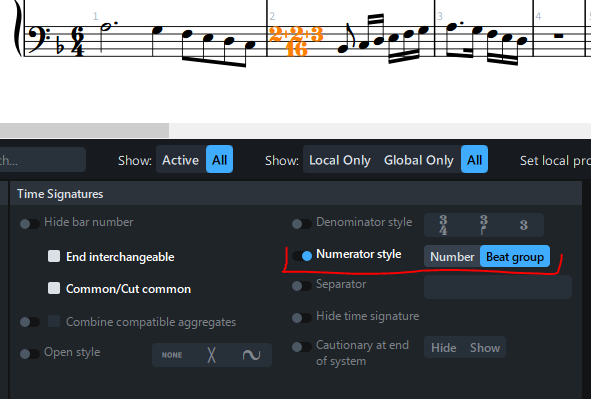
Say I have a meter change from 6/4 to 7/16 (which I do). How do I write 2+2+3 above the score to indicate the division? (That subdivision should of course also be reflected in parts.)
When that’s done, is it carried over to Dorico’s understanding of the rhythm as applied to grouping and beaming?
Jumping from quarters to eighths (one denominator to the next shortest or largest) is by far the most common. Changing from 1/4s to 1/16ths, i.e. skipping an “order of magnitude” (for lack of a term) requires sharpness in performance but is otherwise no different than typical Copland or Stravinsky meter changes.
It’s the answer to the first two paragraphs I’m mainly concerned with.
If you type into the Metre popover: [2+2+3]/16, then Dorico will reflect those groups in the beaming, which should give some indication to the reader, for starters.
As for writing it explicitly, you’ll need to create System Text with “2+2+3” in some suitable style.
Yes, I thought about using the 2+2+3/16 style. That way it would appear for everyone, i.e. in parts.
I think I’d rather use 7/16 with a 2+2+3 above (because that’s what I put in the original), or more commonly like 5/8 in the time signature and 2+3 up top, which is mainly a conductor’s cue.
Or is it? As a player, if I see a 5/8 time signature and there are three 1/8 triplets followed by a dotted quarter rest, is that clear enough? If 2+3 was written above the staff it might crowd other stuff that has to be there.
I haven’t quite decided what style I want to use for meter changes. There are several offered, but I’m not sure I like any of them. With meter changes almost every bar, putting them at the beginning of the measure for every part on the score looks cluttered, but I’m not sure I like any of the alternatives offered.
That screen shot shows the lower Properties panel, where you can adjust settings for an individual time signature. There are also per-layout time signature options in Layout Options, and project-wide settings in Engraving Options.