Here’s a short video demonstrating the issue: click
Here’s a quick rundown of what’s going on:
I add a drum sampler plugin that has multiple outs (think Groove Agent) and route some of the outs to separate channels. I then want to have some processing on the whole group, so I’ve created a group track/BUS and put all of that into a folder.
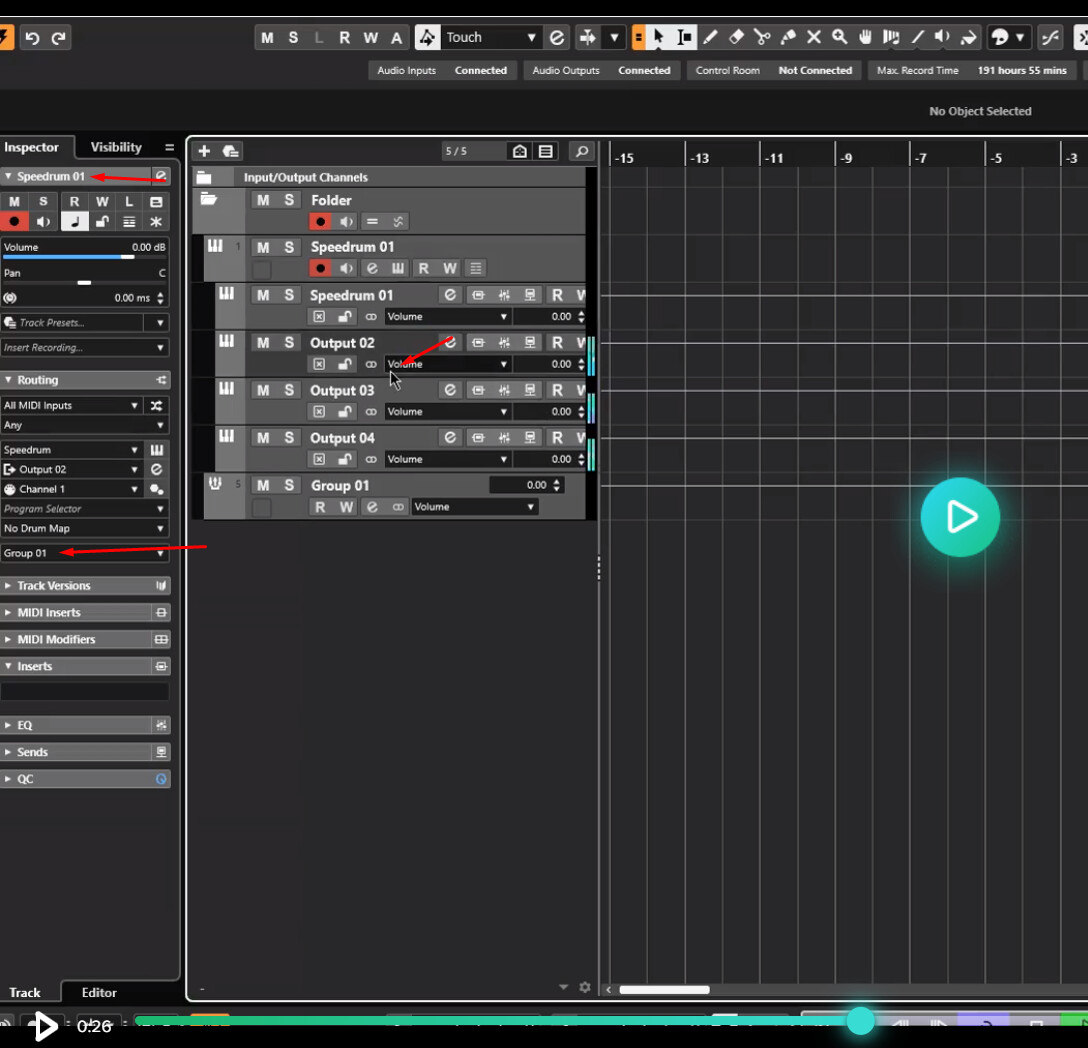
Now, the separate out channels look like they’re routed into the group when looking at the inspector track (it clearly says that it outputs to Group01), but in reality they’re not and there’s no audio going through the Group Track. In order to fix this I need to go into the mixer and reroute the separate channels into the Group (which on the contrary to the track inspector are not routed to the Group01 here).
Is this a bug? Why does it say that it’s routed to Group01 on the output setting in track inspector but in reality it is not, and the mixer seems to confirm this?
Not a bug, although it’s not as intuitive as it should be what it is you were supposed to do.
Bear with me as I want to address handling multiple outputs first. When I create multiple audio outs, I completely ignore the first one because you can’t rename the first output without it changing the name of the track itself, so I create one more total outputs than I need.
Now, to your issue, you need to select the rest of the output tracks you have created and route them to the intended group track.
I want to add that although it appears you selected one of the outputs, the instrument track itself was actually still selected. Apparently this is a known bug that Cubase users are experiencing and there is a fix that will be rolling out in the next patch. For whatever reason, in Nuendo I have not experienced this bug. This led you to believe that those outputs were in fact properly routed, but when you pulled up the Mixconsole they were very clearly still routed to your 2-bus, hence your confusion.
Edit: I’m not sure what users are doing to circumvent this issue, but you can try to select the tracks in the Mixconsole and reroute them there.
This is absolutely confusing and defeats the whole purpose of adding a group track to selected tracks option. A bit unacceptable by today’s standards, honestly. I don’t really want a workaround, if a functionality as simple as this requires you to “circumvent” it, there’s something fundamentally wrong at the core of the program.
Yeah, I understand this can be done, but it also renders the “Group channel to selected channels” option completely obsolete in that case (not to mention confusing) and makes routing those tracks a chore (you can q-link and just change the out put in the mixer to the group of your choice, but it’s still a workaround).
Anyways, the more I use Cubase, the more I realize that with those oldtimer DAWs like Pro Tools, Cubase etc. the learning curve is more about its idiosyncrasies/anachronisms and learning to work around them, more than anything else and I guess that’s also the definition of “an industry standard”, Cubase being an industry standard for composing, Pro Tools for mixing/tracking etc.
I think you have misunderstood in that it does not appear you routed the outputs in the first place, as evidenced by them not being routed in the Mixconsole. In the video I clearly saw you click on the other outputs but observing the channel strip on the left, your selection never changed. This is a known issue, I saw a post about it just yesterday, but has nothing to do with assigning groups. The workaround I suggested for this issue until it gets fixed was to try it in Mixconsole. I’m not sure who this bug is affecting because it doesn’t seem to be happening to everyone, including myself, so it’s not an inherent issue with adding groups to selected tracks, rather an issue with the program switching focus to selected tracks.
Well, in the video I start of with a group track added to selected channels already, and when I click on one of the channels named “output 0x”, the output in the inspector track clearly says it’s routed to group 01, as show in the picture attached.
And yeah, it’s not being routed into the mixconsole, that’s the whole point of this bug - the group channel gets added to selected tracks, the track inspector shows that the drum plugin outputs channels are in fact routed to group 01, but there’s no audio coming through that bus and the mixer is not routed properly in reality, which is the essence of the problem. It’s a bug and the video clearly illustrates it.
See, you think it’s selected but looking here at the inspector it is not, as evidenced by the name the arrow is pointing to in the inspector.
The Mixconsole is a visual representation of your tracks as a row of faders, like a mixer, it comes with some specific functionality not found in the project window, but it is not something you route audio into. I merely highlighted that in your video you can see that the routing never happened because at the top in the Routing section of the Mixconsole, those outputs still show Stereo Out, not Group 01.
I understand. But even though at the very top of the inspector it says Speedrum 01 (the main plugin channel), it says “output 02” right above “channel 1” in the routing section, so I fiugred adding a group track to another track that has a subset of separate outputs should also route those channels to that new group. Doesn’t really make much sense and is counter-intuitive.
Yup, I stand corrected, as now I see it. I guess I’m always in the mixconsole that I totally missed this. You selected ALL the tracks and hit Add selected to Group…, and you think it adds them but it doesn’t apply to the outputs like you expect. The kicker is, if you select JUST those outputs and not the instrument track itself, you don’t get the option to Add selected to Group…you HAVE to do it in the Mixconsole. Since I set up my templates like that in the Mixconsole anyway because the routing of Groups and VCAs are easier to view that way, I didn’t realize that was the only way it was possible! Quite a glaring oversight that should be addressed.