It would be beneficial to have the ability to scale tempos for playback across multiple flows. I am producing rehearsal audio files for one of the marching bands I write for, with sound files at 80, 85, 90, and 95 percent of the final tempo. My current workflow is to export the .mid from Dorico → import the .mid into Logic → Use Logic to scale tempi → import the tempo track into Dorico → Fix some metronome settings that get borked in the process → then export audio with scaled tempi
This gets the job done, but it is time-consuming, especially when you want to produce sound files at multiple different tempos
It would be a useful feature to have natively in Dorico
Perhaps I’m misunderstanding, but couldn’t you just put the scaled tempo as a tempo mark at the beginning of each flow?
Flow 1 → q=80
Flow 2 → q=85
etc. (assuming final tempo is q=100)
I have flows with multiple tempo changes and multiple accelerandos and ritardandos in each. Changing each tempo marking and gradual tempo change by hand is a non-starter.
Is it possible to select only the Immediate Tempo marks and change in there? Am I wrong in thinking that you shouldn’t need to do gradual ones as they are actually relative?
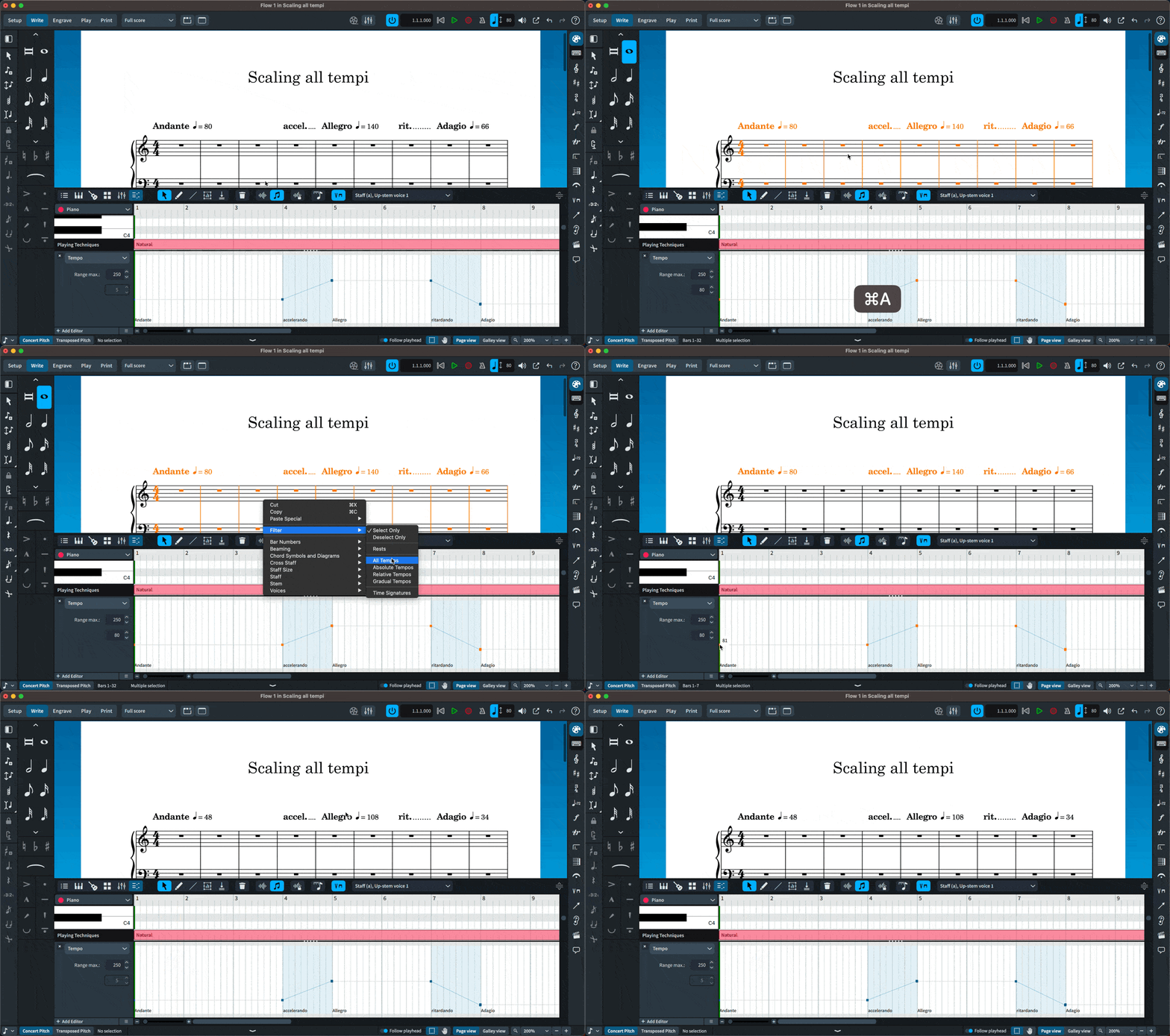
Hi @jcfrith , it is easily done (per flow) with the key editor (if I am not missing something different with your desired result?).
You need to make some easy math to know with which tempo every flow should start. Then:
Select all → Filter All Tempo markings → drag the first tempo to the desired value. It take seconds to do.
I would still need to change every tempo marking across every flow in the project every time that I wanted to scale tempo to whatever percentage of the actual tempo I’d want to produce a rehearsal sound file for.
Scaling tempos in Logic works for this purpose and is my workflow for the moment, but having the feature native in Dorico would save several steps
I appreciate the reply. I see how this is supposed to work, but I am getting unpredictable results with some tempos not scaling as they should. This method seems to be slower for me than my previous workflow. All the same, thanks for the comment
I think there’s an issue with this: If you select all tempo (rather than just Immediate) then they will all be raised by the same amount of bpm.
e.g. if the original tempo begins at 100bpm and you have a rit. that ends 50% slower, the tempo will end up at 50bpm.
If you filter all tempo and raise the initial tempo to 200bpm (100%), the rit. % won’t remain at 50% and the goal would be to keep the rit. % the same if scaled, correct? i.e. you’d want the final tempo at the end of the rit. to be 100bpm (50%).
Instead, the rit. will also be raised by 100bpm and so the rit. % will change to 75% because its final tempo is now 150bpm (75% of 200bpm).
Also, if you only select Immediate tempo markings, they will also all be raised by the same number of bpm rather than the same %.
e.g. in the original scenario - where the initial tempo is 100bpm and the result at the end of the rit. is 50bpm - many would display a tempo indication of 50bpm at the end of the rit. for clarity.
If you only select the Immediate tempo markings (100bpm and 50bpm) and lower by 10bpm, the first tempo will end up at 90bpm (90% of 100bpm) but the second will only be 40bpm (80% of 50bpm) and not 45bpm (90% of 50bpm).
There needs to be a way of selecting all Immediate tempo markings, and if you raise the initial one by 100% then they all change by 100%. This way, the Gradual tempo % will remain the same.
@Janus is correct that if it’s only gradual dynamics following the initial one (with no other Immediate ones) there will not be a problem with after raising the initial Immediate tempo.
This post will be a disaster to read so I hope I’ve got my argument across accurately!
I think I can summarize your point thus: The Y-scale for tempos in the key editor is linear, which means it will do only addition/subtraction. In order to scale tempos proportionally by dragging, the Y-scale would have to be logarithmic.