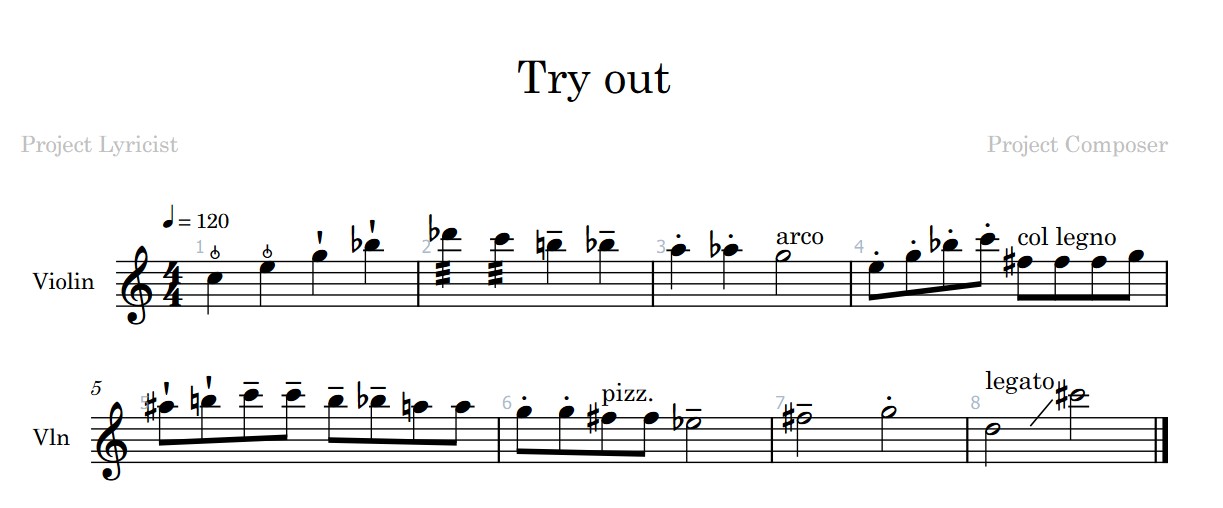
I did a try out to show how frustrating is to try to put articulations on the keys editor and what is show on the score editor this is made with the Spitfire Studio strings…
It seems some articulations as spiccato feather doesn’t appear yet(?) in the palette
And pizzicato not stops when new articulations appear after …
I did a try out to show how frustrating is to try to put articulations on the keys editor and what is show on the score editor this is made with the Spitfire Studio strings…
It seems some articulations as spiccato feather doesn’t appear yet(?) in the palette
And pizzicato not stops when new articulations appear after …
It is because you are using groups incorrectly in your expression map. There has unfortunately been a lot of misinformation and misunderstandings about groups, a lot of people think they ways of organizing techniques ad-hoc, but this is not so. Groups are meant for situations where articulations can play simultaneously with each other and should not cancel each other - if two articulations should be able to play simultaneously, they have to be placed in different groups, otherwise they are often placed in the same group. You have a group called “long” and a group called “short”, which is telling Cubase that any one articulation in the “long” group can play simultaneously with any one technique in the “short” group. This division into “long” and “short” doesn’t make a lot of sense and suggests that you misunderstand what groups are for.
So at the end there, you are telling Cubase to play first regular pizzicato, then pizzicato tremolo with mute, then pizzicato trem sul pont, then pizzicato long sul pont, then pizzicato legato, then pizzicato portamento.
However you do not have slots set up for pizzicato tremolo con sord, or pizzicato tremolo sul pont, or pizzicato long sul pont, or pizzicato legato, or pizzicato portamento, so it is falling back to just matching the first of those (the tremolo con sord, tremolo sul pont, long sul pont, legato, and portamento) since it can’t find a slot that exactly matches both.
It should be doing the same thing for “arco” as well, but you must have changed arco to an attribute instead of a direction, which is telling the score editor that every note in the arco passage has to have the word arco over each note, so you will see “arco arco arco arco” in the score etc. except, you only have it applied to the first note. Arco is normally a direction because you only want it to show up for the first note.
Your map has to be specifically designed to make correct use of groups, and currently you are using monolithic techniques (ex. “trem con sord”) instead of split techniques (ex. “trem” + “con sord.”) which means the groups are not working properly.

 ) Monsieur Ducharme !