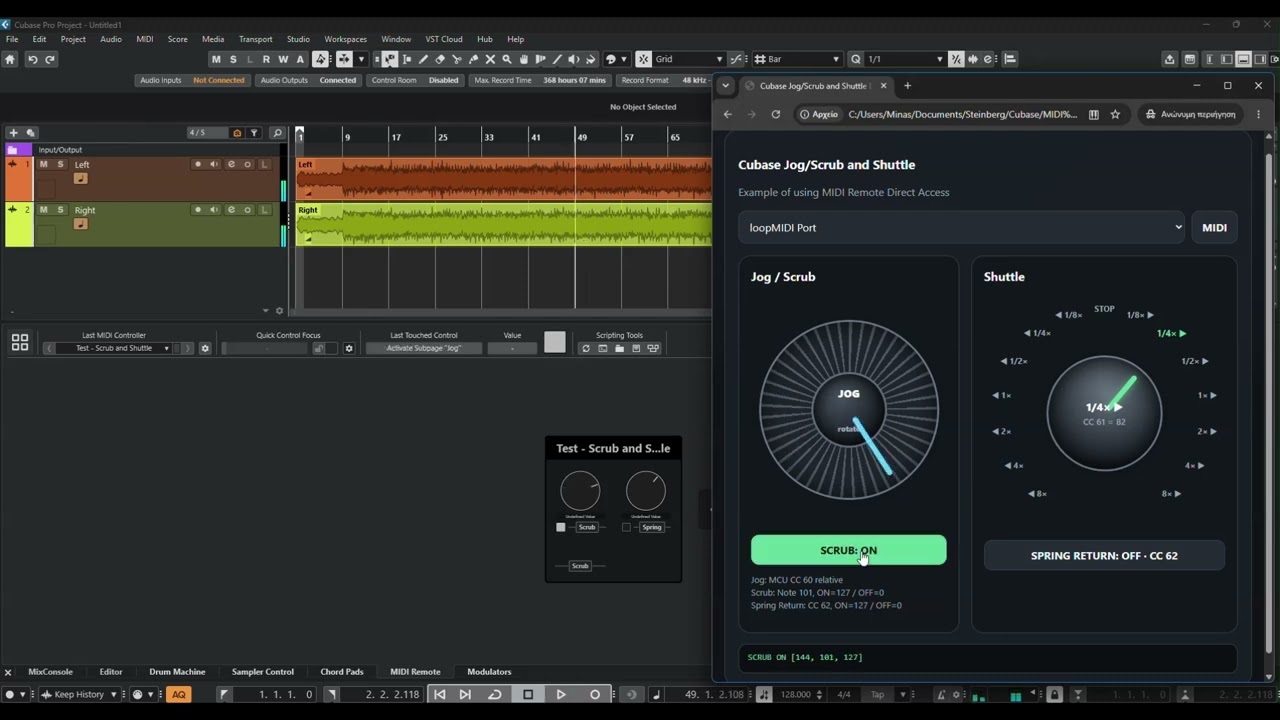
Hey, sure thing. Note that it’s just a remote surface sending midi messages.
<!doctype html>
<head>
<meta charset="utf-8">
<meta name="viewport" content="width=device-width, initial-scale=1, user-scalable=no">
<title>Cubase Jog/Scrub and Shuttle Example</title>
<style>
  :root{
    color-scheme:dark;
    --bg:#0f1217;
    --panel:#191e26;
    --panel2:#242b35;
    --text:#f4f6f8;
    --muted:#9ca7b5;
    --accent:#62d6ff;
    --active:#64d89b;
    --border:#35404d;
    --danger:#ff7474;
  }
  *{box-sizing:border-box}
  body{
    margin:0;
    min-height:100vh;
    font-family:system-ui,-apple-system,"Segoe UI",sans-serif;
    background:radial-gradient(circle at top,#202938,var(--bg) 60%);
    color:var(--text);
    padding:18px;
  }
  .app{
    width:min(1050px,100%);
    margin:auto;
    background:rgba(25,30,38,.97);
    border:1px solid var(--border);
    border-radius:22px;
    padding:20px;
  }
  h1{margin:0 0 4px;font-size:clamp(22px,3vw,31px)}
  .sub{color:var(--muted);margin-bottom:18px}
  .midi-row{
    display:grid;
    grid-template-columns:1fr auto;
    gap:10px;
    margin-bottom:18px;
  }
  select,button{font:inherit}
  select{
    width:100%;
    background:var(--panel2);
    color:var(--text);
    border:1px solid var(--border);
    border-radius:12px;
    padding:12px;
  }
  button{
    border:1px solid var(--border);
    background:var(--panel2);
    color:var(--text);
    border-radius:12px;
    padding:11px 15px;
    font-weight:700;
    cursor:pointer;
    user-select:none;
    -webkit-user-select:none;
  }
  button.active{
    background:var(--active);
    color:#07130d;
    border-color:transparent;
  }
  .layout{
    display:grid;
    grid-template-columns:1fr 1fr;
    gap:18px;
  }
  .card{
    background:rgba(12,15,19,.5);
    border:1px solid var(--border);
    border-radius:18px;
    padding:18px;
  }
  .card h2{
    margin:0 0 12px;
    font-size:18px;
  }
  .wheel-wrap,.shuttle-wrap{
    min-height:350px;
    display:grid;
    place-items:center;
    position:relative;
  }
  .wheel{
    width:min(285px,74vw);
    aspect-ratio:1;
    border-radius:50%;
    position:relative;
    background:
      repeating-conic-gradient(from 0deg,#505b69 0 2deg,#20252d 2deg 8deg),
      radial-gradient(circle at 40% 35%,#626e7e,#252b34 58%,#0c0e12 72%);
    border:8px solid #11151b;
    box-shadow:inset 0 0 0 3px #6a7686,inset 0 0 38px rgba(0,0,0,.8);
    cursor:grab;
    touch-action:none;
  }
  .wheel::after{
    content:"";
    position:absolute;
    width:8px;height:38%;
    left:calc(50% - 4px);top:7%;
    border-radius:5px;
    background:var(--accent);
    transform-origin:50% 113%;
    transform:rotate(var(--rotation,0deg));
  }
  .wheel-center,.shuttle-center{
    position:absolute;
    inset:29%;
    border-radius:50%;
    background:radial-gradient(circle at 38% 32%,#48515e,#15191f 72%);
    border:3px solid #5f6b79;
    box-shadow:inset 0 0 22px #000;
    display:grid;
    place-items:center;
    text-align:center;
    font-weight:800;
    pointer-events:none;
  }
  .buttons{
    display:grid;
    grid-template-columns:1fr 1fr;
    gap:10px;
    margin-top:12px;
  }
  .hint,.protocol{
    color:var(--muted);
    font-size:13px;
    line-height:1.45;
  }

  .shuttle-stage{
    width:min(360px,86vw);
    aspect-ratio:1;
    position:relative;
  }
  .shuttle-knob{
    position:absolute;
    inset:24%;
    border-radius:50%;
    background:
      radial-gradient(circle at 40% 35%,#687483,#232932 58%,#0d1014 78%);
    border:7px solid #10141a;
    box-shadow:inset 0 0 0 3px #687586,inset 0 0 34px #000;
    cursor:ns-resize;
    touch-action:none;
    transform:rotate(var(--angle,0deg));
  }
  .shuttle-knob::after{
    content:"";
    position:absolute;
    width:8px;height:38%;
    left:calc(50% - 4px);top:8%;
    border-radius:6px;
    background:var(--active);
    box-shadow:0 0 12px rgba(100,216,155,.55);
  }
  .tick{
    position:absolute;
    left:50%;top:50%;
    width:1px;height:1px;
    transform:rotate(var(--a)) translateY(-156px);
    transform-origin:0 0;
  }
  .tick span{
    display:block;
    min-width:46px;
    text-align:center;
    transform:translate(-50%,-50%) rotate(calc(-1 * var(--a)));
    color:var(--muted);
    font-size:12px;
    font-weight:700;
  }
  .tick.active span{
    color:var(--active);
    font-size:13px;
  }
  .shuttle-readout{
    position:absolute;
    inset:39%;
    border-radius:50%;
    display:grid;
    place-items:center;
    text-align:center;
    pointer-events:none;
    font-weight:800;
    color:var(--text);
  }
  .shuttle-readout small{
    display:block;
    color:var(--muted);
    font-weight:600;
    margin-top:3px;
  }
  .status{
    margin-top:16px;
    background:#0b0e12;
    border:1px solid var(--border);
    border-radius:12px;
    padding:11px 13px;
    min-height:44px;
    color:var(--muted);
    font-family:ui-monospace,SFMono-Regular,Consolas,monospace;
    font-size:13px;
    overflow-wrap:anywhere;
  }
  .ok{color:var(--active)}
  .bad{color:var(--danger)}
  @media(max-width:780px){
    .layout{grid-template-columns:1fr}
  }
</style>
</head>
<body>
<main class="app">
  <h3>Cubase Jog/Scrub and Shuttle</h3>
  <div class="sub">Example of using MIDI Remote Direct Access</div>

  <div class="midi-row">
    <select id="midiOut">
      <option value="">Click MIDI to connect</option>
    </select>
    <button id="connect">MIDI</button>
  </div>

  <section class="layout">
    <div class="card">
      <h2>Jog / Scrub</h2>
      <div class="wheel-wrap">
        <div id="jogWheel" class="wheel">
          <div class="wheel-center">JOG<br><small style="font-size:11px;color:var(--muted)">rotate</small></div>
        </div>
      </div>
      <div class="buttons" style="grid-template-columns:1fr;">
        <button id="scrubButton">SCRUB: OFF</button>
      </div>
      <p class="protocol">
        Jog: MCU CC 60 relative<br>
        Scrub: Note 101, ON=127 / OFF=0<br>
        Spring Return: CC 62, ON=127 / OFF=0
      </p>
    </div>

    <div class="card">
      <h2>Shuttle</h2>
      <div class="shuttle-wrap">
        <div id="shuttleStage" class="shuttle-stage">
          <div id="ticks"></div>
          <div id="shuttleKnob" class="shuttle-knob"></div>
          <div class="shuttle-readout">
            <div>
              <span id="speedLabel">STOP</span>
              <small id="ccLabel">CC 61 = 64</small>
            </div>
          </div>
        </div>
      </div>

      <button id="springReturnButton" class="active" style="width:100%;margin-top:10px;">
        SPRING RETURN: ON · CC 62
      </button>
    </div>
  </section>

  <div id="status" class="status">No MIDI output selected.</div>
</main>

<script>
(() => {
  "use strict";

  const MIDI_CHANNEL = 0;
  const JOG_CC = 60;
  const SCRUB_NOTE = 101;
  const SHUTTLE_CC = 61;
  const SPRING_RETURN_CC = 62;

  const shuttlePositions = [
    { label: "◀ 8×",   cc: 0   },
    { label: "◀ 4×",   cc: 9   },
    { label: "◀ 2×",   cc: 18  },
    { label: "◀ 1×",   cc: 27  },
    { label: "◀ 1/2×", cc: 36  },
    { label: "◀ 1/4×", cc: 45  },
    { label: "◀ 1/8×", cc: 54  },
    { label: "STOP",   cc: 64  },
    { label: "1/8× ▶", cc: 73  },
    { label: "1/4× ▶", cc: 82  },
    { label: "1/2× ▶", cc: 91  },
    { label: "1× ▶",   cc: 100 },
    { label: "2× ▶",   cc: 109 },
    { label: "4× ▶",   cc: 118 },
    { label: "8× ▶",   cc: 127 }
  ];

  const MIN_ANGLE = -140;
  const MAX_ANGLE = 140;
  const STEP_ANGLE = (MAX_ANGLE - MIN_ANGLE) / (shuttlePositions.length - 1);
  const CENTER_INDEX = 7;

  const el = {
    connect: document.getElementById("connect"),
    midiOut: document.getElementById("midiOut"),
    jogWheel: document.getElementById("jogWheel"),
    scrubButton: document.getElementById("scrubButton"),
    shuttleStage: document.getElementById("shuttleStage"),
    shuttleKnob: document.getElementById("shuttleKnob"),
    ticks: document.getElementById("ticks"),
    speedLabel: document.getElementById("speedLabel"),
    ccLabel: document.getElementById("ccLabel"),
    springReturnButton: document.getElementById("springReturnButton"),
    status: document.getElementById("status")
  };

  let midiAccess = null;
  let output = null;
  let jogDragging = false;
  let jogPreviousAngle = 0;
  let jogAngleRemainder = 0;
  let jogVisual = 0;
  let scrubOn = false;

  let shuttleDragging = false;
  let shuttleIndex = CENTER_INDEX;
  let shuttleLastY = 0;
  let shuttlePixelRemainder = 0;
  let springReturnEnabled = true;

  function setStatus(text, cls = "") {
    el.status.textContent = text;
    el.status.className = "status" + (cls ? " " + cls : "");
  }

  function send(data, text) {
    if (!output) {
      setStatus("No MIDI Output selected", "bad");
      return;
    }
    output.send(data);
    setStatus(text + " [" + data.join(", ") + "]", "ok");
  }

  async function connectMIDI() {
    if (!navigator.requestMIDIAccess) {
      setStatus("Your Browser doesn't seem to support Web MIDI. Please use Chrome or Edge.", "bad");
      return;
    }
    try {
      midiAccess = await navigator.requestMIDIAccess();
      refreshOutputs();
      midiAccess.onstatechange = refreshOutputs;
      setStatus("Web MIDI active. Please choose Output.", "ok");
    } catch (err) {
      setStatus("MIDI access error: " + err.message, "bad");
    }
  }

  function refreshOutputs() {
    const old = el.midiOut.value;
    el.midiOut.innerHTML = '<option value="">— MIDI output —</option>';
    if (!midiAccess) return;

    for (const out of midiAccess.outputs.values()) {
      const option = document.createElement("option");
      option.value = out.id;
      option.textContent = out.name || out.id;
      el.midiOut.appendChild(option);
    }
    if ([...el.midiOut.options].some(o => o.value === old)) el.midiOut.value = old;
    chooseOutput();
  }

  function chooseOutput() {
    output = midiAccess && el.midiOut.value
      ? midiAccess.outputs.get(el.midiOut.value)
      : null;
    setStatus(output ? "Output: " + output.name : "No MIDI Output selected", output ? "ok" : "");
  }

  function pointerAngle(target, event) {
    const r = target.getBoundingClientRect();
    const x = event.clientX - (r.left + r.width / 2);
    const y = event.clientY - (r.top + r.height / 2);
    return Math.atan2(y, x) * 180 / Math.PI + 90;
  }

  function normalizeDelta(delta) {
    if (delta > 180) delta -= 360;
    if (delta < -180) delta += 360;
    return delta;
  }

  function sendJog(direction, amount) {
    amount = Math.max(1, Math.min(63, amount));
    const value = direction > 0 ? amount : 64 + amount;
    send([0xB0 | MIDI_CHANNEL, JOG_CC, value],
      "MCU Jog " + (direction > 0 ? "→" : "←"));
  }

  function setScrub(enabled) {
    if (scrubOn === enabled) return;
    scrubOn = enabled;

    const value = enabled ? 127 : 0;
    send(
      [0x90 | MIDI_CHANNEL, SCRUB_NOTE, value],
      "SCRUB " + (enabled ? "ON" : "OFF")
    );

    el.scrubButton.classList.toggle("active", enabled);
    el.scrubButton.textContent = "SCRUB: " + (enabled ? "ON" : "OFF");
  }

  function jogPointerAngle(event) {
    const rect = el.jogWheel.getBoundingClientRect();
    const x = event.clientX - (rect.left + rect.width / 2);
    const y = event.clientY - (rect.top + rect.height / 2);
    return Math.atan2(y, x) * 180 / Math.PI;
  }

  function normalizedAngleDelta(current, previous) {
    let delta = current - previous;
    if (delta > 180) delta -= 360;
    if (delta < -180) delta += 360;
    return delta;
  }

  function pointerDistanceFromJogCenter(event) {
    const rect = el.jogWheel.getBoundingClientRect();
    const x = event.clientX - (rect.left + rect.width / 2);
    const y = event.clientY - (rect.top + rect.height / 2);
    return Math.sqrt(x * x + y * y);
  }

  el.jogWheel.addEventListener("pointerdown", e => {
    const radius = pointerDistanceFromJogCenter(e);
    const minimumRadius = el.jogWheel.getBoundingClientRect().width * 0.18;
    if (radius < minimumRadius) return;

    jogDragging = true;
    jogPreviousAngle = jogPointerAngle(e);
    jogAngleRemainder = 0;
    el.jogWheel.setPointerCapture(e.pointerId);
    e.preventDefault();
  });

  el.jogWheel.addEventListener("pointermove", e => {
    if (!jogDragging) return;

    const radius = pointerDistanceFromJogCenter(e);
    const minimumRadius = el.jogWheel.getBoundingClientRect().width * 0.18;
    if (radius < minimumRadius) return;

    const currentAngle = jogPointerAngle(e);
    const delta = normalizedAngleDelta(currentAngle, jogPreviousAngle);
    jogPreviousAngle = currentAngle;

    if (Math.abs(delta) > 90) return;

    jogAngleRemainder += delta;

    const DEGREES_PER_STEP = 3;
    const steps = Math.trunc(jogAngleRemainder / DEGREES_PER_STEP);
    if (steps === 0) return;

    jogAngleRemainder -= steps * DEGREES_PER_STEP;

    const direction = steps > 0 ? 1 : -1;
    let remaining = Math.abs(steps);

    while (remaining > 0) {
      const chunk = Math.min(63, remaining);
      jogVisual += direction * chunk * DEGREES_PER_STEP;
      el.jogWheel.style.setProperty("--rotation", jogVisual + "deg");
      sendJog(direction, chunk);
      remaining -= chunk;
    }
  });

  function endJog(e) {
    if (!jogDragging) return;
    jogDragging = false;
    jogAngleRemainder = 0;

    if (el.jogWheel.hasPointerCapture(e.pointerId)) {
      el.jogWheel.releasePointerCapture(e.pointerId);
    }
  }

  el.jogWheel.addEventListener("pointerup", endJog);
  el.jogWheel.addEventListener("pointercancel", endJog);
  el.jogWheel.addEventListener("lostpointercapture", () => {
    jogDragging = false;
    jogAngleRemainder = 0;
  });

  el.jogWheel.addEventListener("wheel", e => {
    e.preventDefault();
    const direction = e.deltaY < 0 ? 1 : -1;
    jogVisual += direction * 3;
    el.jogWheel.style.setProperty("--rotation", jogVisual + "deg");
    sendJog(direction, 1);
  }, { passive: false });

  el.scrubButton.addEventListener("click", () => setScrub(!scrubOn));

  function indexToAngle(index) {
    return MIN_ANGLE + index * STEP_ANGLE;
  }

  function renderTicks() {
    el.ticks.innerHTML = "";
    shuttlePositions.forEach((p, i) => {
      const tick = document.createElement("div");
      tick.className = "tick";
      tick.style.setProperty("--a", indexToAngle(i) + "deg");
      const span = document.createElement("span");
      span.textContent = p.label;
      tick.appendChild(span);
      el.ticks.appendChild(tick);
    });
  }

  function setShuttle(index, sendMidi = true) {
    shuttleIndex = Math.max(0, Math.min(shuttlePositions.length - 1, index));
    const p = shuttlePositions[shuttleIndex];
    const angle = indexToAngle(shuttleIndex);

    el.shuttleKnob.style.setProperty("--angle", angle + "deg");
    el.speedLabel.textContent = p.label;
    el.ccLabel.textContent = "CC " + SHUTTLE_CC + " = " + p.cc;

    [...el.ticks.children].forEach((tick, i) => {
      tick.classList.toggle("active", i === shuttleIndex);
    });

    if (sendMidi) {
      send([0xB0 | MIDI_CHANNEL, SHUTTLE_CC, p.cc],
        "Shuttle " + p.label);
    }
  }

  function angleToIndex(angle) {
    const clamped = Math.max(MIN_ANGLE, Math.min(MAX_ANGLE, angle));
    return Math.round((clamped - MIN_ANGLE) / STEP_ANGLE);
  }

  el.shuttleKnob.addEventListener("pointerdown", e => {
    shuttleDragging = true;
    shuttleLastY = e.clientY;
    shuttlePixelRemainder = 0;
    el.shuttleKnob.setPointerCapture(e.pointerId);
    e.preventDefault();
  });

  el.shuttleKnob.addEventListener("pointermove", e => {
    if (!shuttleDragging) return;

    shuttlePixelRemainder += shuttleLastY - e.clientY;
    shuttleLastY = e.clientY;

    const PIXELS_PER_POSITION = 10;
    const steps = Math.trunc(shuttlePixelRemainder / PIXELS_PER_POSITION);
    if (steps === 0) return;

    shuttlePixelRemainder -= steps * PIXELS_PER_POSITION;
    setShuttle(shuttleIndex + steps);
  });

  el.shuttleKnob.addEventListener("wheel", e => {
    e.preventDefault();
    setShuttle(shuttleIndex + (e.deltaY < 0 ? 1 : -1));
  }, { passive: false });

  function releaseShuttle(e) {
    if (!shuttleDragging) return;
    shuttleDragging = false;

    if (el.shuttleKnob.hasPointerCapture(e.pointerId)) {
      el.shuttleKnob.releasePointerCapture(e.pointerId);
    }

    if (springReturnEnabled) {
      setShuttle(CENTER_INDEX);
    }
  }

  el.shuttleKnob.addEventListener("pointerup", releaseShuttle);
  el.shuttleKnob.addEventListener("pointercancel", releaseShuttle);
  el.shuttleKnob.addEventListener("lostpointercapture", () => {
    if (!shuttleDragging) return;
    shuttleDragging = false;
    if (springReturnEnabled) {
      setShuttle(CENTER_INDEX);
    }
  });

  el.springReturnButton.addEventListener("click", () => {
    springReturnEnabled = !springReturnEnabled;
    el.springReturnButton.classList.toggle("active", springReturnEnabled);
    el.springReturnButton.textContent =
      "SPRING RETURN: " + (springReturnEnabled ? "ON" : "OFF") +
      " · CC " + SPRING_RETURN_CC;

    const ccValue = springReturnEnabled ? 127 : 0;
    send(
      [0xB0 | MIDI_CHANNEL, SPRING_RETURN_CC, ccValue],
      "Spring Return " + (springReturnEnabled ? "ON" : "OFF")
    );
  });

  el.connect.addEventListener("click", connectMIDI);
  el.midiOut.addEventListener("change", chooseOutput);

  renderTicks();
  setShuttle(CENTER_INDEX, false);
})();
</script>
</body>
</html>