Hi,
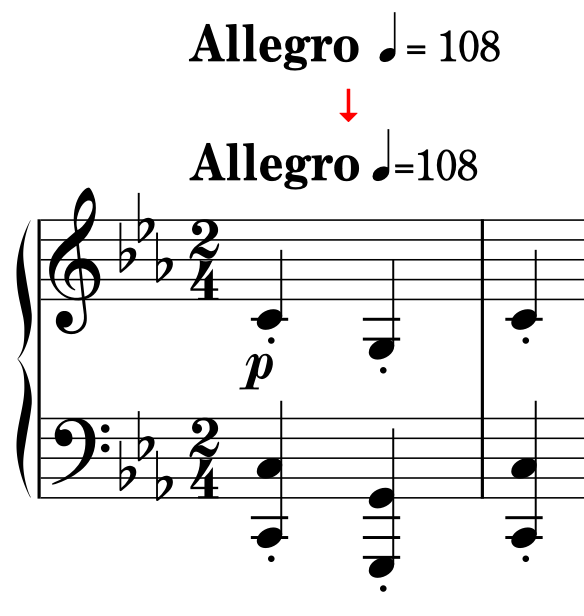
Is there a way to remove extra spaces in metronome marks?
If not, I request a function to adjust this.
By default, tempo marks should appear 3 spaces above the staff. You can alter this setting in the Vertical Position section of the Tempo page of Engraving Options.
I think Soya means the amount of space between “Allegro” and the crotchet. Also either side of the equals sign.
I see, yes. No, at the present time there’s no way to adjust the space between tempo instructions and their following metronome marks.
Thank you @dspreadbury and @StevenJones01 ,
Sorry for the confusion.
As you say, I want to remove spaces on both sides of the equal sign: it’s too loose for me.
You could try entering it as staff-attached text (or system-attached, depending on your requirements).
Here is an example I created in a few minutes. I matched up the font size by eye, so they are probably not exactly the same. You can change the size of the spaces, etc., to your liking.
If you decide to do this sort of thing, you will still need to have a real tempo marking to set the tempo but hide it in Properties by setting its colour to white, then move the text-based marking into position.

Fake tempo marking.dorico (587.6 KB)
1 Like
And you can use MusGlyphs font to do lots of nice things in this area too.
1 Like
IIRC one can ask the Properties panel simply to not show the metronome marking, which avoids having to fuss with setting the color to white.

2 Likes