SpectraLayers Pro 12.0.30 hang on unmix song

I’ve seen some messages in this forum relating to crashes on unmix song and using up all VRAM. I just tried my first attempt on my new Windows 11 system, though, and it appeared to just hang. The song was about 4:12, and I was going for vocals, drums, bass, guitars, piano, and other. I started around 2:36 PM, and it relatively quickly got to telling me it was 3% done and there should be about 55 seconds left. Promising sounding…

However, it just stayed there – I finally gave up about 10 minutes later. I tried canceling, and it did at least acknowledge that it was canceling but then it continued to hang. I eventually gave up, and I was going to try procdump to get a DMP file, but it didn’t do anything, assumedly because there were no exceptions. Ultimately, I just killed the SpectraLayers process.

My configuration is Core Ultra 9 285K CPU, 64 GB DDR5 RAM (6600MHz CL32), GeForce RTX 3060 Ventus 2X 12G graphics card.

I took a few screenshots along the way, and this is pretty typical of what the GPU memory use in Task Manager was showing:
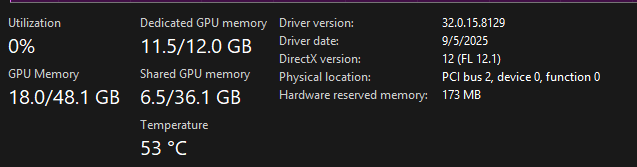
Basically using most of the VRAM it got up to 11.7 GB later). I’m guessing the 0% utilization means it wasn’t actually doing processing on the GPU, though?

Here’s a shot of Task Manager’s Processes tab, which actually dos show 100% GPU use, so maybe I’m wrong on the Utilization figure in the other screenshot?

I was just using default Auto setting for the AI processing devices, which picked the 3060 (there is also onboard Intel graphics, I think built into the CPU, which says it has 6 GB of VRAM). I also used high-quality.

I tried setting it to the Intel graphics, but it gave a warning on too little VRAM, so I didn’t bother attempting it that way. I did try with the CPU, and it took a while, though I think less than 10 minutes (I forgot to note the time at the end of the process). That did a reasonably good job. I tried unmix chorus after that to separate the lead vocal from the harmonies, but it didn’t do a very good job with most of the harmonies still being in the lead vocal track.

12.0.32?

2 Likes

better safe than sorry :slight_smile:

I just checked Steinberg Download Assistant, and it’s showing the latest version as being 12.0.30. Is there a newer version somewhere else?

It may be a day or so before I can try anything again, as I kicked off an initial full backup on my new PC late last night, and history with my old PC would suggest it might run a few days (as of about 8 hours later, it’s showing being at 16%).

you wrote 12.0.32

2 Likes

Oops! LOL. I guess it was a typo. Fixed now. (I thought maybe you were suggesting trying a newer version to see if it fixed the issue.)

also that, see here…

1 Like

Thanks, I remember seeing that in that thread, and that’s what I was wondering if you might have meant with the .32 reference. Might be worth trying once my PC finishes its full backup, though the discussion surrounding it specifically mentioned crashing, rather than hanging, which is a key reason I posted this thread since, unless those who are mentioning crashes really mean hangs, my symptoms are different.

No, as we see on your screenshot your computer currently uses 18 GB RAM for graphics (11.5 GB on your GPUs VRAM and 6.5 on your computers RAM). This means you don’t have enough VRAM. The computer than switches to CPU processing. Processing on your CPU takes like ten times as long.

While this would seem to make sense based on the GPU-specific screenshot, and is what I’d probably expect should be happening (sort of, but see below) in a scenario where there isn’t enough VRAM, the Task Manager screenshot shows no CPU usage. Also, the Unmix Song operation quickly got to 3% completion but never progressed beyond that, so it’s not like it actually switched over to completing the operation with the CPU.

I tried later, switching to CPU for the AI (instead of Auto, which showed that SpectraLayers chose to use the GPU), doing Unmix Song on the same song (with the same Unmix Song stems options). In that case, CPU utilization in Task Manager actually got as high as 102%(?!?!?) at times, and it consistently stayed high (it was cycling up and down regularly, but I don’t think it ever got below maybe 70%). The Unmix Song also completed. I forgot to check the end time, but it was definitely less than 10 minutes, and that was decidedly less time than I’d given the attempt at using the GPU for AI. The completion meter also showed relatively steady progress along the way.

With respect to my note on expectations in the case of too little VRAM, I don’t know enough (anything?) about the possibilities for load sharing between CPU and GPU and VRAM and system RAM. However, my conceptual inclination is to think maybe there could be some potential for letting the GPU do a portion of the work (maybe based on VRAM limitations) while letting the CPU fill in for what doesn’t fit within the GPU’s capacity – i.e. as opposed to having it be all or nothing in the scenario where there is not enough VRAM.

I finally got a chance to try the 12.0.31.432 possibility. Not only did it complete without a hang, but it only took on the order of 4 minutes to do the same unmix operation I’d tried previously (4:12 song splitting to vocals, drums, bass, guitar, piano, and other), so pretty close to real-time! Hopefully this patch makes it to a formal release soon.

4 Likes

It worked for me. In time, “Unmix song” lasts a little longer than the real duration of the song.