Hi all
Would love to have colours stored with the alpha channel setting, or at least the alpha value available from the properties panel.
Any workarounds come to mind?
Hi all
Would love to have colours stored with the alpha channel setting, or at least the alpha value available from the properties panel.
Any workarounds come to mind?
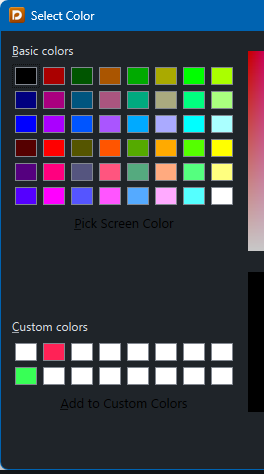
If you’re using Windows, I’m not sure what capabilities the system colour picker has on that platform, but on macOS, you can already save a custom preset including an alpha channel value in the little “droplets” at the bottom of the colour picker. Simply drag the colour from the large preview into any of the little droplets on the right. To delete it again, click the droplet (you don’t get any feedback that it’s selected, but it is) and hit Delete.
yes, Windows 10 reverts the alpha value to 255 for new colourings.
Would be great if this could be made consistent across platforms.
thanks
That’s something you’ll need to take up with Microsoft. Dorico uses the system colour picker.
Interesting, I wonder why?
Why would we go to the trouble of implementing our own colour picker when the operating system provides one?
so that the feature set matches? Imagine if graphics app took that attitude…
I understand that you would like to be able to save a colour preset with an alpha channel, and that the Windows colour picker doesn’t provide this. We’ll certainly think about whether we should prioritise the implementation of a new colour picker for both platforms in order to satisfy your requirement, but bear in mind that we have very limited available development time, and a colour picker is not a simple thing that can be knocked up in an afternoon (very few things are!).
You can create a colour with an alpha channel on Windows, you only cannot save it to a droplet in the colour picker. The result you are looking for is absolutely achievable on Windows.
yes of course, but I have hundreds of these to consider for a textbook and could really do with preset colours with alphas
If there are certain colors that you use, you can write a macro to assign the color (and the alpha value) to selected items. You can also assign this macro to a shortcut key. Then you just select the items and invoke the macro.
(You would need one macro for each color.)
Hi Aaron, thanks
The problem here is that the macro records the action as applying the final hex-value, not the actions ‘select the droplet, then apply the alpha’. So if I subsequently edit the droplet, the macro will still apply the old colour.
ugh…but thanks again
[EDIT might be being too hasty here - I can of course edit the macro with new hex data - I’m going to mark that as a solution - thanks again]
(That’s what I meant by “one macro for each color” – each macro has one full hex value.)
Given that it’s a system thing, and I hardly expect the team to jump on this for my benefit, I’ll do what I usually do and add the coloured stuff in something like Inkscape post-engraving - or use a.n.other typesetting app
Incidentally, @dspreadbury, with dark mode selected in Dorico, the “Pick Screen Color” and “Add to Custom Colors” buttons draw with dark text and are hard to read (I didn’t even see them at first!). Is this also an MS issue?
!! never saw the text either
For illustrations in a book, I would definitely use a drawing app to modify the default output of any notation app (and indeed have done so) – simply because a drawing app will always be better suited to the task.
You can even do things like put lines and colour masks in different layers, so that you can update the drawing document with a revised version of the notation PDF, and still keep your edits.
Completely agree, and it’s what I do. There are simple things though that I like to do in the main engraving app. It’s more a workflow thing and it can save some time - a change of note-spacing unfailingly undoes the alignment with the top layer.
It’s certainly not anything we’re doing!