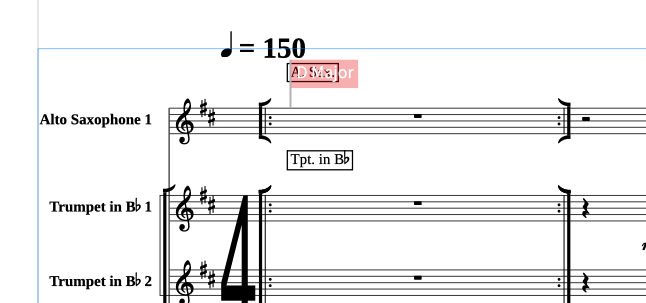
I’m a bit stuck trying to figure out what I’m doing wrong here.
I’ve created a custom line to indicate vamp, and I’m using opt+click (macOS) to add it to the score:
The line appears correctly in the parts, but it’s not showing in the full score. When I click on the vamp line in one of the parts, the settings look like this:
So my question is: why doesn’t this custom line appear in the full score? Is there something I’m missing in how it’s being added or displayed?
Related to this, is there a setting that places system attached lines closer to the stave? This is taken from one of the parts:
Although I’ve been working with Dorico for a while now, I’m still getting to grips with some aspects of the workflow. I’d really appreciate any help in understanding where I might be going wrong.
System-attached line issue
I’ve entered a system-attached line in the score (as described at the start of this thread, see bar 1), but while it appears correctly in the parts, it’s not visible in the full score. Any ideas why this might be happening?
Orphaned markings in parts
While experimenting with different ways to indicate “Straight,” I seem to have ended up with orphaned markings in some parts that don’t appear in the score. For example, in Reed 2, bar 21, there are three “Straight” markings, all in different text sizes from the score. Is there a way to clean up or reset these inconsistencies without manually going through each part? I’ve noticed similar anomalies elsewhere. For instance, “ABC” in Reed 2 at bar 73, which must have been an old note I left at some point.
Pages showing incorrectly in Engrave mode
In Engrave mode, the Pages panel shows 305 pages. This might reflect the total page count of the project the flow was exported from, but it’s clearly incorrect for the current flow. Why is this number off? I’ve noticed that there’s a page override on page 305 that needs to be cleared, could this be causing the issue?
I don’t know how you entered your line, but when I try (for instance, I write a whole note on that bar, use the “attach to rhythmic position” start and end, then delete the note) the custom line is present both in the score and in the part.
The same happens with your staff text. If I enter Straight (whatever the font, the size, etc) at bar 21 in Reeds 2, it appears in the score
Remove the override on the last page, and your score will simply have 28 pages. That override prevents dorico from deleting all the other pages.
So to sum it up, I have no idea why the staff text and lines do not work “correctly” on your system…
I am at a complete loss to understand how this work for you, but not for me
In Galley or Page view, if I opt+click the vamp line (set to attach to the bar lines), nothing shows in the score, but yet more lines show in the parts. I thought this might be because I am attaching the line to Clarinet 1, which has no notes in bar 1, but even if I add a whole note as a placeholder, the issue persists.
Maybe someone from the Team will be able to download your file (which behaves here as you describe it, although I cannot reproduce the behavior) and will be able to diagnose it!
In this screen capture, I have opt pressed before selecting the vamp line but as can be seen, no line appears in the score but is present in the parts.
One small quality-of-life improvement that could make it even better: it would be great if it worked when a rest is selected. On my first try, I selected the opening bar’s rest in Clarinet 1, expecting it to take me to Flow 16, but it instead jumped to Flow 1, Bar 1.
Now that I understand how it behaves, I’ll definitely be using this shortcut regularly… it’s super handy.
I’ve noticed that when I add a line using a simple click (i.e. without holding Opt), it appears in the score and in the part to which it was attached, but only that part. From what I understand, holding Opt+Click is necessary to create a system-attached line that appears across all relevant parts and the full score. Is that correct? I just want to be sure I’m not misunderstanding something vital…
Using alt/opt makes a marking local. For instance, a meter entered with alt+enter in the popover will be applied only to the staff where the caret is. I’m wondering whether that’s the root of your problems. I’ve never thought about a local custom line but it might actually be a thing. Try not to use alt. [Edit] @rraby and @Anthony_Hughes proved me wrong in the next post.
The only thing where alt is used for a system something is for System-attached text (the popover is shift+alt+X)
I cannot use alt-click to input a line because I’m not using my pointer as “loaded with some object from the right panel”, because I’m a popover guy… and I learned to use as little mouse as possible with Dorico. I’ll try to change my Preferences to see if I get the same result as yours. [Edit] : I could not enter a line like that.
Alt-clicking (opt-clicking on PC) an item in Dorico will duplicate it, so I don’t think that behavior can really exist though.
In this video, at 1’45’', https://www.youtube.com/watch?v=RI2bM3ySk7g&t=115s, Anthony mentions that Alt+Click ( which I understand to be Opt on the Mac) is required for system-attached lines. Alas, this does not work for me in the score I uploaded The need for Alt+Click is also mentioned in the manual:
To input a barline-/rhythmic position-attached line that applies to all staves, Alt/Opt-click it in the Horizontalsection.
This works insofar as the line appears in the parts but not in the score, whether viewed in Page, Galley or Engrave view.
Now, for some reason, it should show in the Score at the top, and it does not (but it’s on every part). Let’s investigate!
[Edit] I found the culprit! Your Layout options>Systems and Staves>System attached items…
You should not use the Specific Players stuff, or make sure Horiz. lines are ticked for Reed 1! (I would not use it or tick everything for Reed 1!)
Thanks again for the alt-click into the panel reminder, that’s why I love this forum. You learn so much helping others
Your patience and perseverance are greatly appreciated, Marc.
The flexibility of Dorico can be quite bewildering at times, but I’m slowly finding my feet. I can absolutely see why the option you mentioned would be so useful, but now I’m slightly terrified I’ll forget to tweak settings in flows that don’t use Reed 1. It’s like setting traps for my future self!
Thanks once again for your time and sharing your knowledge and expertise on the forum.