I have three notes in a row (same pitch) that all have a tenuto/staccato articulation. On the third note the tenuto and staccato has a larger gap then the previous two notes. Why is this happening? To the reader it gives the impression that the third note is note the same (like it is descending). I can’t find anything in the Engraving Options or Properties Panel to adjust this. I would like them to all appear the same.
Tenuto & Staccato spacing issue.dorico (589.4 KB)

There is a setting in Engraving Options > Articulations > Vertical Position > Advanced Options > Staccato > Do not allow inside staff , but in this case I would slightly enlarge the stem in Engrave Mode to force the staccato to move up.
Ah ha!!! Easy fix. Thank you so much!
For me, I have to extend the stem by about half a space to get the staccato dot up, which then looks really … off. In fact, each artic look higher than the last!
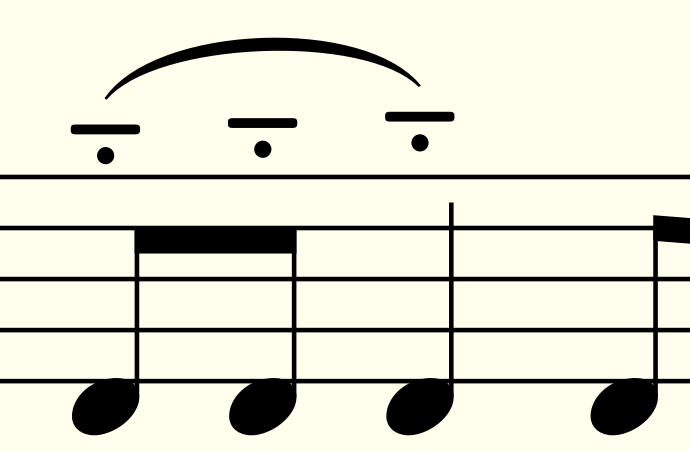
They all look different, even the two first ones, I think.
Jesper
Please don’t shoot the messenger 
The engraving option produces the same position of the tenuto/staccato group.
From the “calligraphy” perspective the best looking way is to move up also the beam and align the articulations manually.
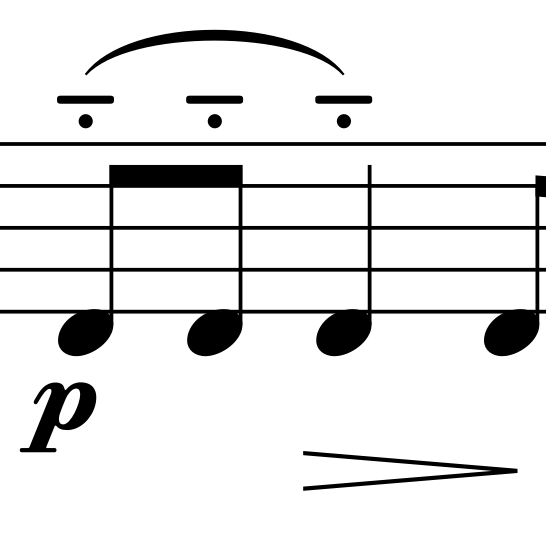
I agree with the first part of your message!  Setting the staccato to be outside the staff gives the best result.

Of course, the default behaviour is for slur and artics to be notehead-side.
I contemplated putting the articulations on the note side, but I opted to copy what the original manuscript had. I think this was done to make the dynamic markings less crowed. I often move slurs on the beam side if it makes dynamics and hairpins too displaced. Normally I would put this on the notehead side. Always a comprise!