I purchased SpectraLayers Pro 11 and wanted to ask you where I should start. My immediate needs are to learn how to Create Stems of every instrument possible within my WAV files. The Stems would then be imported into Pro Tools for Mixing and Mastering. Any guidance is appreciated.
I used the SpectraLayers 11 Manual. I carefully read and watched all the videos that are linked to. You will often see the same video referenced several times.
I watched, noted and tried out carefully what the videos showed, time and time again to get a relationship with the program itself and all the modules.
I think I got the best results when I played around with the program and investigated all the ideas I got along the way.
Read – watch – try out – build intuition – build creativity…
I expect that there will soon be a manual for the new version 12 that is presented today…
audio you recorded? mono/stereo stems? pre-recorded material?
and what is it that you want to do?
if you expect to unmix stereo (mastered) song/music/audio and unmix into stems, you will struggle IMO…at this time
this is not at all clear
“my WAV files”…? what does that mean…Personally,I have 40 years worth of various recordings of “my homemade” original music/ audio
do you have a library of popular releases or is it your personal material…
I learned a great deal from phil pendelbury on YT.
I watched all of @Phil_Pendlebury livestreams on SL10 and then some on SL11.
I didn’t watch them live Phil’s pacing I found worked well for me.
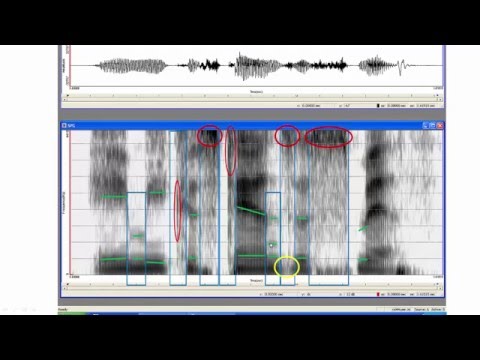
Also, much of using SL is having some basic understanding of reading the spectrogram. Frankly, being a bit lost on the spectrogram took a fair amount of teething for me. That said, a the majority of my current work is dialogue; nevertheless, using human voice to learn will help understanding spectrogram which is critical for SL work. Not that I use any of this guy’s terminology.
Something like:
Also, there are web pages on spectrogram can be very helpful too.
Not to mention there are a lot of posts on this forum with SL workflow advice.
On a personal note, I would like to say thanks for the kind words. It is really appreciated.
I guess I should explain for the benefit of others, that, yes, the videos were live, so the pacing is slower than your average modern fast cut edit, multi camera angle, YouTuber, haha. And I appreciate that you noticed that.
But I always go through afterwards and add detailed chapter markers so if anyone wants to skip the live stream waffle it is quite easy.
I haven’t done any new videos for a while but am gearing up to get back into it soon.
I’m just going to reiterate how important it is to get a reasonable grasp on being able to recognize what is being displayed on the spectrogram
I spent the last week separating wanted cicada noise burned into an interview (mono recording of a lav and a shotgun). My first pass didn’t really work. And I have been avoiding using the harmonic selection tool due to paste anomalies I whinged about on this forum last year.
Well, I realize now I needed to modify my selection workflow (using harmonic selection tool and brush tool; mostly set to “Add To” selection) and realize now how good SL is at this. Users need to know what to select and not (you’d think that goes without saying) and recognizing graphic forms of sound on the spectrum is deeply helpful.
Yeah, I gotta ditch most of my work from last week, but have learned a workflow I should have been using all along.
I should have been clearer…
My clients send me a stereo WAV file of songs they want Mastered. Many times what they actual need is a remix. I’ve used stem creation software like RipX to “unmix” the songs even if I get a good Kick and Snare to then import into Pro Tools along with their original stereo WAV file. I’ve heard great things about SpectraLayers in this regard which is why I purchased it. I’m hoping to get better quality Stems using it, meaning with less artifacts than what RipX is giving me.