Hello all. “Long time listener, first time poster.”
I’m curious as to how many of us have been/are using the DMX features of VST Live Pro. While like most of you, I primarily purchased VSTLP for the <insert name of your preferred live performance VST host here, like Forte, Cantabile, Mainstage, etc. which I have/am using>-like capabilities, I was also excited about the DMX control capabilities. So much so that I purchased a DMX interface and some lighting to integrate that into our band’s live performances.
DMX Users - Can you please share your experiences/successes/failures to date so that we relatively new “lighting directors” can all benefit from our efforts?
I’ll start with a couple of things. As a point of reference, I’m on a Windows 10 system using an ENTTEC Open DMX USB interface with an Eliminator Lighting Min PAR bar fixture. I’ve tested this configuration and confirmed that it works successfully with both DMXControl3 and Q Light Controller Plus.
Now for some issues that I’m experiencing.
. Basic testing of the DMX track from “Ghosts.” Results are unsuccessful. The DMX track appears to only work in the DMX Visualizer. I have tried two routing options as follows:
* Routing to the DMX Mixer. According to the VST Live - Operation Manual page 92, *To view the fader movements of a DMX Track on the DMX Mixer, set the output to the DMX Mixer.* I think this is the routing that they are describing:
(Would include an image but I’m a new user and only get one media post)
When I play the song and look at the DMX window, no moving faders.
DMX Users - Has anyone else tried this, and if so what are your results?
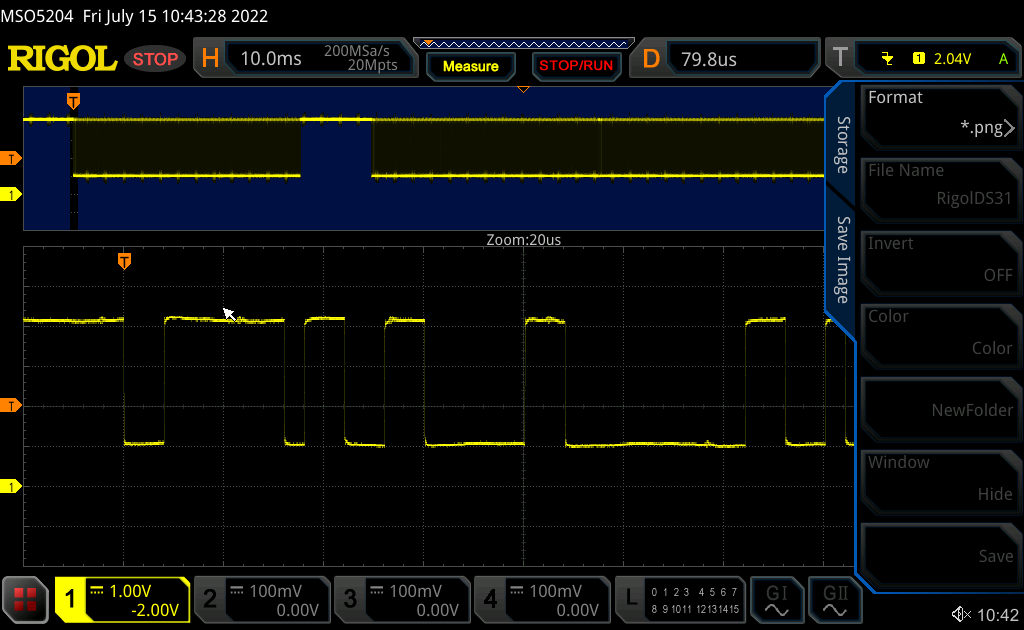
- Routing to my DMX interface: In this case, I’m routing the DMX output to my ENTTEC Open DMX USB interface. Here’s the DMX Connections panel (I’m including this as my one media so you can see my DMX connections):

And here’s the track routing:
(Would include an image but I’m a new user and only get one media post)
Again, no activity on the fixture. FYI my Mini PAR Bar has Macros on Channel 1, Macro Options on Channel 2, and Strobe/Fade speed on Channel 3. So given that the DMX Visualizer suggests R/G/B on channels 1/2/3, hence I’m assuming the DMX track is using Channels 1-3, I would expect at leas some crazy activity from the fixture.
DMX Users - Same question but with external DMX interfaces - Has anyone else tried this, and if so what are your results?
2. New DMX track in New Project. Since the demo project appears to be somehow “locked” (meaning I can’t arm individual tracks), I created a new project with a new DMX track. My fixture uses Channels 4-8 for Master dimmer and R/G/B/W dimmers, so I recorded a bunch of fader moves in the DMX Mixer and created a new track. So far, so good. But the output doesn’t go anywhere. I’m assuming the DMX visualizer doesn’t work with other channels (based on the legend (RGAB = Channel 1|2|3), but I had no luck in routing the input to either the DMX Mixer or my interface and fixture.
DMX Users - Have you tried creating new DMX control tracks, and if so what are your results?
Sorry, the post is too long already but I am having no luck with the VSTLP DMX options.
A couple of thoughts that I’ll probably cross-post to the features. These assume that at least the advertised DMX capabilities work.
- Ability to assign any DMX channels to the DMX visualizer (for example, I need to see Channels 5-8 for my Min PAR Bar fixture).
- Ability to import DMX tracks created in VSTLP. I could probably re-use my lighting scenes if there were some way to add one that I already created - creating a new track from scratch is quite the process.
- An in-tool DMX editor. Someone else mentioned the ability to set specific values in the DMX mixer (agree); I’d like to see something like the Lyric editor where I can tweak the DMX channels and values in the song timeline, similar to the way the Lyric editor works. The ability to fine-tune or create a series of moderately complex lighting channels and settings at specific timestamps, or copy/paste/move them in the timeline, would be really cool. I know that you can drag the DMX track around in the Tracks window, but have an event displayed in a timeline window would really take the lighting capability to the next level.
Thank you all for reading and I’m looking forward to your comments!
~Onionhead (Keyboardist and vocalist by day, lighting designer by night!)


 ).
).
 And you getting DMX data from VSt Live, that’s a good start.


 .
.

