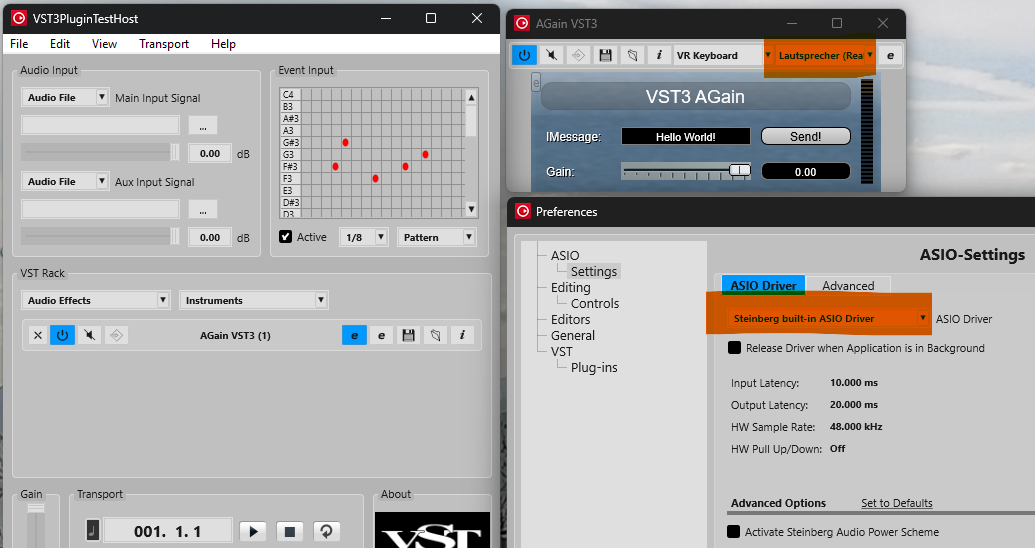
I’m trying to run the VST Plugin Test Host WITHOUT using a plugin first, just to test to see if I can get audio. It doesn’t play any sound, no matter what I do.
I’m testing a sine wave, as well as loading a WAV file. Neither one produces any output. I know my computer plays sound because I have WinAMP which can play the WAV file with no issues.
I’ve also tried building the sample plugin that the VST 3 project generator made, and it doesn’t produce any audio either. Same deal - tried a sine wave as well as a WAV file. Nada.
Is the sample plugin that the VST 3 project generator makes, functional or not?
The project generator produces an “empty” plug-in that does not process audio and thus does not forward its audio input data to its audio output data and thus you will not hear anything in the test host. Just build the example plug-ins in the SDK and insert the AGain plug-in.
This is old post but I have similar issue: Win 11, VSTPluginTestHost, and I get no sound. I do not even know if it should produce sound, as I did not see any tutorial telling “press this play button and you should hear sound, filtered by your plugin”.
Anyway, I made the “hello world” tutorial, producing gain-plugin. I added it with the vst3plugintesthost, with no luck. I also added the mentioned Again-plugin with no sound then either. There is a on-off swicth for the plugins, but I cannot tell which way it is on and which it is on, as it just shows blue or blank -colors. I assume it is on if it is blue, though by default, when plugin is added, it was blank I guess. However, I tried both ways - no sound.
I have added a midi-file through File → load midi file. Though I do not know if that was needed in order to test it. I also added wav -file from "Audio input” -section, from the top part, leaving bottom part as sine.
In all cases, if I press play button at “transport” -section, I do not hear any sound.
I am new to this so might be doing something wrong, like pressing wrong play button or such. Could you please give an example, or link to one, where all required steps to test if it is working, are shown. Like 1) add wavefirel pressing 3 dots at Audio Input -section on top left. 2) add Again filter from VST Rack - section in midddle, from Audio Effects… please make sure the Enable / Disable -icon is blue (or blank?) etc. 3) and finally press Play at Transport-section in bottom area. You should now hear sound from computer loudspeakers. If not, please ensure you have correct playback device selected at… or something like that.