What is the easiest way to add (crossfade) reverb into the end of a track with Wavelab? I need to master a song that was faded to suddenly and the reverb needs to carry over a few seconds for the fade out. Obviously the effect is only needed only at the very end of the file. Your suggestions are very much appreciated!
There are several ways. If this is the last song, simply add the “Silence” plugin to the Master Section, and put a marker in the montage, till the very end point.
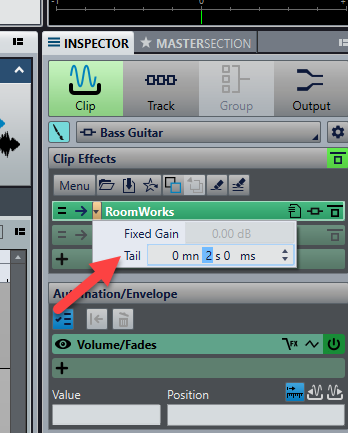
If this is a clip, you have the option to add a tail to the clip, to let the reverb signal continues a bit after the clip.
I do it in a montage, add another track in a montage, put reverb module on the separate track, duplicate the section I want to reverb, output it as 100% wet and adjust the levels accordingly
This does not add a tail in fact. If you add 5 seconds here, the resulting WAV after rendering a clip from the montage, is still exactly the same length as the clip was in the montage. Please fix this, I would really like an easy way to add half a second at the end of every render. Please advice, or change that function from your screen shot to do what it suggests to do. Best wishes, thank you
However, if you don’t render the whole montage, this is not enough.
In that case, you have to render a selection that extends the clips, as on the following picture.
Ok thank you. Its just a little inconvenient because then the clip titles do not carry over and it’s just a lot more work/steps involved. Being able to simply drag a clip to be longer / extended, would be a single feature that I’d happily pay for an update for