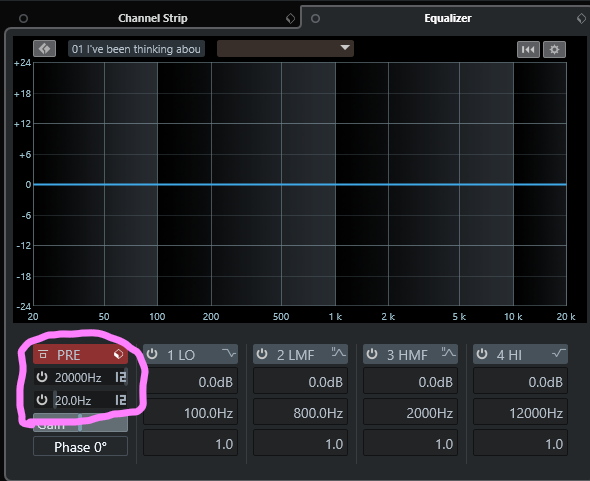
Hi, I have lots of tracks each using an insert of VSL MIR Pro (a convolution reverb plugin) but before that each track - except those with natural deep bass - an insert of Ozone EQ to shave off the sub frequencies to get rid of unncessary mud. As there are therefore lots of instances of Ozone its impacting the CPU performance so to be more efficient on the processor I’d like to use the EQ functionality native to Cubase.
For my purpose above what is the best way of doing this in Cubase? e.g. as a Cubase EQ insert before VSL MIR Pro or in the channel settings as pre gain?
I’m afraid there’s no general answer. That depends on your tolerance towards artefacts. Some say there’s no audible difference and others disagree, especially when it comes to High Pass filters.
Maybe a good starting point would be the amount of reverb in play, how steep you set up your HP and which signal it is used on.
Thanks, I’m not concerned with artefacts, I think the native EQ for what I want to do will be absolutely fine. I don’t know “where” I should put the EQ though - would it be best to put this as a pre-EQ in the mixer channel or as an insert (before the reverb)?
Ever since the addition of the Channel Settings tab in the main Project Window, I’ve been defaulting to the Channel EQ, which now lives in the top left corner, and disappears when you move your mouse away (whoever implemented this is a genius. Such simplicity that turned the channel EQ from something I NEVER used into what is now my most used, and the most convenient EQ).
As complementary info: these three features are in the PRE section: the filters (high pass, low pass), pre gain and polarity. Although they are shown together with the channel eq, they are always at the very beginning of your channel chain (PRE) and can not be moved. The channel eq is part of the channel strip (I think so, at least) and the channel strip can be moved pre inserts or post inserts.
By the way, the filters in the PRE section are obligatory for a lot of channels in my projects and I know many -when not most- of users here use them, so just use those filters.