I know there are some older threads on this but I wanted to share my recent experience.
I run Win 11 with RME UFX+ with great success. I had heard folks warning about 24H2 and a couple of weeks ago it installed and I paused updates as long as I could.
On Saturday I installed it, as expected RME drivers had to be reinstalled and otherwise seemed fine. I tested a bunch of programs and it seemed cool.
Today when I opened my 2 track audio project my CPU meter which is usually hovering around 10% for this was bouncing over 60%! couldn’t believe it.
Found this true of every project I opened.
I was within 10 day window and went right back in and rolled back to 23H2 and everything is back to normal.
I had thought all of this would have been figured out by now as I only really saw threads from 6 months ago, the reason I started this one.
Anyone else experiencing this? anyone every tried adding to the registry to avoid this build?
I’m running Cubase/Nuendo 14 on Windows 11 24H2 with RME with no problem on several machines tested fine, from a trusty old Dell laptop with Intel CPU to my main workstation with latest AMD Ryzen 9 9950X CPU.
Not that this helps you much, but there are dozens of reasons why you might have a problem w/ 24H2, and you’ll need to break the problem down scientifically to try to isolate the culprit. This can be a nightmare sometimes, I know, but there are plenty of people running 24H2 every day like me in a production environment, no problem.
If you are in the middle of a big project or deadline, then I suggest you stick with what is working, of course, but when you have a break and want to diagnose the problem, start with creating an new empty project and testing it by adding one plugin at a time to see if you can replicate the performance issue you are facing. There could be some other driver conflict, a plugin issue, a dependency issue, some other subtle regression or conflict with some other service/app, and so on… and your post didn’t provide nearly enough information and details to see if it can be replicated on other people’s systems. It’s a complex environment and anything could have contributed to the issue, so be methodical and patient in your testing, and if you can create a repeatable recipe, post the recipe with complete system details (with details of all drivers, versions, plugins, extra apps, etc.) here and see if other people can replicate the issue.
Good luck! It’s never fun to deal with stuff like this when it happens, I know the frustration, but just be aware there are plenty of people with Steinberg + RME on Win 11 24H2 doing just fine, it’s hopefully going to be possible for you too with some troubleshooting.
Thank you all for the replies. I paused updates until late July, but I do want to figure it out as I can only kick the can down the road so far. I use very little plugins, (UAD mostly). This system was built in 2020 and in 2024 updated to win11 from win10. Its been solid and smooth until this update. The update has been on my surface for months but I dont run too intensive stuff on it.
It was weird that after I installed 24H2 and opened Cubase Pro 14 the cpu looks normal for a millisecond and then jumps from 10% up to 60%.
My DAW is just runs Cubase and Davinci resolve most of the time.
Not sure how to test when I have time, can’t really imagine its a plugin.
I also updated my signature to reflect my current setup.
I hear you, but don’t limit your imagination when it comes to bizarre regressions or seemingly nonsensical incompatibilities when it comes to DAWs, hardware, drivers, plugins, dependencies, related issues, and OS updates. It can get weird, even with something minor and unexpected.
When you’re ready to investigate, start a new thread or come back to this one, and go through everything step by step, with lots of detail and deductive logic, building out a project from scratch, checking each step of the way for odd behavior, until you can replicate the problem. Then create a repeatable recipe. Once you do that, you have a much higher chance that some nice person here (or even Steinberg) can help.
A word to the wise when it comes to tracking down issues like this: Your chance of success directly correlates to the quality and detail of your posts and your focus on logical, scientific, repeatable steps. However, on the other end of that spectrum, the more emotional and vague the posts, the less chance of success. Not saying you are doing that, but when you see people having issues here in the forum, consider which end of the spectrum their posts gravitate towards, and you can predict the outcome of those threads quite easily.
I thought I would follow up, thanks for the suggestions. I rolled back to 23H2 and everything was fine again but just kicking the can down the road. So I had some this weekend to try.
It went the exact same way as the first time. I updated to 24H2, RME needed the drivers to be reinstalled and then no problems day one. Started and rebooted a few times, ran Cubase w empty projects, my own templates, last 5 or 6 projects and still all good.
Next day I boot up, open empty Cubase project and my audio meter is spastic hitting the read and hovering around 80% on empty project. **But I did notice this time that for the first 100-200ms when the project opened my audio meter was normal, then the meter went blank (about 50ms) and then came back spastic. Never seen anything like it. I opened my taskbar and whoa! my cpu is bouncing around 1Ghz (between 0.87 and 2.9Ghz) usually its solid at 4.89Ghz.
My DAW was setup by ADK Pro Audio in 2020 and again in 2024 (win10-win11) and I knew what we changed in BIOS (disabled C-state and a few others) so I thought maybe somehow those got reset, I checked and they were fine as they should be.
Then it came to my attention that Windows Fast Startup might be doing this. I went into Ctrl Panel>Pwr Options>What power buttons do>disabled Win Fast Startup>
From my understanding Windows might have been overriding the BIOS settings with its new power management during this fast startup. Undoing the fast startup apparently allows windows to properly start with adjusted BIOS settings,
Everything was solid at 4.89Ghz again,
Its only been a couple days, if absolutely nothing happens then I think I’m good.
This sound familiar to anyone?
Interesting. I had fast startup disabled for another reason. When I booted with fast start my Nektar p6 keyboard controller had to be switched off and on. Disabling fast start solved it. I think I prefer it anyway as you get a clean boot.
For me, anything related to the words hibernate, sleep, fast startup, selective shutdown…anything like that…are the FIRST things to be completely, permanently, irrevocably, DISABLED via registry/power schemes, etc upon clean os installs.
There are those who…for whatever reasons…rarely do full shutdowns. Or desire fast startups. I’ve never been in that camp myself. That’s evil stuff territory for a daw imo
Win 11 pro 24h2 with regular updating set to “on” (something I actually never used to do) has been stellar here on my systems.
me too, I didnt even know this existed and it was default to on. I never sleep or hibernate any of my machines. Apparently its new or its new that its ticked by default.
Just wanted to circle back and say that my machine is still working perfectly since I stopped that new Fast Startup feature in windows 6 weeks ago. My cpu is always at 4.89hz and projects are just cruising along.
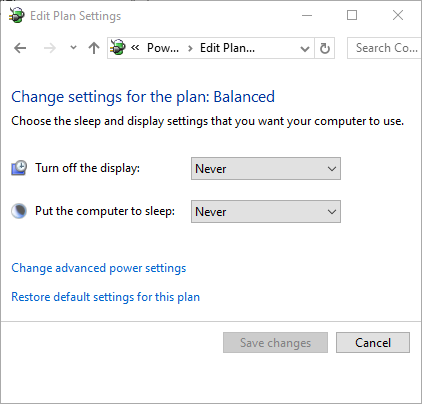
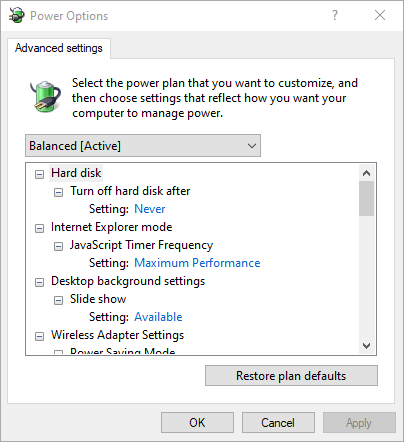
@wavefunktion why not use the Steinberg power plan or just use the windows ‘High performance power plan’ ? you’re editing the ‘Balanced power plan’ and just doing what the Cubase power plan or Windows high performance plan do.
Quick note: When a full windows upgrade is installed like 24H2 , not just an update, then quite often Windows will reset the power options back to ‘Balanced’. So make sure to reset your power options to High Performance after a windows upgrade.
Sorry to jump in here but you all have me wondering now to the cause of some of the random Cubase issues I’ve had. So cubase was my Dads and I used Studio One from a Uni version but wanted to go over to cubase. So we updated the old license last year to 13 for me to use. I had no real major issues with 13 apart from external midi with old samplers. To be fair all other external hardware works fine and I don’t use samplers much.
Anyway I got the upgrade to 14 for my birthday and it worked fine. The CPU/Performance etc on 14 was great on my PC. Now I did have to update to this 24H2. I was getting an odd error saying my windows was out of date which a few people had. So I got that sorted out and 24H2 was also installed. Cubase has not been quite the same since and in the back of my mind I have wondered if it was Windows updates like this 24H2. Because cubase 14 was fine when I upgraded for quite a few months.
Just to be clear my issues are not major. Like crashing every five mins or not starting up etc. But I did notice when I upgraded I was fine. Only as time has gone on and window updates etc have been issued have things happened more.
edit: Also Nvidia drivers can be funny I’ve been told and I have an Nvidia card.
You can also enable windows ultimate power plan. I use that and still make a few modifications. Agreed that after a windows update you need to go through the settings again as it does tend to reset them to standard.
Yes this could be some of the issues and I did have studio driver but I looked after your reply here and it’s game ready driver. I will now swap over to studio again. Thanks for pointing this out.