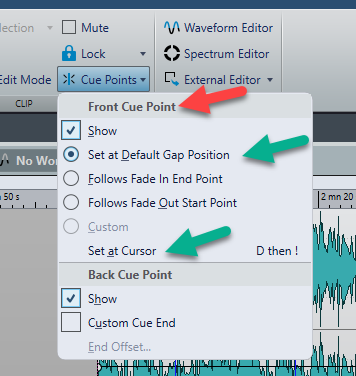
I’m not sure if I’m terming this correctly. There is a cue point that’s created automatically after the end of file at +2s. How/can I set up an auto cue point that is ahead of the start of file, and set it to a specific time?
Also, a random Q - there used to be a key modifier to scroll through the Montage window tracks (I believe Option on mac?), but it seems to have stopped working. Is this set to something else? Couldn’t find this in Shortcuts.
Regarding the Cue Points - how can I set it to have a cue point BEFORE the audio file start? I’m not seeing that as an option. I find this very useful for placing start and end markers outside of the boundaries of files.
Very interesting regarding the Accessibility issue. I’ll look into that because I had this working in the past.
Ok, thank you @PG1 - I saw that. This is not useful then. It would be great to have a Front Gap setting and a Back Gap settings. I’m not necessarily referring to using these the way they are intended, but they are usable in a number of ways.