So I have a vocal track in my project, alongside some backingtracks. This vocal track is meant to contain some 3th party plugins to switch some effects. Basicly, I just insert a vest and add a automation track to that plugin. But whatever I do, non e of the plugins respond to the automation track. I this a bug in the earlier live 3 versions or what am I doing wrong here?
VST Live Manual - Track Types - Automation
Tested in 3.0.33. Everything works.
Which version do you use?
I know i need to upgrade to the latest version but I haven’t seen anything on automation on the releasenotes from entire version 3.0.xx
Anyway, here is a bit of a video:

Same Problem here for weeks! And i tried it with really simple things: Change the Metro-Volume to 0.
I think i tried everything… No Automation working, no Midi (except incoming Midi and Midi-Clock) working. I tried to go back to previous Versions (3.10, 3.20 an 2.XX) and in the past it worked on this versions but now it doesnt. I clean re-installed everything - doesnt work.
If i create a new Projekt - it works. If i import a Song from the non-working Project - it doesnt work, but the standard “new Track” works. If i create a new Song in the non-working Project - it doesnt work.
And like i said: It everything worked in the past, and from one day on it doesnt…
1 Like
I tried creating a new project. And for some reason it works when there is nothing within the project but only 1 audio track and 1 automation track.
It doesn’t work on my existing projects.
i have tried everything, and everything works just fine. As long as you start a new project.
Very frustrating!
So I am getting a little bit further on the MIDI-thing.
I have set up 4 MIDI tracks. I want to control 3 Kemper Players in the end. I can get my Kemper to switch on the second track. So I am programming a few program changes on track 5 and I set up the MIDI-paratmeters on track 6 to correspond with my Kemper. I have to draw a midi track on track on track 6, if i delete it, the Kemper won’t respond.

This is getting annoying. Everytime when I think i’m getting closer, another issue pops up.
After 2 hours i finaly managed to get it working, now my kemper only responds to the MIDI events when i pause the song.
Try having a play with the MIDI chase options in Preferences.
That doesn’t change anything for me.
2 Likes
It was just a thought. I had some playback issues and it fixed mine.
1 Like
Strange thing is, it is working properly when i start a new project. It’s just not working in my current projects I’m working on.
2 Likes
Cannot check your project until you share it.
Here is my video. Yes, I tested on a new project. Then did the same test on my live project - works as expected. So please check this in version 3.0.33
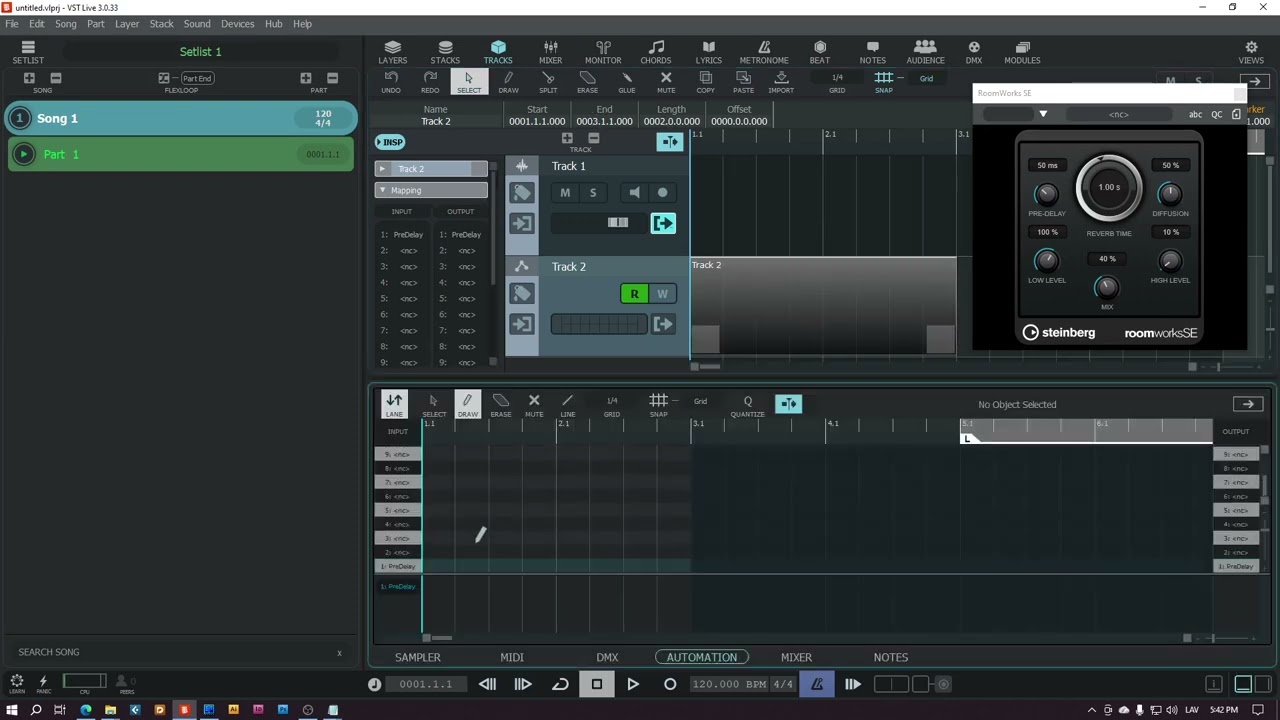
I found something weird @Joey, while trying to create a Test-Project for @ArthurNeeman!
Automation only works, if the Song-Named Channel (at Mixer) is routed to an active Output! It can be a virtual output, but need to be routed - also if its going through a group, the group needs to have an output. Then everything works… What the heck, thats confusing…
1 Like
For what you have group without routing it to the output, song or other group or chain of groups whose far end routed to the output?
Just curious… Maybe I need that setup too 
I dont wanna groups as a dead end  - but i wanted to try, if i can trick this “unusual” mechanic with a dead group instead of a dummy-output, cause i dont use the Song-Named standard channel and still ignored it.
But i think we got the solution, if Joey’s Problems are solved too.
If I remember correctly VSTL will not process anything that is not connected to an output, so your idea kinda makes sense. Maybe they carried this logic through too far.
4 Likes
Amazing! Some took this issue serious and wanted to help.
@Ritschy I should check if the Song-Named Channel (at Mixer) is routed to an active Output.
Also, @ArthurNeeman where can I upload my project?
1 Like
I assume we have a solution for you - if all channels are connected to the output, automation works. This is how VST Live works.
You can ZIP you project and add here in your reply. If not me, then anyone who interested to help, will download and check it.
1 Like
Hi @Ritschy,
we can have a look to your project if you give us access to it. If you don’t want to show it in public, please send me a PM. Use the “Save Archive …” function prepare a zip.
See you,
Michael.
2 Likes