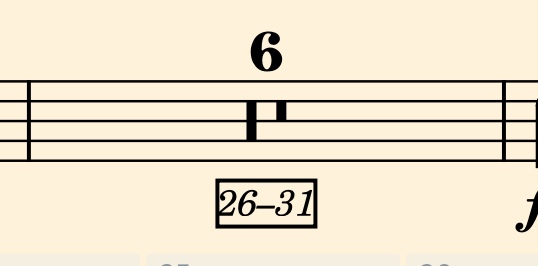
I’m getting stuck, as I’ve checked in Engraving, Notation, and Layout Options and can’t figure it out. I’m guessing I’ve stared at the correct thing and just didn’t understand what I was looking at…
Where are the options for defining the look of bar numbers vs bar number ranges in multi-bar rests? I’d like to get a consistent look (or at the very least, consistent position!) for both of these. I’ve found options pertaining to one or the other, but they’re not the same so I’ve been unable to mirror settings.
Unfortunately, I don’t think that there is an option to solve your problem. I think the issue is that the bar number range is attached to the multi-bar rest, rather than to a barline.
Well, that’s unfortunate. However, at least for me, I’m not precious about the specific formatting, so long as I can make it consistent.
So is this saying that the formatting for the multi-bar rest appearance is largely uneditable? So to make it match, I’d just need to go to bar number appearance, remove the box, and set the spacing tighter? Although, I think I did see a setting somewhere for setting the multi rest spacing, so maybe I can pull that further down while removing the boxes from the regular bar numbers?
DONE - I had to go into layout options and turn off the enclosure setting (otherwise I ended up with two boxes over the regular bar numbers, messy), and then engage the border from Library Paragraph Styles Bar Numbers.
Then in Engraving Options, for multibar rests, I set the distance to 4 spaces so it matched my spacing for the regular bar numbers. It looks great!!