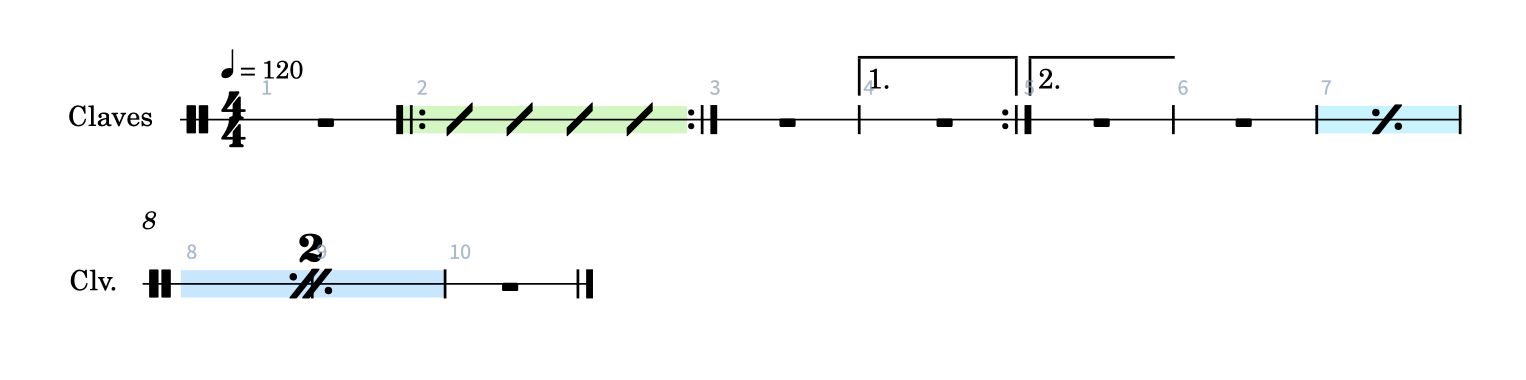
I’ve installed Cubase 15 Pro and have encountered the following bugs in the Score Editor:
It’s not possible to insert bar repeats in single-staff notation.
In five-staff notation, I can insert bar repeats, but Cubase doesn’t play them. If I enter notes instead, they are displayed alongside the bar repeat sign, making it completely unreadable.
Please fix these minor bugs - thanks!
Also, a request: It would be ideal if I could display the lyrics I enter, for example, for Omnivocals, as lyrics in the Score Editor.
I presume you mean single line staves for percussion in your first comment? We’ll investigate further.
Aside from that, as you discovered, repeat markings in the Score will not have any impact on playback in the rest of Cubase. This brings a lot of complexity, and I’m not sure if and how we could do that. It’s certainly not a minor bug, but behaving as designed right now. You could look at hiding the notes (score menu) in the repeated bars.
I think the repeat function is also complex for the user.
Perhaps the arranger track could be used for this.
If I hide all the notes of the displayed repeat section, will the staves of that section also be hidden? That would actually be how I’d like it to work and it would be flexible. (I can’t test this yet, as I haven’t installed Cubase 15.)
By the way, thumbs up for the hide function!
(now a general hide function for all elements/objects)
If you hide notes, the Score Editor will not see them at all, and draw rests instead. The rules for staff visibility apply as set in the Layout Settings / Vertical Spacing / Staff Visiblity section. So yes, staves that are empty will then be hidden automatically.
Exactly, I mean single line staves for percussion. It’s not possible to insert bar repeats while having a single line stave displayed. Funnily enough, it’s very common to have lot of bar repeats playing those instruments (I’m a percussionist). Anyway, thanks for your investigation.
Regarding the rest: I don’t want the playback behavior to change when I display a bar repeat. In fact, hiding the notes is exactly what I need – thanks for the tip! It would be great if the notes (and rests) were automatically hidden when I insert a bar repeat. That would really speed up the workflow.
Can someone tell me where I can find an updated manual for Cubase 15 notation?
I just wanted to insert a forced accidental.
It used to be a question mark symbol in the menu. Now I have to look it up.
Here seems to be nothing:
One more thing about hiding bars due to repeat signs. As far as I can see, it’s only possible to hide notes, but not entire bars along with their contents – or have I missed something?
Automatic hiding an empty line is nice, but it becomes a gamble because you can’t individually adjust the number of bars per line.
I’d be interested in more details. Why?
Wasn’t the old editor also MIDI?
If notes can be hidden, then surely performance markings and bar lines can also be hidden. What does that have to do with MIDI?
I just can speculate…I guess that Cubase and Dorico are two very different programs. The Dorico architecture does not get along with the Cubase workflow nicely. There are many many problems, reported by multiple users, which should have been adressed BEFORE the switch to the new score editor was made. After a year and a full version circle, not much happend to improve basic workflow problems. One of them is the repeats-situation, others are:
limitations with instrument types, mainly with non-classical instruments (guitar, drumset)
no user defineable instrument types
hiding of certain elements, not just notes
no user presets, I´m forced to make “my” settings again and again
commands hidden in layers of menus
very few key commands, so much more clicking
functions which are only available by using key commands, not appearing in menus
lots of missing symbols
fixed presets for many graphical aspects, with no chance to change for certain situations
no control over the number of bars per staff
selecting notes is strangely hard, sometimes impossible
just global settings for distances between staffs
etc.
I´m afraid we have to wait some more years, to come at least close to the functionality of the old score editor. In my 30 years with Cubase this is the first time for me that an essential part of the program got erased, replaced with a new score editor, that has just a fraction of the functionality I was used to use on an almost daily basis.

 Anyway, thanks for your investigation.