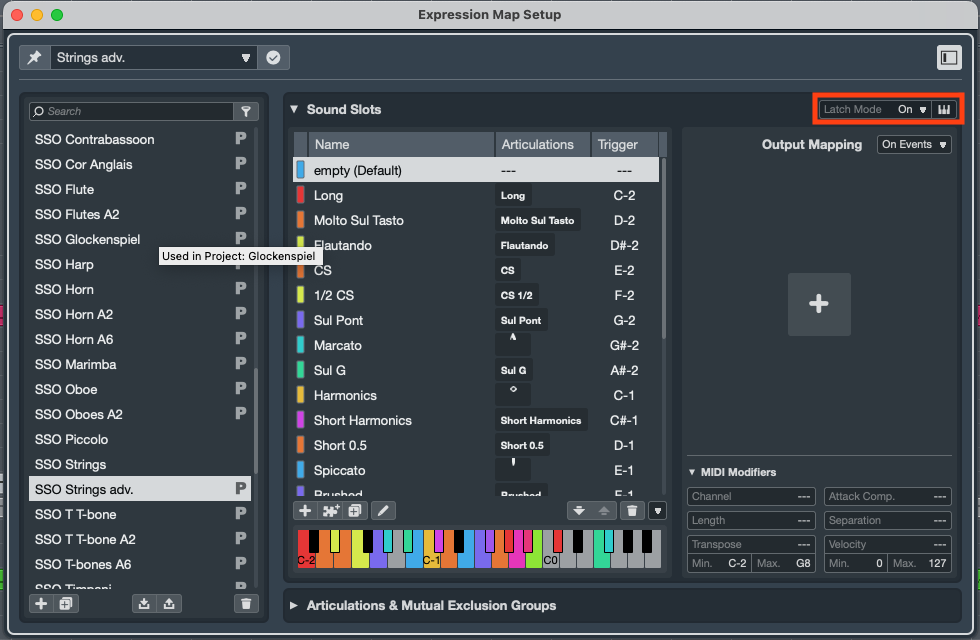
Great to finally see expression maps updated after years of neglect.
There are still improvements to be made:
Editing sound slots is still a bit messy and UX can still be improved even more. Many articulations are not there and many users default to typing text instead of symbols. Experience is still not smooth.
More input controls - the two options Keyswitch and MIDI PC is not enough.
We need a global input control setting. Currently my Cubase 14 DAW template where all maps were set to MIDI PC reverted to keyswitches which will require lots of manual work to adjust back without a global input setting. The global setting could still be overrided by having a local input setting option within a specific map (should be deactivated as a default).
Expression maps should have strong integration with the MIDI Remote Editor page.
I would also like to see touch screen subpage in the MIDI Remote editor, this would be an added input control option for expression maps (while still supporting Keyswitches or MIDI PC) - it just makes sense to have this directly in the DAW. This could be run by iPad Sidecar and similar touch screen display options and give us dynamic sound slot buttons showing the current slots in the selected track. Add touch screen templates from different media composers (+macros) as examples how to set up a touch control page. Overall, this could provide a very smooth touch screen UX option when using expression maps.
Expression map list would do well with columns and tags like vendor and other info and in general more sorting options for a better overview. Preferably offer folders too. Make sure we have features like batch save, batch rename, batch import, batch export. Users having expression maps tend to have large templates so managing and sorting expression maps needs to improve. Anything slowing you down here when making a big DAW template is an issue. Currently my expression map list in my DAW template is very long so this is needed.
Still no factory expression maps from the big sample library vendors on Cubase 15 release date.
Please add your comment on other issues which should preferably be fixed 2025-2026 during the Cubase 15 main life cycle.
Can you be a bit more specific? What exactly are you doing, and where along the way do you feel slowed down by the UI? So far we’ve had feedback about the creation of custom articulations, which needs a mouse click more than previously. It would be interesting to hear your specific concerns.
As for the list of articulations, that has grown significantly in Cubase 15. What exactly are you missing? Maybe it’s more an issue of discoverability?
Again, a more specific request would be interesting. You’ve mentioned midi remote. anything else?
Editing sound slots: Overall editing experience creating sound slots has not improved that much. Nice to see some copy and paste finally though. I need to build more new expression maps before I can provide deeper feedback (I built most of the in Cubase 14 for my current template).
Many libraries have specific naming schemes for their articulations so Cubase cannot suggest well what preset articulation symbols etc would be best, so many users tend to default to text on most sound slots.
Plus it is hard to go back to your Cubase 14 template and reedit everything in Cubase 15 so there should be options how to do it but maybe retain the previous edit text version too.
Input control:
I could see different MIDI CC settings, one that comes to mind right now is providing a MIDI CC setting to assign one fader to move between the sound slots i.e. when using a boutique composer controller with 3-4 faders (MIDI CC) or a 8-10 Fader Controller (in MIDI CC mode). Let me move the one assigned fader between 1-10 sound slots on the selected track. This could open up the expression map control in new ways. Many fader controllers today lack great MIDI PC on faders so MIDI CC as an alternative makes sense here.
Another option is to set up regular key command binding options for sound slots
Some of these input control options is not an either or - they are added on top of the current ones. I think the input control settings needs to be improved here.
Touch control pages within the DAW: Please explore this next with expression map sound slots. The iC Pro app works terrible on large templates and is frustrating to customize (better to use a mouse and edit this within the DAW). Best solution is to have touch control pages in the DAW and saved in your orchestral template. In the simplest form, just let us move a touch control window to your iPad Sidecar.
Reminder (Expression map list): Expand the current expression map list with more features like folder, tags and added columns to sort or filter. Batch rename, batch export/import etc needed too to cleanup and backup your expression maps (so many hours of work). Scrolling my current list is still no fun without certain sorting filter and folders.
Again, a more specific request would be interesting. You’ve mentioned midi remote. anything else?
I think it would be fantastic if the Midi Logical Editor could interact with Expression Maps, and I think this would fit nicely with sberg’s idea.
As example: If there was a context variable for Expression Map Slot, so I could run a Midi Logical Editor Preset that selects all notes where the Expression Map Slot equals “Legato”
And also that I can access the Expressions in the bottom tab of the Midi-Remote-Logical Editor so that I could run a preset that changes the expression of all Legato Notes to the expression named staccato.
This would also allow for a fantastic integration with the Midi Remote. Because Midi Remote can already execute the Midi Logical Editor and the Midi Logical Editor is very powerful already.
I could see some media composers helping Steinberg put together a bunch of different clever touch control pages to solve different problem with great macro examples and new ones with expression map support.
Also, I think controlling expression maps with a Midi-CC fader is already possible. I think I know somebody who has his template setup that way.
If I remember correctly he is using a Track Input Transformer to turn the incoming CC messages from the fader into keyswitch notes or program change messages and that way controls the Expression Map, you might want to try it out.
Yes, you can do it in different ways (via custom solutions). But custom solutions are not great UX, they are just custom and takes time to setup. And Expression maps need more input control options to improve UX. This is one of them.
It would be nice to have a input control settings subpage from the Expression map windows. It is likely not a complex thing for Steinberg to add. When the feature works you just assign one MIDI CC number from your fader controller and you should be able to switch sound slots with your fader.
Please don’t try to second-guess what is or isn’t simple to implement. There’s a lot of dependencies, in terms of code and functionality. Not all of that is obvious to users, but it’s important for us when we decide which feature requests to prioritise.
While it’s interesting to hear your suggested solutions, I’d find it far more interesting to hear which problems you are facing in your very personal workflow. We’re happy to consider the best approach ourselves.
Sorry for presuming complexities. I still hope we see more input control settings on expression maps.
Input settings and Fader controlling sound slots (use case description)
Current issue with inputs are that I dont use keyswitches (conflicts with my software instruments) to control my expression maps which means the only current working input options is MIDI PC (which for some reason was set back to keyswitches in Cubase 15 without asking hence me also asking for a global input setting as default so I can switch back to MIDI PC).
MIDI PC cannot be assigned to one fader normally (if the hardware do not have special support) which means MIDI CC is a better alternative option, hence my suggested the solution to have sound slot switching on a fader (assigned by MIDI CC).
Fader makes sense, many who use Cubase to compose music already use faders controllers to control sample intruments with Expression (MIDI CC 11), Modulation (MIDI CC 1), Vibrato (MIDI CC X), Articulation/Sound Slots (MIDI CC Y - possible expression map settings)
Sidenote: I can however finally also click (select) with a mouse directly one sound slot (which did not working in Cubase 14) so technically there is another input option to switch sound slots. But that is not a proper hardware control option.
There are sample instruments built with fader GUI to switch articulations so it is not unheard of.
I would probably not record switching with the fader but use it for the convenience by being a parameter on the main composer fader controller. You switch articulation then start record again.
If you need physical switching while recording, maybe use touch screen control panel or another MIDI button controller, or just make the edit with a mouse after.
Yes you’re right, we should leave it to you how to approach improvements.
The Attack Compensation feature of the the newest version is a big step forward, but
I would also wish for cubase expression maps to have attack delay compensation that works for legato patches. (and I think there are a lot of people who also wish for that).
It’s probably a big ask, because the script is not at all intuitive to use, but if cubase expression maps had something similar it would be truly perfect. (And that could make the dream of using orchestral sample libraries and still having everything on grid possible)
The reason why I’m asking for something that another script can do already, is that the Cubase implementation can actually work with negative delay. If I’m using the Kontakt script it will still apply positive delay to my live playing (when I record on the track), and it makes it pretty much impossible to hit record and play the notes in live, because of how much delay is applied to what I’m playing.
Despite how much I’m talking about what I would like Expression Maps to be, I’m very happy about the updates in Cubase 15. Awesome work, and a sincere thank you from me to you and the rest of the Cubase team . Keep up the good work!
Agree on variable attack compensation needed in some fashion.
Hope we see this added 2025-2026. Expression maps are complex and time consuming, you do not want small improvements, trickled out every other years which would require users to make manual updates to each map again. Better to focus now on the cheer majority of expression map improvements needed, and hopefully it will cover the need of most users for a while.
Biggest pain point with Expression Maps for me is that the maps are stored with the project. Makes sense, until a new project is created that is not based on a template that already has the maps stored. Especially with large scoring template, this becomes a pain to set up again.
A global Expression Map repository similar to one implemented in another DAW not mentioned here would be a good starting point. We can then decide which maps to apply to a track, which then is stored with the project.
Even better, allow folks like Babylonwaves to package Expression Maps in a single file that can be added to the global map repository. This would allow us to evolve map setups with new versions when fixes are applied or new instrument setups are added.
This is actually one of the key elements that made me start looking at other DAWs that do this much more elegantly.
I would recommend you to use Track Archives for that. Steinberg fixed it, so that Expression Maps properly get imported.
Make a default Track setup for a Sample Library that you use, including expression maps, EQ (to filter out the noise floor) and your preferred mix out of the available mic positions and then export the selected track.
And the next time you start in a new project and you want to use that sample library, just import the Track from your Track Archive. Importing a Track is very fast and easy and will save you a lot of time in the long run if you use it.
I’m not sure if this was possible in earlier Cubase versions so I thought I would mention it, it is possible in Cubase 15 already to import many maps at once, you can do a multi-select and drag and drop as many as you want all in one go.
So you could have a folder that has 300 expression maps in it, select all, and drag and drop them all in seconds.
EDIT: Just checked, it seems that wasn’t possible in Cubase 14 at least. So it is new to 15…
Keep in mind too there can be downsides to referencing a map folder on disk automatically outside of the projects. The map may have changed on disk to a version that no longer plays back the same as the old version of the map. So you then have to make sure that you are always saving the current map being used with the project just in case so it will always continue to use the old map even if the map has changed since. And then you need to provide some kind of button to let the user update the map to the newer one on disk from the one being used in the project. So then you need some kind of versioning mechanism for maps so it can tell if the one on disk is newer than the one in the project. There are a lot of things that have to be considered.
Nice to hear batch import works (if I understood correctly) haven’t tried it yet, however there are more improvements needed to the expression map list after an import (as mentioned in the first post of this thread):
Please add more ideas how to improve the expression map list (the list stored in the project and seen on the Expression Map Setup page, left column).

 . Keep up the good work!