Very happy to hear. Appreciated, Stefan. 
1 Like
This would be amazing. Also the dream for me would be to access all properties of the expression map on the currently selected track from within a Midi Remote script.
So you could for example get the names and other properties of all the articulations in the expression map, and the current articulation, as the articulation changes as the music progresses.
This would enable custom made Midi controllers with displays or even touch screens with the articulations all clearly labelled, and the labels would update when you select a new track or change the articulation.
Agree dynamic expression map buttons which you can set up within MIDI Remote Editor just makes sense. I have also mentioned touch displays too a few times before, it feels like the obvious next step after improving expression maps.
MIDI Remote Editor should have a subpage with touch screen pages which can in it’s simplest form be run with iPad Sidecar (that way it follows you with your DAW template + quicker to design the pages with a mouse than an app on your iPad).
I would also love to see some big media composers provide a bunch of suggested Macro (Logical Editor) buttons with some touch control display templates in MIDI Remote Editor. The Logical editor is the other part of the equation of a native touch control panel within Cubase, you need macros. Could this lead to new improvements in the Logical Editor too perhaps?
Please vote on this thread if you want touch control with expression maps. Any proof of life on this idea from the Cubase dev team would be amazing.
Yes I would love this.
I imagine a floating articulation window which displays all available articulations in a list or grid as clickable buttons, which update as you change track. This could be displayed on a secondary touch display, which would be incredibly convenient.
2 Likes
(yes, too all: dynamic articulation buttons) + lots of other custom buttons (Macros via Logical Editor, Velocity control, Modulation and Expression control, Switch different views, General DAW control etc). You would likely have multiple touch control pages to access different controls.
How about an option to connect to a reverb send, and give a value per articulation
So you can turn down the reverb on a staccato for example.
It is an interesting idea.
Currently best practice is to divide tracks and expression maps in short and long articulations and send them to different intrument mix groups then add a reverb send to each group with different settings to accomodate whether it is long or short articulation.
If you want short and long articulation on one single track with one expression map, the expression maps probably needs to be able to switch mix groups (long or short) for that section. This is probably a bit easier than reverbs shifting settings (which might be difficult to implement with third party plugins in an ok way).
I have however no idea what technical issue and audio artifacts mix group switching or reverb setting switch might create. It might not be that easy to solve.
Hey everybody,
awesome to see some action on Expression Maps, which have not been updated for a long time.
Right now i have two remarks.
-
it would be great to have an “UNDO” button in the Exp Map Setup. Just in case i misclick or enter something wrong…
-
Custom Articulations are not stored somehow, why is that?
I just created a little map and within i created several custom articulations, which are now shown in the “Custom Articulations” category:

When i create a new map - directly below it in the same project - the Custom folder is not even shown, the articulations i just created are not available anymore (but still are in the map above).
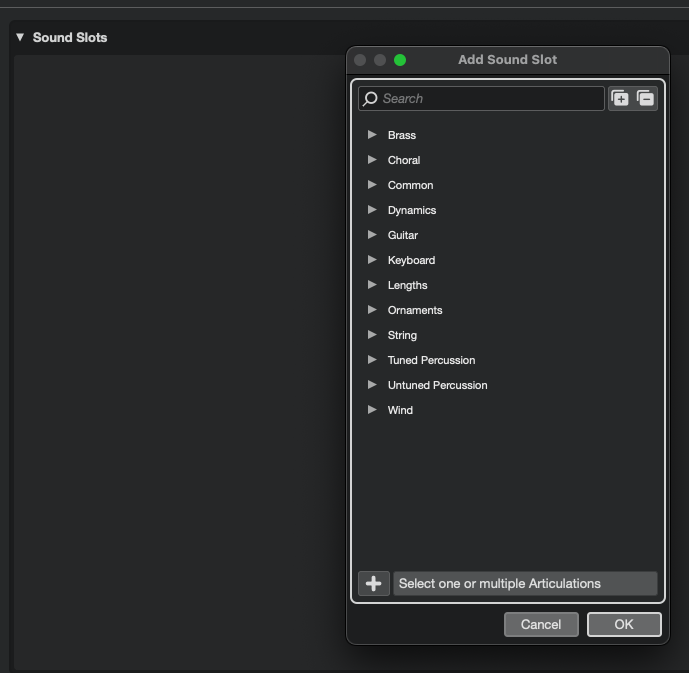
It would be really helpful if my custom articulations would be ready for being re-applied. Everywhere (so within the same project, but also in a new Cubase project).
Thanks for taking a look maybe and all the best.
1 Like
I’m afraid voting won’t have much impact on the prioritization of this feature request. We’ve noted the request.
2 Likes
just realised that CMD-z actually triggers UNDO.
Awesome (and sorry) 
At least it is finally the year of the Expression map.
We are doing all we can to get some long awaited improvements.
They are still looking at UX improvements for the Expression Map Setup page so any feedback is probably appreciated at the moment.
There are some kind of common playing techniques missing, i´m working on new maps for an hour now and have found those:
- Sul Ponticello Tremolo
- Sordino Tremolo
- Sul Tasto (and/or Flautando) Tremolo
- Sordino everything else (Staccato, Détache, etc.)
[i know that in a score “Con Sordino” would start a passage that has everything played with mute on, but that´s not how most sample libraries work] - Molto Flautando (for Spitfire´s “Super Flautando”)
- Molto many other things
If we could create and save our own custom articulations you would not have to care too much about it, as there are soo many libraries having sampled that one thing or having many different options of almost the same articulation (think 8dio Spiccato, which came in 5 iterations in Adagio).
2 Likes
Steinberg should probably do both another inventory of common library articulations and improve custom articulation UX further. There are lots of variants.
I disagree about these, these should not be added as monolithic techniques. In these cases the idea is that you should be making a sound slot with two techniques in it. In other words, create the sound slot and set both “sul ponticello” and “tremolo” as the articulations, or both “con sord” and “tremolo” as the articulations, etc.. That is the way it is designed to work. You aren’t limited to just a single articulation in a sound slot - you can select as many articulations in a single sound slot as you need.
The problem with monolithic techniques is there are way too many different combinations you could have. You could have a library that has a staccato note played as a harmonic while sul tasto and with a mute all at the same time. Making all of these possibilities individual monolithic techniques in a giant list would be a bit crazy - you would need thousands of things in the list at least. That’s the reason you have the ability to make compound slots, so that these various combinations/permutations can be represented without the list becoming a crazy length.
1 Like
i see.
But this forces me to combine stuff all the time instead of simply looking for “Sul Pont Stacc”.
Which of those i need (it always ends) would be my problem would Cubase remember my custom articulations.
I don´t think it would be wise to include any thing every library ever recorded as presets, that would be crazy and stupid. Even people owning those often never use the rare stuff…
For notation i totally dig the possible selections!
It’s not that difficult, I’m not sure you understand.
- Add a new sound slot
- In the search box type:
sul pont | stacc - You will see both sul pont and staccato, select both by first clicking on staccato and then holding down CTRL on windows or probably it is CMD on Mac while clicking on sul pont
- Click OK to create the sound slot
2 Likes
I suspect not every user would know to hold CTRL to combine, this is a bit of an UX issue. Maybe the imlementation can be improved on the Expression Map Setup page?
Using Ctrl as a modifier key to select multiple elements has been a part of UI design on both platforms for about 30 years.
Yes, CTRL is obvious in like a spreadsheet software. This is still a narrow speciality feature in a DAW, not in the general DAW workspace, which means Steinberg may have to guide the user. Maybe test more with users who builds an expression map for the first time and those returning to update their expression maps after the Cubase 15 release.