This isn’t what I’m afraid of. With big complicated maps a certain set of articulations may be nonsensical or may change the slot that ends up getting selected. If you were to choose a slot and it applied those articulations in that slot to different maps that might not even have that slot, you could accidentally break your playback in other tracks, or create a huge mess. People might do it accidentally. They might choose all parts because they want that, but then forget they are in that mode and choose a slot that doesn’t even exist in the other instruments and change their articulations to random wrong things.
Articulations might be in different groups in one map and the same group in another, and if you choose a slot that has multiple of those articulations loaded and it applies all of them in the map where they are in the same group, you get the otherwise impossible state of having two articulations in the same group added and then it might be unpredictable which one actually gets used.
Interesting. I haven’t used the new system as deeply as you so I understand there may be logical complications that I’m not aware of. It seems to me that any kind of “do to one” vs “do to all” edit should follow the part editing mode, and it’s on the user to be aware of what that is set to. But I totally get that maps can become quite complex.
My gripe, really, is that as far as I’m aware there is no way to change attributes for notes that are on different tracks and open in the key editor at the same time, when part editing mode is set to All Parts. I would like to, as the editing mode suggests, be able to edit all parts at once, and for tracks that share identical maps I don’t see it theoretically creating any problems. For more advanced use cases I would obviously want a system that ensures that nothing gets borked.
If there was a way to select a slot to get the articulations, that function should be destructive in order to work properly (i.e. it should completely remove all entries from the lanes in those points and replace them with the ones specified by the slot) - except in the case of where the entry was already there, perhaps a direction from before (and then no need to repeat it).
In this case imagine you have the exact feature you are asking for. Now imagine when a user has made a selection to go into the All Parts mode, they also accidentally selected another track they didn’t want to include, maybe doubling the same notes so it wasn’t noticeable. Presumably you will just see a list of slots from one of the maps because I don’t know how you’d see all the slots in all the maps simultaneously. Selecting the slot from that first displayed map (whatever it is) should also completely obliterate all articulations and directions in lane entries in other maps for that same passage and replace them with the ones from the slot they’ve selected. If there are no matches, it should just delete everything. I can see people accidentally making big deletes this way. They might not notice right away, and work on other things for more hours and come back and find that is gone.
Yeah, I hear you. As I edited my post above to say, I think it’s on the user to be aware of what the part editing mode is set to, but I can understand concerns about accidental edits/deletions. With great power comes great responsibility!
The inability to draw/edit CCs on multiple tracks at once (without using Logical Editing) is another big Cubase gripe of mine, and raises similar design questions about how it could be implemented. I’ve always imagined it somehow follow the part editing mode I’ve as mentioned above. Hopefully the bright minds at Steinberg will come up with some good ideas. As you can see, your users are very passionate about your software!
Don’t get your hopes up. Perhaps we will get some bug fixes, but any substantial change or new feature, we can consider ourself lucky if we get it in Cubase 16
We know there is a roadmap to improve Expression Map Setup list (listing all current maps) with more features + Legato dynamic delay compensation settings has been confirmed, hopefully this year.
Would love to see expression maps versioning management too to easily revert to older versions of the same expression map.
Would like to see Global input setting too in Expression maps, Cubase 15 reverted all my maps from MIDI PC to Keys. Manually changing them all is a pain.
And of course I still want Fader MIDI CC setting in the Expression Map Setup window (under Input settings as global addon option) to control one Fader to change Sound slot on the current selected track.
It is too distruptive to release small improvements with the expression maps setup system each year due to complexities and and all the hours it takes to manage and update expression maps so it is better they fix as much as possible 2025-2026 when users are updating their expression maps.
I think the legato delay stuff takes some planning and thinking and shouldn’t be rushed if they’re going to do it right and well. In the meantime there are some quite reasonable workarounds. I’m hoping we might see the Cubase maps brought up to parity with the Dorico maps (they are getting close now, but still some gaps), as it might end up being necessary for the strongest integration between the two programs.
There’s a large contingent of Dorico users who want to be able to easily bring their projects over to Cubase for fine tuning, and that process is a little too involved and disconnected at the moment, just because of things missing from the Cubase maps that are in the Dorico maps.
Now fixed in latest update. I tried maps w track delays and seemed to work incredibly well
I set up my CSS maps with track offset of 50ms, then have slots of leg fast, leg med, leg slow each with vel constraints and delays to match. I created a leg 1st articulation attribute which switches legato on with no delay. Each first note in a legato phrase is given the attribute of leg 1st and the legato f,m or s are then marked in midway through the first note of each phrase.
We have resolved an issue that could cause inconsistencies when applying Attack Compensation in Expression Map articulations. If you entered Attack Compensation values in Cubase 15.0.5, please take a moment to review them again after the update.
After updating I can still only see regular attack compensation and no extra settings for legato after the update. This doesn’t sound like they have released a proper dynamic legato attack compensation setting to me, or are we talking about different fixes?
Expression maps are so time consuming to setup so you do not want to have to redo settings all the time, I hope Steinberg is still focused on addressing more Expression maps improvements in Q4 2025 and Q1 2026. Hopefully we will see more improvements soon.
I can also see that 15.0.6 update have not added any global input setting for expression maps. Cubase 15 reverted all my input settings on expression maps to keys while I had MIDI PC on Cubase 14. This is extremely time consuming to change back on each expression map on its own, some kind of global input setting is still needed with clever override rules.
We still need a global input setting for expression maps, Steinberg (and a single MIDI CC fader setting to switch sound slots as an optional addon setting would be very appreciated too for users with composer fader controllers).
Sidenote: Hopefully we will see improved expression map list management soon too (left column) in Expression Map Setup window (it is at least considered in some form). Versioning, folders and even tags would help when updating your maps and keep check on your progress what sections you have revised.
In Cubase 14 and before, in the Articulations lane of the key editor, the Articulations were always in 1 color (blue for me, I don’t know if it’s the default and the same for everyone…).
In Cubase 15, their color change according to your Event colors settings. Could you add an option to have instead the color we defined in the map ? (the one displayed in the Sound slots lane)
It would greatly help to discriminate visually the articulations, for example if you choose all your legatos in a color, all your shorts in an other color or all your “decorative” (trills, tremolo…) in a third one, or even specific color for some articulation, you don’t have to search anymore in a big list of texts (personnaly I don’t use Symbols, as some libraries have multiple versions of one articulation). Color is read much faster than text. Besides, I really don’t understand how it could be useful to have our articulations in the color of the block/instrument, or of the velocity, or of any of the other color options.
Thanks Steinberg to consider this.
EDIT : sorry, I know there is a “Sound slot” option for Event colors. I mean choose the color of the articulations in the articulations lane independantly of the other events. I want to have my notes in the color of the block/instrument (useful and essential when you edit multiple instruments at once) AND the articulations with their color defined in the map
Agree. Many users have a system where you assign all long articulations around a certain color group with color variations within that group, and the same for short and others. Makes sense to have global settings for colors in the same way we need a global input setting to switch sound slots.
Critical we still have some kind of override system though for every global setting where you can adjust a color if you want to change it in a specific expression map.
I do most of my work from a non-touchscreen monitor setup, but when I “play” my digital piano, I’m usually running software or taking lessons on its own all-in-one touch-screen PC. I could definitely see the value in this.
Happy to hear, and as a reminder composers all the way up to Hans Zimmer have touch screen control macros with the Cubase logical editor today so it just makes sense to see a DAW integrated solution with the Cubase MIDI Remote Editor (+Expressions maps and Logical Editor) on a subpage with touch control pages intended to use with iPad Sidecar support (display expand) as the most basic version of this.
I’m not sure I understand what you are asking for, but I think you might need to have a way to select colors for articulations and assign colors to individual articulations. I don’t see how using the slot color would work for this since it is not a 1:1 relationship.
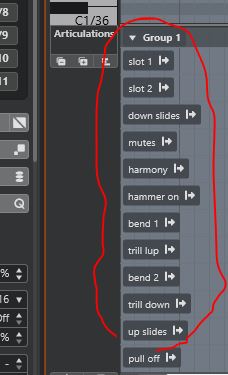
You can hit the little “+” button under “articulations” to expand all groups. Personally though I prefer working with groups in their collapsed state rather than expanded since it takes up less real-estate on the screen.
 I always enjoy your insights on the blue forum.