The Expression Maps in Cubase 15 fail to play back the correct articulations after a ‘Trigger’ (Remote Key) has been sent from my control surface, namely, Metagrid Pro.
Windows 11, Cubase 15.0.21
The Expression Maps in Cubase 15 fail to play back the correct articulations after a ‘Trigger’ (Remote Key) has been sent from my control surface, namely, Metagrid Pro.
Windows 11, Cubase 15.0.21
Hi,
Do you have any concrete scenario, please?
And what exactly happens, if it fails? Does it mean, the previous expression continues? Or is it reset?
How are you entering the articulations to begin with - what method? Are you by any chance using something like Metagrid Pro where you are programming buttons to trigger them?
Thanks for the reply.
Below are the repro steps. The issue seems to occur when ‘Triggers’, previously called ‘Remote Keys’ are sent from a control surface e.g. Metagrid Pro.
To reproduce:
Draw 3 MIDI events in the Key Editor
Assign 3 different articulations with an Expression Map that uses ‘Attribute’
Send a ‘Trigger’ (Remote Key) message via a control surface like Metagrid. e.g. C-2
Play back the MIDI part.
Result:
Articulation assignments for events 2 and 3 are ignored. Only the first event plays back with the correct articulation. Almost as if it is ‘stuck’ on that first articulation.
The only way to get the part to play back correctly is to unassign/reassign the Expression Map. But this only works until another ‘Trigger’ is sent from my control surface.
I tested out what would happen if I sent a Trigger from my Roland digital piano. It did not adversely affect the playback.
This happens when you send only the note-on’s from the Metagrid Pro. You have to send a note-on followed by a delay then a note-off. If you search you can find other threads about this.
Having a note-on by itself for the trigger with no note-off is wrong. It used to work this wrong way. It no longer does. My understanding is that this is a deliberate change and not a bug.
Hmmm… note-on by itself works perfectly with the Generic Remote, the MIDI Remote and the old Expression Maps. With no need to program a delayed note-off.
The MIDI Remote works on note number only so there must be a note-off happening under the hood. This sudden change only further complicates the setup process with no real benefit to the user.
I suspect the intent might have been that if the user wants to hear a phrase they previously programmed, but with a different articulation than the one that they wrote it with, they can keep the key depressed during playback to purposely force Cubase to use that articulation and ignore the articulations that were recorded for as long as they hold down the key.
There’s also the new design that now the expression map slots are on/off toggles, you trigger it once the slot turns on, you trigger it again the slot turns off. The note-off might help to distinguish between individual toggle actions, so that it won’t change the slot state unless both are received, preventing situations where two note-ons at the same time could turn the slot on and instantaneously back off again.
Is there anything else I should know about the new EM’s i.e. any bugs? Is the pre-delay working as expected? I do recall there being an issue.
There was a bug with the predelay but it was all fixed. It should be good now. I don’t think there are any serious issues you need to worry about, they should work pretty well once you make that change to the Metagrid configuration.
There is also this issue..
I set up the note-off messages and things still aren’t working as well as they do in C14. Basically, I load a project and press play and articulations are not playing back correctly. This is without touching my control surface.
If I click on an event in the Key Editor, the acoustic feedback sounds the correct articulation. But way too often I press play and it get’s stuck on a particular articulation i.e. ignores my assignments. No such issues occur in C14.
Example: I change one event to a Trill and now everything is playing back as a Trill. And this is with delayed note-off messages.
I’ll stick with C14 for now until these things get ironed out.
Do you have a simple project where you can demonstrate this issue? I can’t get it to stick on mine.
Are you showing or hiding the sound slots lane, and does the sound slots lane show the correct technique but you just aren’t hearing it? Or does the sound slots lane match what you hear?
I don’t display the sound slots lane usually, I assume you mean the ‘Articulations’ Controller Lane at the bottom of the Key Editor. But it just misbehaved so I displayed the Articulations lane and sure enough everything was in order. But If I clicked on an e.g. Detache Short event with my mouse, now the other events would ignore their assignments and play Detache short and visa versa. I did have ‘Latch’ activated in the EM so I will try it without it. But I am still baffled by this behaviour.
One thing that is consistent, is if I unassign the EM and reassign it, everything triggers perfectly. So it’s like my note-off messages are not working properly.
I’m still not completely convinced that this whole note-off messages being compulsory is a necessary.
Yeah the sound slots lane is a new lane that is a sub-component of Articulations controller lane in Cubase 15 that shows you what slot Cubase intends to play at a certain point, it can be turned on or off within the Articulations controller lane. You can see it in my screenshot here:
It is useful for troubleshooting because it tells you what Cubase intends to trigger at a certain point, which helps you distinguish between issues triggering or logic problems.
Regarding the note-off, you can see it in this previous two threads:
I’m going to mess around with the note-off timings. I have a hunch that the way I have done it is not working. Basically, I set up Bome MIDI Translator to send 88 different note-off messages to Cubase whenever I tapped a MGP button. I just checked the MIDI Remote and it was struggling to register more that 4 MIDI notes at a time. But incrementing the timing per note-off seems to fix it. At least in the MIDI Remote. Hopefully it fixes the EM too.
Nope! didn’t work. This isn’t making any sense at all. In many cases I haven’t even touched the articulation buttons on my control surface and hitting play results in very unpredictable behaviour. Basically articulation assignments are completely ignored, and this is after unassigning/reassigning the EM and adding delayed note-off messages.
What makes even less sense, is that I can get it to play back correctly if I click on the MIDI events in the Key Editor. Somehow this temporarily fixes it. But then without even touching my control surface, I will notice articulation assignments being ignored again, i.e it’s stuck.
I’ve been working with EM’s for 10 years and this note-off thing has just added an enormous amount of unnecessary complication. C14 works perfectly. Steinberg have definitely broken something. I’m out of patience. C14 it is. At least until more people kick up a fuss about this new note-off crap.
As suggested, best to upload a project that shows your issue, and
Did you look at this?
Here’s a video of the EM stuck on the default sound slot. This is a brand new project with one instance of the Sine player and one EM loaded.
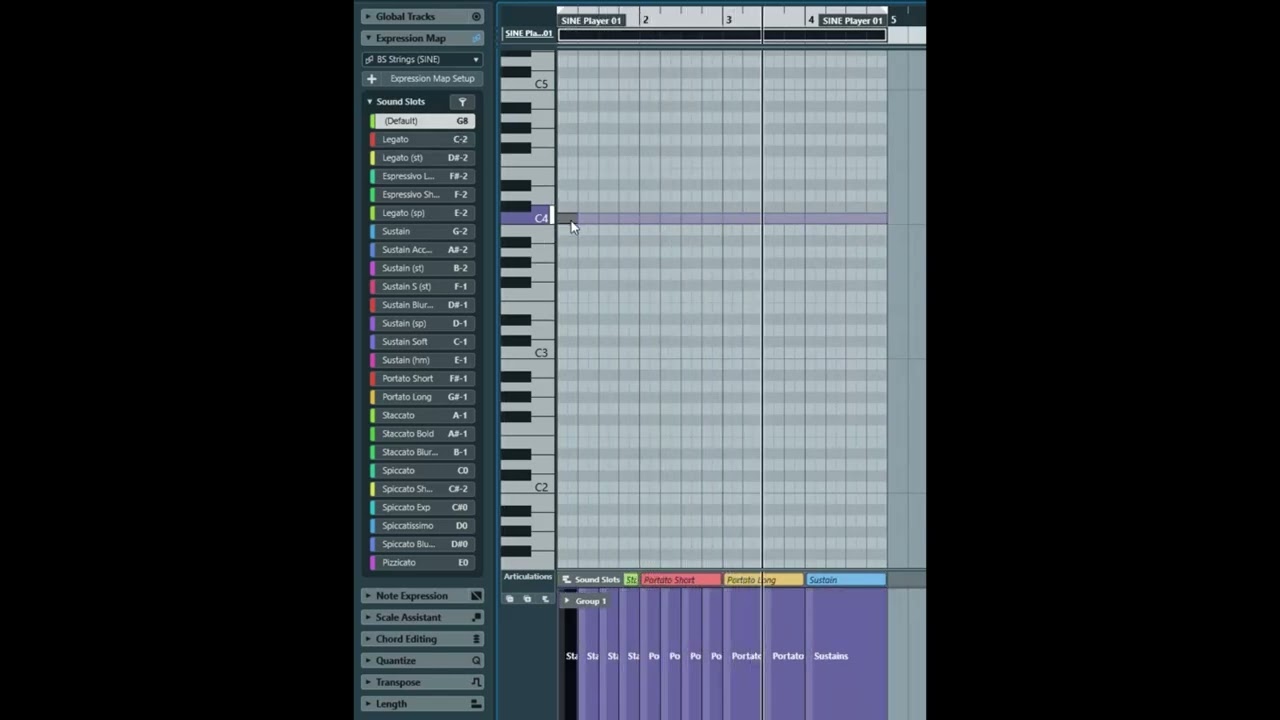
And here’s the project file.
Cubase EM Issue.cpr (831.8 KB)
The whole problem with this note-off thing is that control surfaces like Metagrid Pro are designed to send note-on messages in order to trigger macros, transport and all manner of DAW functions. So now we need to make sure that we don’t use channel 1? And if we do we need to create a pause followed by a note-off.
And these changes to the EM system are so we can hold down a key and listen to our MIDI part play back with an alternative articulation, like that’s a thing.
So I’ve been playing through your file for a while now clicking on things during continuous loop playback of that section and I can’t get it to misbehave, it keeps following the articulations.
There are two exceptions of course where I can interrupt this, but neither seems to be a misbehaviour. If I want to hear what your phrase sounds like Pizzicato, I can hold down E0 and keep holding it down and then it forces pizzicato and doesn’t do any changes until I release the key and then I hear what I should (it starts following the articulations once again).
The second exception is if I click on a sound slot in the sound slots list during playback (which toggles the sound slot on), the sound slot is locked until it is manually toggled off with a second click. So for instance if I manually click on “Pizzicato” during the playback process, it will stay on pizzicato and ignore the lanes until I click on “Pizzicato” a second time to toggle it off and then it goes back to following the slots. But this is just the graphical mouse equivalent of the ability to hold down the key E0 to force pizzicato. This also works with the “default” sound slot if I click on it with the mouse during playback, it will force that until I click on it a second time to toggle it off and allow it to follow the entered ones instead.
Is this what you are experiencing possibly? Like the only way I can get “Default” to stick like in your video is by clicking on it while it is playing back to lock it, but then clicking on it a second time releases the lock and allows it to follow along again with the articulations as written. Otherwise it just keeps sailing along consistently triggering what it should.
Cheers for the help. Just before I start the enormous task of adding individual note-off messages to my 5 MGP pro templates each with 150+ grids of 50-60 articulations LOL, I would just like to get your opinion on what is taking place in this video.
You can see that Spiccato is playing, and then I manually click on Pizzicato. But it doesn’t override the Spiccato - you can see that in the Sine player Pizzicato is not active. Why is this do you think?
I now understand what this new system was designed for, people have requested that we be able to click in the Left Zone to select articulations. But it has bugs. Somehow I can get normal playback without sending note-off messages. This shouldn’t be the case. And even when I do send note-off messages, sometimes it doesn’t play back properly. So it’s buggy. And as you can see in the video, clicking on the Pizzicato should overide the assigned articulation but it doesn’t.
