Here’s a guide to what these icons at the top right corner of your MIDI and audio parts and events mean.

What: Group
Where: can be found on MIDI Parts, Audio Parts, Audio Events, and Pattern Events
Why: This part/event has been grouped together with some other parts/events
https://www.steinberg.help/r/cubase-pro/14.0/en/cubase_nuendo/topics/parts_events/parts_and_events_grouped_events_c.html
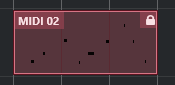
What: Locked
Where: can be found on MIDI Parts, Audio Parts, Audio Events, and Pattern Events
Why: This part/event has been locked from certain changes (position, length, others).
https://www.steinberg.help/r/cubase-pro/14.0/en/cubase_nuendo/topics/parts_events/parts_and_events_lock_event_attributes_r.html
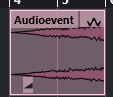
What: Time-stretch
Where: can be found on Audio Events
Why: Any sort of real time time stretching happens on this event. This can be audio warping, VariAudio (only time changes, not pitch changes) or simply a time stretch (or compression) of the event itself.
https://www.steinberg.help/r/cubase-pro/14.0/en/cubase_nuendo/topics/parts_events/parts_and_events_resizing_events_with_the_object_selection_tool_sizing_applies_time_stretch_t.html
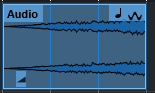
What: Musical Mode (includes time stretch)
Where: can be found on Audio Events
Why: Event is set to “Musical Mode”; that means the speed of the audio event will follow the tempo setting of the project; since this is achieved by means of time stretching the time stretch icon is also displayed
https://www.steinberg.help/r/cubase-pro/14.0/en/cubase_nuendo/topics/sample_editor_tempo_matching_audio/sample_editor_tempo_matching_audio_musical_mode_c.html
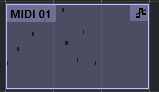
What: Do not follow Global Transpose
Where: can be found on MIDI Parts and Audio Events
Why: You can define a project root key. This allows for quick transposing of the project. A part with this icon will not follow the project transpose (aka Global Transpose).
https://www.steinberg.help/r/cubase-pro/14.0/en/cubase_nuendo/topics/transpose_functions/transpose_functions_project_root_key_transposing_with_t.html
https://www.steinberg.help/r/cubase-pro/14.0/en/cubase_nuendo/topics/transpose_functions/transpose_functions_global_transpose_exclude_individual_t.html

What: Direct Offline Process has been applied
Where: can be found on Audio Events
Why: there is a Direct Offline Process applied to this event
https://www.steinberg.help/r/cubase-pro/14.0/en/cubase_nuendo/topics/direct_offline_processing/direct_offline_processing_c.html

What: Shared
Where: can be found on MIDI Parts and Audio Parts
Why: any edit to a shared part will also take place on all the other parts that “are shared” with this one
https://www.steinberg.help/r/cubase-pro/14.0/en/cubase_nuendo/topics/parts_events/parts_and_events_creating_shared_copies_c.html

