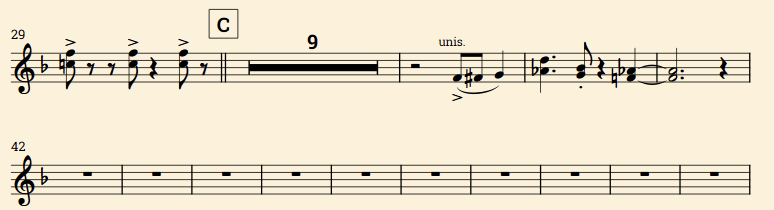
Seems I’m not the only one that’s had issues with multi-bar rest consolidation, but I couldn’t find anything very recent on the subject. I have attached a minimal example of the issue I encounter.
multibarrests.dorico (3.9 MB)
Here, it’s just 21 empty bars. Both trumpet parts show consolidated rests, but the combined/condensed view shows 21 individual empty bars.
Write mode, full score. Showing signposts.
Trumpet 1 part:
Trumpet 2 part:
Combined trumpet part:
I cannot find a way to get the combined part to show multi-bar rests, and it’s preventing me from completing my current project. I can’t really present parts to players with a long series of rests like this.
Help appreciated in any way to get around this so I can finish the project.
Hi!
I’m not sure it’s possible to use multibar rests in a condensed part: usually, condensing is for full scores, and full scores do not use multibar rests. There might be something “not allowed” there.
Strange enough, I can use condensing and multibar rests in your project, in the Full score, and condensing won’t work, but multibar consolidation does… Oh, condensing works once I create a condensing group.
1 Like
Layout Options > Vertical Spacing > Staff Visibility > Hide Empty Staves > Never
2 Likes
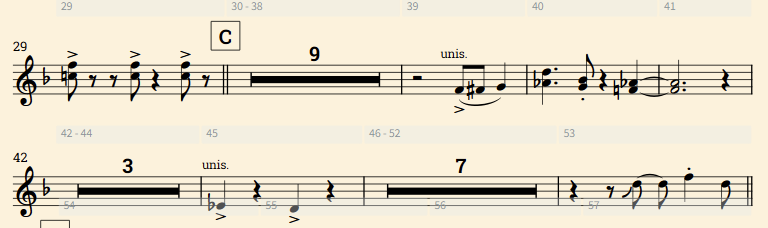
Unfortunately that option doesn’t work for me, because these parts use slash regions, which don’t condense (so I am forced to clear out & hide the 2nd tpt part during slash regions, otherwise I see 2 identical slash region staves). But the behavior in my OP is very inconsistent. In my actual project I see the following:
As you can see, sometimes the multi-bar regions work, sometimes not. And if I add some material in measure 45, it starts working…
Something feels broken here. I really wish I could just use the “Hide Empty Staves” workaround but I am forced to use it as a workaround to a different issue. (and even, why does that option affect this behavior anyway?)
Update after fiddling: Dorico’s fitting algo seems to just treat condensed parts differently than normal parts. If I force the measures into a small space, it will create multi-bar rests. But by default Dorico will fit the layout by using the spacing of the individual empty measures. Non-condensed parts don’t suffer from this because Dorico’s fitting algo seems to prioritize multi-bar rests in that case. Maybe there’s a hidden setting to change that behavior I just haven’t found it yet.
So a kind of workaround is to manually force these regions into a small enough area that Dorico will create multi-bar rests. I still don’t see any workaround for long multi-bar rests (like in the above example a whole line just showing |=== 11 ===| in 1 consolidated measure.
Any alternatives?