The UI for Cubase 15 extends the folder color so that you can easily see what your track is inside of. This is an improvement from the black, empty space. Which also happens to be something I recommended a few years ago! Great work.
v15

v14
The UI for Cubase 15 extends the folder color so that you can easily see what your track is inside of. This is an improvement from the black, empty space. Which also happens to be something I recommended a few years ago! Great work.
v15
v14
I think you’re the minority here. Most feedback I’ve seen on this new feature is positive.
Could be possible to able and disable that option, althought i never used a folder inside folder inside folder inside folder….
I think the option to automatically follow the parent folder’s color is cool. However, the prominent folder border line and continuous color of the parent folder on the left side make the UI very hard to read and less aesthetically pleasing.
Well, the point of that line is so that you can quickly read what color the folder is as you’re viewing tracks. Version 14 shows a black region which doesn’t communicate the color of the folder. For example, if you are color coding, meaning a folder color carries a meaning, you would need to look up or scroll up to verify a folder color.
I find the new way more aesthetically pleasing. Sorry. Maybe you’ll get used to it.
In my test run theres a bug, that is not in Nuendo.
In Cubase when you change the automation lanes color to a specific color, and then close the automation lane and reopen, the color changes.
In Nuendo it stays exact as you choose it.
Which is what i want because i like all my automation lanes to be pure white.
Strange. For me it is like this:

Maybe something got messed up in your preference files. You could check by creating a fresh new profile:
Ill uninstall and reinstall, i like the new folder look, but i found this irritating as i always like to make my automations different colors to my tracks.
This will lead to nothing. Please try the new profile thing that I suggested.
For me also the track color and events change when I dragged them in a folder, altrough I’ve switched off the setting
That was already the case in previous versions. It happens to parts/events that are set to “use track’s color”, i.e. have no specific color defined.
I have already reported this to Steinberg as an issue some time ago but it seems it has gained no traction with them.
I don’t like it too. New design tends to modern simplicity, but this thing looks like old windows nightmare)))
Also I like colorizing feature, but I’d like better if they combine it with group track.
Out of curiosity, despite not liking how it looks, do you think it visually communicates useful information?
As I mentioned in another post, it solves the problem of color coding folders. Here’s an example:
All the tracks are within a folder. I color code folders as “orange” to represent a subject matter. What color is the folder of these tracks? The answer is that we don’t know.
Do you think the v15 approach solves this?
Not exactly for me.
I prefer to have, lets say wave guitar tracks blue, the group guitar color dark blue and folder track light blue. So I definitely see this guitar blue sea here) but also could separate tracks.
So for me would be better if I could assign all infolder tracks to one color with some function, but then have opportunity to change group and folder track.
Also the it would be even better for me if the group and folder track would be the one thing.
As for now - this folder design madness confusing a lot and looking ugly. My opinion.
Before you drag them into the folder, add a file to those tracks, and they will get the folder’s color
ISSUE RESOLVED |
Cubase 15 | Folder settings set to not take on Folder colors.
My Nuendo 13 works perfect, what you set as the automation lane color, stays, regardless of whether you open or close the track or folder the tracks are in, In Cubase this is a bug.
It is clear the automation in the project window stays the set color, but the track header and header bar glitch and get confused.
ISSUE RESOLVED |
Objective:
The Folder, Track and connected Automation lanes should all have the ability to have there own color, not overridden by the parent Track or Folder.
Solution:
Preferences > User Interface > Track & MixConsole Channel Colors >
Auto Track/Channel Color Mode > 1. Use Last Applied Color
Or 2. Use Tracks Default Color
Also
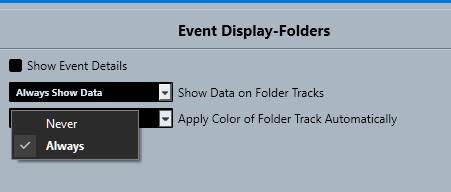
Preferences > Event Display > Folders >
Apply Color of Folder Track Automatically > NEVER