Seems the Cubase 14.0.40 update is released:
Well Nuendo 14.0.40 is also available in the download assistant!……No changelog as far as I can see
Seems the Cubase 14.0.40 update is released:
Well Nuendo 14.0.40 is also available in the download assistant!……No changelog as far as I can see
Volume automation now reverts to its initial value when removing the first automation point.
This is glorious!!!
EDIT: except it doesn’t work.
Maybe this item wasn’t included in Nuendo .40 update?
All I know is I updated through SDA and the behaviour hasn’t changed. It really is a pain in the ass when you click an automation lane by accident and now you can’t revert to the old value cause ctrl+z just removes the point and the volume change is not registered in mixer history.
I was also surprised to see this item on the list as I cannot see any changes to the previous version in this regard.
It’s not a good update….really needs a HOTFIX. (Dolby Atmos screwed up)
I always wonder why a ctrl plus left click doesnt set the automation point on centre when panning in automation lane.
If it doesn’t then maybe you have assigned the modifier to reset controls to default value to another key.
Or are you using a surround panner?
Or maybe your preferenes got corrupted. You can check by using a new prodile.
Thanks i will try that, and no i just use te normal panner oftenly.
Cubase 15’s initial release is surprisingly very stable. More so than 14.0.40, or is it just me?
Steinberg seems to have prioritized polishing the core engine this time, building on the performance gains from 14’s later updates like 14.0.40. 15 feels like a natural evolution—faster pattern sequencing, better modulator integration, and overall snappier performance—without the ‘half-baked’ vibes that turned off a few 14.0.40 holdouts.
I wonder if we can get a Nuendo 14.5 merger (the C15 core engine) because April 2026 is far away.
Hi @RadioTal
yes, well said, many things seem to react more smoothly with Cubase 15.
I think about the same as you, as far as overall performance & feel are concerned.
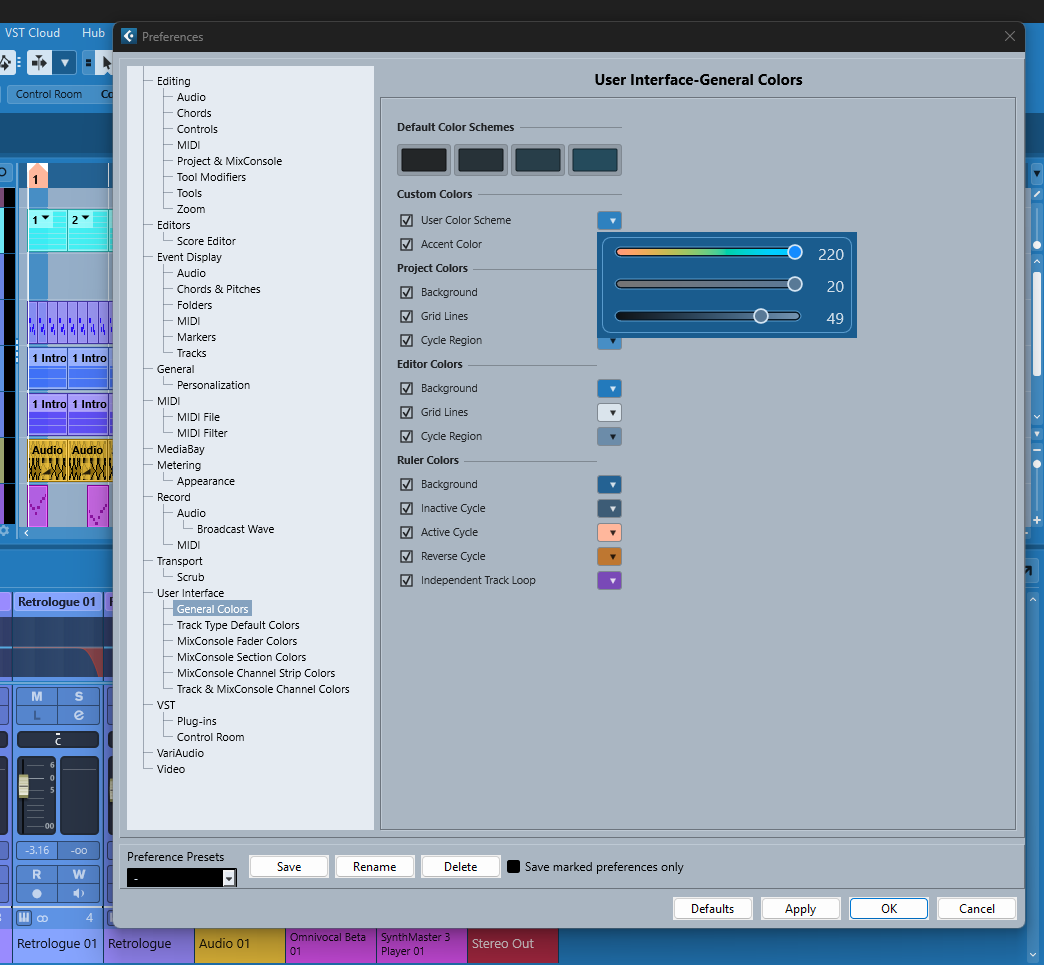
IMO the only thing that is now really sub-par (in my humble opinion), even utterly annoying, is the new GUI coloring system. I don’t like its kind of “black box” like structure, or better: the now irreversibly implemented coloring options nanny-ism".
Apart from that, Cubase feels fresher than before, and I’ve had no strange crashes so far.
Best,
Markus
I think @Michiel_80 Is referring to ‘ctrl’ click on an automation point for Standard Panner, ctrl clicking an automation point on the automation channel will not set it to centre default (Even with modifier set to ctrl). The value has to be entered on the info line….
What does this refer to? I noticed the new color picker for the UI, but I haven’t really dug into the particulars as I primarily use Nuendo, and I guess I’ll cross that bridge when N15 is released.
Like completely broken Dolby Atmos you mean? That’s not a matter of being half baked, it’s more like taking something cooked and ready to eat, then putting it back in the oven and burning it to a crisp.
Thats a serious issue but what I meant was that cubase 15 doesn’t feel unfinished or incomplete in the way that some users who stayed on version 14.0.40 felt about the newer versions. In other words, people who refused to upgrade from 14.0.40 because later updates felt rough or not fully polished won’t have that complaint with Cubase 15.
Hi @Semarus ,
this is what I was referring to:
IMO a completely ruined user experience, I’d say.
Also, those four dark color scheme “buttons” on top cannot be edited further in a meaningful (aka “transparent”) way.
It’s just “click this and be done, or modify with much higher restrictions than before”.
If you click on any of those color scheme buttons and then choose “Apply”, this instantly “kills” any imported GUI color schemes (from previous versions of Cubase, v14 or earlier). The GUI color tone that I’m using (pls. see my screenshot’s background) is a washed out blue tone, a self edited color tone which is a bit more relaxing to my eyes than any previous default presets, let alone the new presets.
Once the imported blueish color tone gets edited in the new GUI coloring system, it cannot be restored anymore by using the new color / parameter faders.
Not good at all.
And Nuendo 15 wont’t allow to handle the GUI colors any differently, I’m afraid.
Best wishes,
Markus
Hi Markus, perhaps take this over to Cubase forum, and Nuendo 15 is some way off. This thread seems to have gone off topic a bit as it is specifically about the 14.0.40 maintenance.
Hi @ckon ,
I agree, although any GUI features / issues in Cubase / Nuendo 15 are (or will be) more or less the same.
It seemed more practical to respond here in this thread, and I wasn’t planning to elaborate beyond this point anyway.
Cheers,
Markus
 …
…
I am constantly bringing parameters and automation breakpoints to their default value like this.
Tried the panner (again) one minute ago - works like a charm.
No idea why it doesn’t work on your end either.
Nuendo 14.0.32 ctrl clicking upon an automation point in the automation track will not go to default centre as part of automation edit, ctrl clicking on the info line value does reset to default value for selected automation point.
You are absolutely right. Not sure where I misunderstood the posts but it happened somewhere. Ctrl/Cmd is already occupied by lifting the grid restriction, resp. locking the movement to either horizontal or vertical.