Hi everyone!
In addition to my Cubase template for Organteq 2, I’d like to share another one, but for Dorico. There’s already another excellent template by @JesterMusician, however it didn’t quite suit my needs. The reason is simple: for finished compositions I use a different template of mine that only switches between pre-prepared combinations, whilst for drafts I wanted a template where registration could be done on the fly. Overall, the aforementioned template works for this too, but there’s a nuance: the stops are opened by their index, and if I’m experimenting with different presets of mine, this becomes a real nightmare. Plus it’s impossible to read afterwards, because you look at the score and each time you have to calculate which stop is at the designated index.
Actually, it was to solve this problem that I created this template. Briefly about it:
The main goal, as I’ve already mentioned, was to add the ability to create registrations as I compose, and to open the needed stops by their name. Say I have Gedact 8' on the Hauptwerk manual and on the Rückpositiv: I need to ensure that when I write in the notation “open Gedact 8'”, it only opens on the manual I need. In the case of the template I mentioned above, this is done by designating the manual number with a letter index plus the sequential number of the stop on it (for example, A1 or B5). I did it differently: in the Play tab I enabled Independent Voice Playback and assigned each staff to a channel. The upper and middle staves were mapped by default to Hauptwerk (second channel), but then, due to limitations in Dorico, so that Playing Techniques could change the channel during playback, I assigned the middle staff to the third channel, to Rückpositiv. It turned out that if two staves are on the same channel, in Endpoint Setup Dorico considers that the second staff has no assigned instrument and uses the one on the upper staff. So, to determine which manual to play on, I use playing techniques that change the channel during playback.
To open and close stops I created a pair of playing techniques, one for opening and another for closing. For instance, to open Gedact 8' you need to use [+gd8], to close it - [-gd8]. The abbreviation used is the same as in Organteq 2 on the stop knobs. Additionally I created playing techniques for pedal couplers, the Tutti button, and combinations. I’d planned to add monophonic couplers and tremulants as well, but realised that in drafts I hardly ever use them anyway, so I left it. I also haven’t added expression and crescendo pedals yet as well. I’ll probably add all of this in future updates if anyone finds my template useful and needs these functions.
To each of the playing techniques I added playback techniques, and then created an expression map for Organteq 2. In it I added the ability to switch manuals on the staves by changing channels: for example, if you want to play on Hauptwerk, you write [hw], on Rückpositiv - [rp], Schwellwerk - [sw]. The pedals are always on the third staff, so there is no [pd] playing technique for pedals or something like that. Next I created a mutual exclusion group for each pair of techniques (on and off). Except perhaps for the manuals: they’re in a single exclusion group.
Now for the magic. The magic wouldn’t have happened if Organteq 2 didn’t have a full-fledged JSON-RPC API. I searched for documentation online but found nothing, and only later through trial and error simply navigated to http://127.0.0.1:8081/jsonrpc, where the documentation lay. Using this documentation I wrote a script in Python, which I subsequently called “Organist”, that listens to IAC Driver in macOS, through which it receives events from Dorico. Each stop is mapped to a separate CC. For instance, stop 1 is mapped to Prinzipal 32', the Prinzipal 4' stop to CC 16, and so on. Each technique, for example [+pz4], sends a value to the corresponding CC: if the stop needs to be opened, then 127, if closed - 1. Not 0, because Dorico generates noise during playback, sending zeros to various CCs, and if the script expected precisely 0, the stops would spontaneously close during playback of the composition. The other playback techniques, with the exception of combinations and general cancel, work analogously. Combinations work through program change, general cancel too: at the very beginning of composition playback the expression map has Init, which sends program change 0, and Organteq, receiving this, sees in its mapping preset that program change is linked to general cancel, and returns the organ to its initial state. For combinations it’s done analogously. The script listens to these events but doesn’t participate in them itself: it only updates the appearance when it hears program change 0, for instance, to perform a reset.
I’ve rather gone on. Here’s a demo to see this in action, and then we’ll continue:
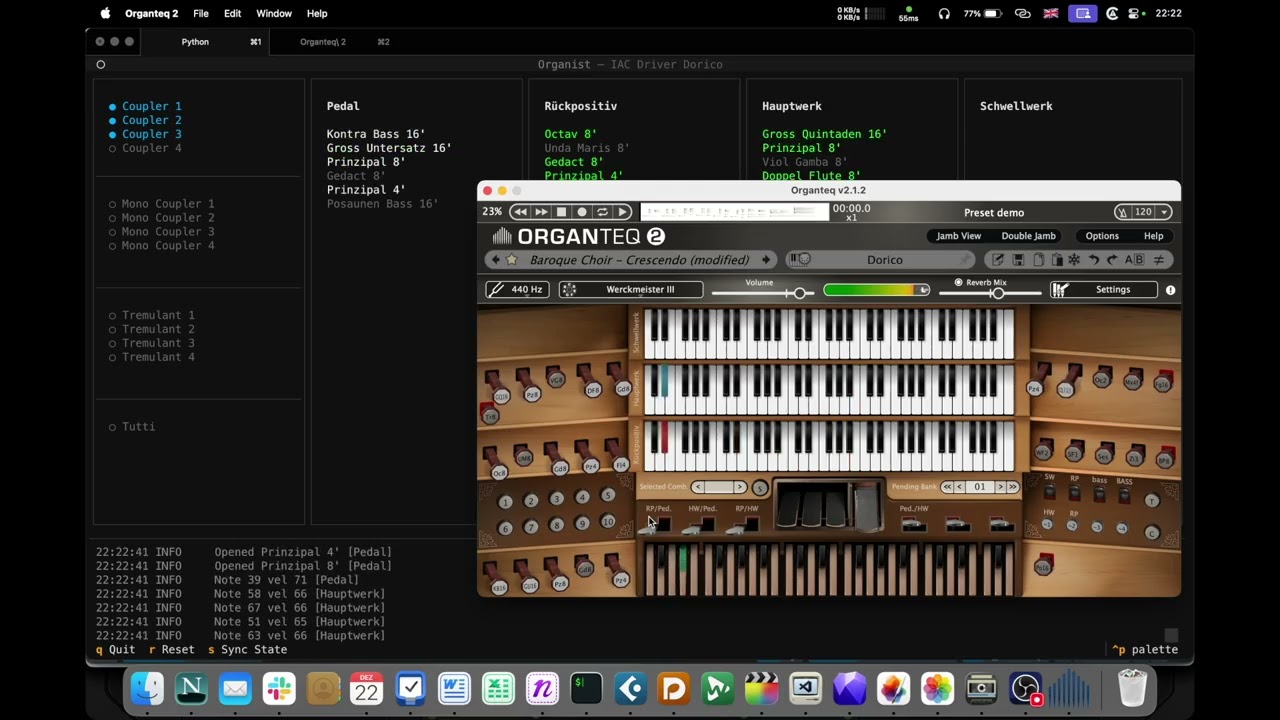
Apologies for the notation, the chords look odd because I used the middle staff exclusively for Rückpositiv registration. It could have been done more elegantly, of course, but it is what it is. I rewrote the composition itself from the Organteq 2 demo.
Now regarding how to make all this work. A small disclaimer: I haven’t tested this on other operating systems, so I can guarantee it will work on macOS, but no idea about the rest.
-
First you need to download and run Organist. This can be done in my GitHub repository: GitHub - coignard/organist: Organteq 2 MIDI bridge for Dorico
-
Then create a venv using
python3 -m venv venv; source venv/bin/activateand install dependencies:pip install -r requirements.txt -
In macOS settings, open Audio MIDI Setup → MIDI Studio, enable IAC Driver there, and create a bus for Dorico
-
From the terminal, launch Organteq 2 with the
--serveparameter so the API is available:/Applications/Organteq\ 2/Organteq\ 2.app/Contents/MacOS/Organteq\ 2 --serve -
You can now run the script. It will find the needed MIDI input itself and connect to it. If it can’t guess, it will offer you a choice from the available list
-
In Organteq 2, load the mapping preset
-
Open the template that contains my playing techniques + expression map for Organteq 2
-
In the Play tab, make sure IAC Driver Dorico (or whatever you called it in Audio MIDI Setup) is selected, Expression map is set to Organteq 2, and Independent Voice Playback is enabled
-
In the preferences (
Cmd+,) on the Play tab, untick the checkbox for MIDI Input Devices next to the driver you designated for Dorico. Otherwise a loop will occur and Organteq or Dorico will crash, or both, depending on your luck
You can now run it, it should work if everything was configured correctly.
Important disclaimer: I mainly use stops from German Baroque, so for now only those are available. If I have time to add French ones, I’ll let you know in this thread.
Any advice on improving the template, code, etc. is very welcome, but I can’t promise I’ll be able to respond quickly to it. Of course, you can also write to me via email: contact@renecoignard.com
Have fun!
René Coignard