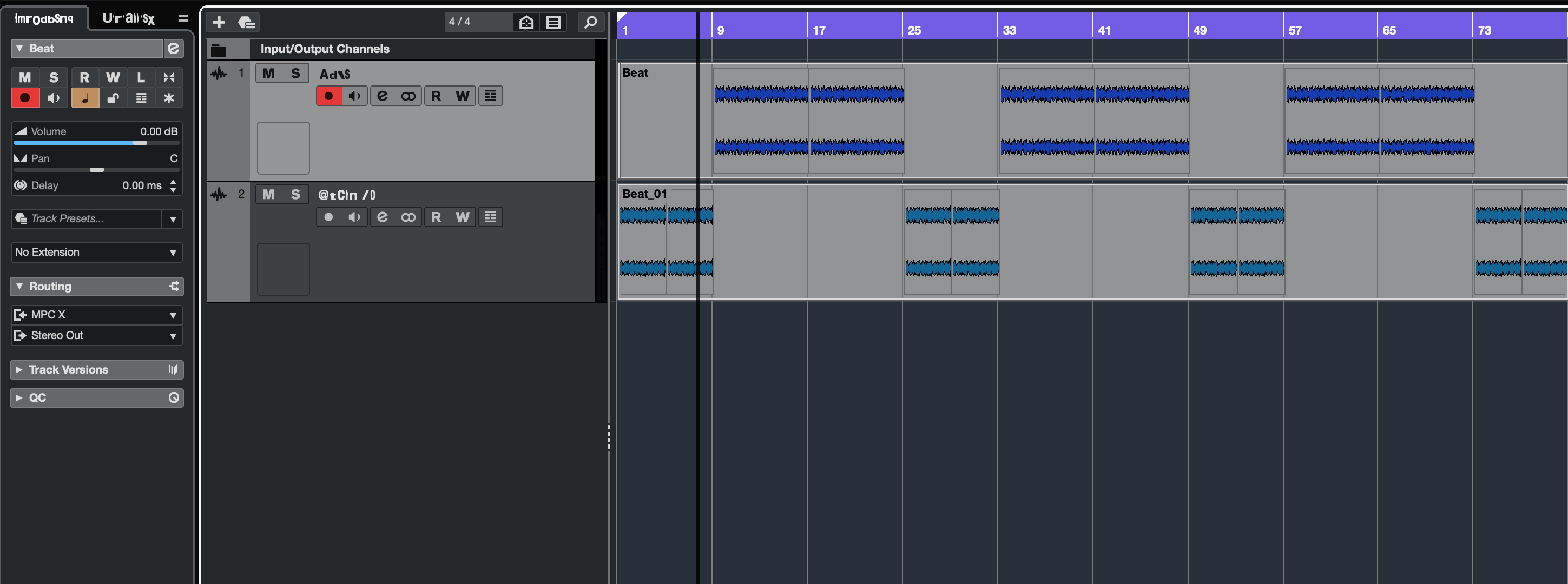
Hello, I 'm noticing a graphics glitch in Cubase Pro 13.0.41 under OSX 14.6.1 . My track names are updated yet the characters are all jumbled up. I’m on a Mac Studio Max M2 with 32Gb of RAM. Is this a known issue?
See attached screenshot.
Cubase Glitch Image
Regards,
B
Hi,
This is a known and already reported issue on Mac.
Please, search the forum.
For example here, here, here.
Ok, several posts reporting the same issue. Restarting Cubase appears to stop the glitching. Now that I think about it, I’m pretty sure I’ve seen this issue in some other apps under OSX recently.
Regards,
B
Hi,
I’m glad for this information, thank you! I wasn’t sure if this was Cubase only.
Just installed 13.0.50 maintenace update and this glitch is worse than before. Restarting Cubase isn’t fixing the issue.
This issue is quite often due to a bad or corrupted system font. Try opening Font Book and disabling all the user installed fonts if you have any.
Thanks for the tip. I’ll look into a confirm if it helps as I do have quite a few custom fonts installed.
Regards,
B
I’ve made some progress in resolving this issue. Disabling custom fonts didn’t help, and I confirmed that all fonts are valid and not corrupt.
After exploring various settings, I found that enabling ‘Disable GPU Acceleration’ under User Interface settings appears to fix the problem. Now, I’m wondering how much of a performance impact I might see with GPU acceleration turned off.
B