Editing automation in tracks and CC lanes

I know this has been mentioned before, but rather than spend time trying to find those old threads I would like to start this discussion again, in part because I want to make sure that my assumption is correct and that I’m not missing a setting somewhere, which I hope is the case.

Editing MIDI automation in an instrument track is a pleasure for the most part, save for the jumping beans issue that I hope will be fixed soon. But we have all these tools that make editing MIDI easy and fun. Part of that is that in the key editor, if you select two points next to each other, then you can move that selection easily, or you can scale it, and do even more stuff.

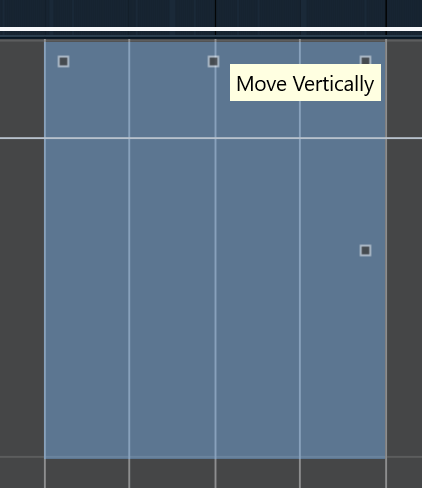
But when it comes to doing the same for automation in the project window for tracks, it has a completely different behavior that doesn’t make any sense. For example, let’s say I want to change the selected automation points:

So I hover the mouse at the top of that selection, which shows that icon to move the selection up or down. Except that it doesn’t move the selection, it creates new automation points and moves those instead:

This is the most confusing thing I’ve ever seen in any program that has any kind of automation or keyframing, after using dozens of different programs for 30 years. I don’t remember seeing a single program that creates new keyframes when you select some and then move the selection. It just doesn’t make any sense.

At least we can accomplish what we want editing the number from the info line, but that creates a mouse pointer travel where there shouldn’t be any. This should behave exactly as it does in the key editor inside the CC lanes, which is the way most creative software behaves.

And what sense does it make that if you have four contiguous points, of which you select the 2nd and 3rd and move them up or down, instead of creating ramps from 1 to 2 and from 3 to 4, it creates new points that are on the same place as 2 and 3? It’s beyond ridiculous, and it’s hard to comprehend because editing of automation can’t be different in one place of the app than in another.

Is this really the way it is, or am I missing a setting somewhere?
3 Likes

No, this has been a long standing complaint. I agree, it is counter intuitive and annoying.

I started using Cubase with Pro 12, and it was that way at least since then. So it puzzles me why Steinberg would release one major version per year without addressing this. How hard could it be to add or modify part of the Cubase code for this specific thing?

That’s the good thing about open source software, something like this in Blender would probably be fixed years ago by now, or someone would have come up with an add-on to add a choice of using it like it is, or adding a ramp.

I just saw a change on 15 Pro that I liked, which is the pencil in the audio track in the project window. To raise the volume of the softer parts of a song, until 14 you would have to raise the gain of the clip to like +12 and then with the pencil bring down the loud parts that went above 0 dB when you raised the waveform.

Now the pencil puts the gain band in the horizontal center, which is the way it always should have been. But the way to edit points is just as bad as editing automation in a track.

Another way to create an area to raise or lower the volume in a track is to use the range selector. You select a range, the mouse pointer turns into the move or scale tool (it doesn’t show in the screenshot),

and you move down or up:

This would be very helpful if it didn’t do something so absurd as creating a sharp dip instead of creating something more gradual like this (which I did manually of course):

I mean, the sharp dip doesn’t help anyone, while the gradual one is standard in any software with automation. Of all the audio and video editing software, the good old Sony Vegas was the one that had the best workflow. Because it started as an audio editing software, many things were designed for audio editing more than video. And a feature introduced around 2009 I think was that you would select a range, then move up or down, and it would create something like the last screenshot I posted above. Four points where you could lower or raise the clip gain, but with about a second on each side to do it gradually, as it makes the most sense. I think that duration was configurable.

Why can’t Steinberg see that it’s useless the way it is? I’m seriously asking, because perhaps there is a good reason, and I would love to know it even if I have to rethink the way I do some things.

Not everybody necessarily shares your opinion. It is the old “surely my opinion is shared by the vast majority” assumption.
I don’t claim to know what the majority prefers but lets assume Steinberg knows this better than anyone of us.

I can imagine that people who only use audio in Cubase, like recording and mixing engineers, game sound developers or post production pros prefer the current 4 point editing.

I don’t assume that. I’m just going by what I read in this forum and others, including the previous reply.

Why would they prefer that? I mean, nobody likes a sharp change in volume, it’s always gradual, even if it’s just half a second, but it’s hardly ever sharp. And there might be a few scenarios where that is needed, but why not just put the choice? Cubase has choices for dozens of things, why not make this a choice?

I mean, I really would like to know what are the scenarios where a sound engineer, game sound developer, etc, prefer the current 4 point editing like you say.

I made a thread about this last year but didn’t receive much support.

Perhaps people don’t use this feature much or are happy with the discrepancy between CC lanes and Automation Tracks.
(I haven’t checked the Cubase 15 manual to see if the function is described the same for MIDI CC and automation still.)

Here’s a bonus issue on the same subject:

1 Like

You illustrate better than me, having added videos of the absurd behavior. I really can’t understand why Steinberg doesn’t at least put an option to do it one way or another, and why is it in such an illogical way as the only way, when clearly they know a better way, which is the way it’s done in the CC editor lanes.

This is not crazy talk. Absolutely NO ONE in the creative world selects two or more automation points AKA keyframes and expects them to duplicate said points when clicking and dragging up or down.

1 Like