Robert….. Sorry, I just have to comment, you are running a $5000 US (Amazon.com: PNY NVIDIA RTX A6000 : Electronics) video card….!! WOW!! SL must be able unmix a 70 piece orchestra composition in 10 seconds with that!!
It’s not really faster than a RTX 3090. But the VRAM size makes it super stable, I am mainly working in Davinci Resolve and hi-res video can eat VRAM for lunch.
Back then when I had to buy a new GPU all RTX 3090 had been bought out by scalpers, so the price difference between the gamer and the pro card was much narrower.
And there were plenty of RTX A6000 available (because no scalper would buy those).
The price did hurt back then, but the GPU came at least in a noble package. One where you would almost expect an expensive old wine inside 
After the latest update it crashes both in standalone and nuendo versions.
The latest version of SL doesn’t crash here on a MacMini M4 Pro 14 Core , 64GB Ram, but the unmix song function turns the usually quiet machine into a “noisy vacuum cleaner” and it’s running hot ! Once the process is done, it returns to it’s silent state.
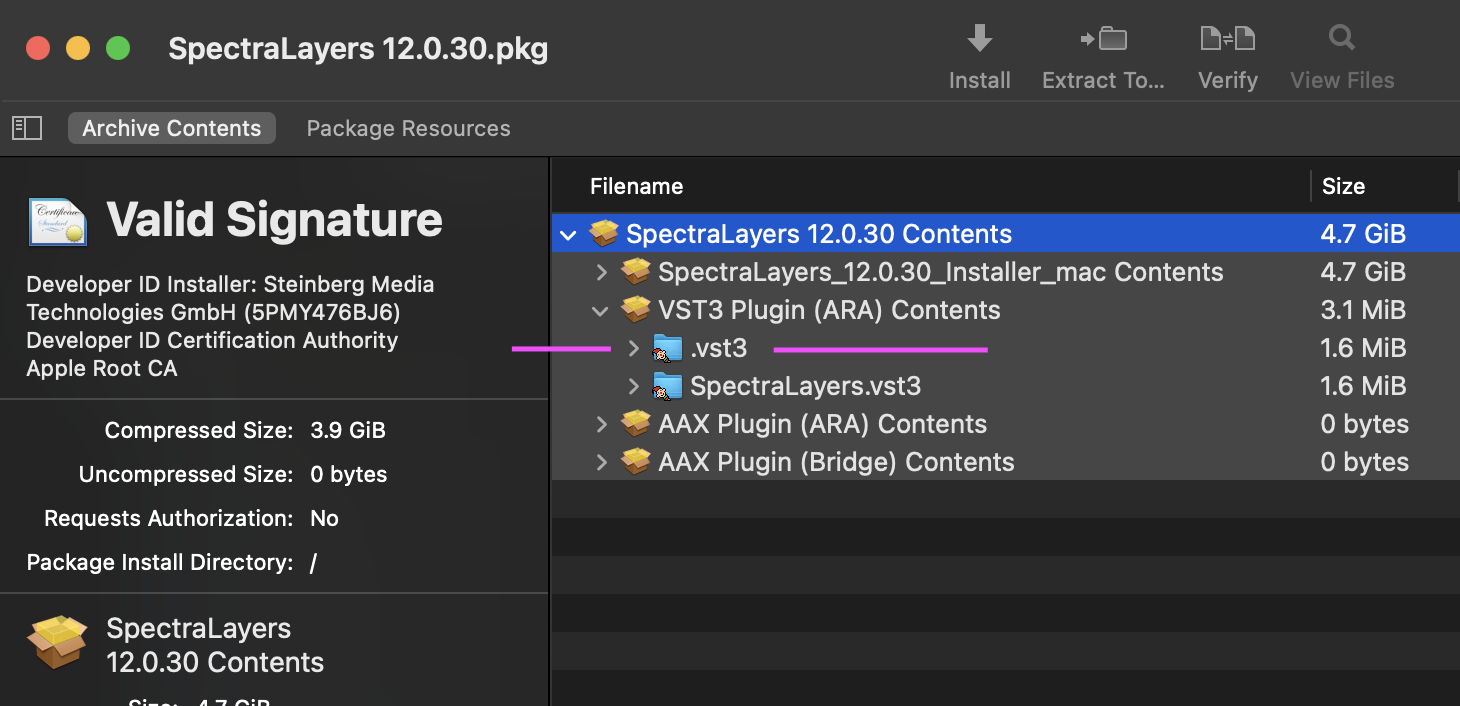
The Mac version installer has a serious issue with its VST3.
It installs SpectraLayers.vst3 and another nameless file with just a .vst3 extension (starting with a dot ends up hidden by the OS and the package now shows as a folder)

Then on later scans, Studio One gets the wrong vst info and throws an error when trying to apply the ARA.
Studio One error:

Solution:
- On Library/Audio/Plug-Ins/VST3 folder. Show hidden files (Command Shift dot) and manually delete the ‘nameless hidden folder’ .vst3
- On Studio One go to View>Plug-In Manager and, at the lower right, click [Remove Plug-In Settings]. That will force a full re-scan.
Here is 2 screenshots of the installer package content comparing versions 12.0.3 and 11.0.7

Beautiful work! We already reported the bug, but had no solution. Absolutely brilliant post you made and very helpful, thank you! 
Great and thanks for the help, I will try this immediately, great post…
Tried the solution but no effect….
I’m not one of those individuals, and my symptom was not a crash but a hang – for more details, see:
However, I’m happy to report that the 12.0.31.432 version, using automatic setting (which picked my NVidia GeForce RTX 3060 for AI Processing Device) to unmix the same song with the same settings that had hung earlier, not only did not hang, but unmixed the song (to high quality) in approximately real-time (on the order of 4 minutes for a 4:12 song – I was just using the Windows system clock, so there could conceivably be up to 59 seconds of slop on my timing it).
My challenge is unmiksing a consert with a gospel quier with band . Find to aeparate keyboard s and shaker from the drums is a challenge.
In Spectralayers 12 pro .
Any help appreciated .
I came to this thread today because v12.0.30 of SpectraLayers was crashing every time I tried to do Unmix Song with the “All” template in Balanced mode on my ASUS ROG Zephyrus laptop (NVIDIA GeForce RTX 3060 Laptop GPU with 6GB dedicated VRAM, running on Windows 11 24H2, with Intel Core i7-12700H CPU and 16GB RAM).
It worked successfully (if slowly) if I switched SpectraLayers to CPU-only, but I just installed the 12.0.31 special build to see if it fixed the crashes. I tried a new attempt with the special build, making sure to select the Auto option (where it said it would be using the NVIDIA GPU by default). The job is running now, but I can see zero activity on the GPU- it appears to just be doing another CPU job now and both memory and SSD storage utilization are maxxed out.
It’s at least not crashing anymore, but I don’t understand why it’s not using the GPU now, even though it’s apparently auto-selected? It’s quite slow.
Iam looking forward to 12.0.40 … when will be patch day?
You don’t have enough VRAM. If your VRAM runs out the speed is no longer determined by the GPU but the CPU. Unmixing all stems at once needs more than 17 GB of free VRAM.
Try selecting only single stems instead of all so you stay under 6 GB of VRAM usage. Then repeat the process with other stems.
Hello, I just have a few doubts about SpectraLayers 12.0.0. I was able to use the GPU (NVIDIA 1650 Ti with 4GB VRAM) for unmixing, but now it crashes. So I disabled the shared RAM option (special 12.3 build). When I uncheck “Not use shared VRAM,” it now switches to CPU and takes about 20 minutes for a 4-minute song. Did the underlying AI models change between versions 12.0 and 12.2?

The method of unmixing all layers individually produces varying results, and depending on the order, the results can be quite noticeable.
Is there a certain order you can recommend?
Sadly you can’t create a batch process out of different separation orders because the resulting layer names and group names cause naming conflicts which stops the batch process.
It always depends on the song. What you value is also crucial. You’ll have to try it out for yourself. That’s why unmixing the layers one by one isn’t the solution for me.
Wasting my time with trial and error is not my thing.
It would be a great time saver if SpectraLayers could batch process Unmixing with different settings for each step but sadly it doesn’t work because the name of the resulting stems and groups will cause the batch process to stop.
Both v12.0.20 and v12.0.30 crashed for me, so I was still running 12.0.10.
This v12.0.31.432 seems to work fine on my older system with an i7 7700/32GB and an NVidia GTX1060/3GB. “Use Shared Memory” is enabled.