Overall, a great update and worth the price with many new features. Download went quick, installed without issue (OS X High Sierra), and I really appreciate it started up, grabbed the prior settings and didn’t rescan all the plugins (like the v9 blacklist surprise). The only time-sink is manually moving the new sound files to my external drive and creating alias’ in their place. But I’m used to doing this with Steinberg products, and it just takes some time. Watched the new features videos (really like Greg’s YouTube stuff) and been learning the new features. Steinberg has certainly come a long way when compared to major updates earlier in the product’s history. Nice job, Steinberg.
Granted, this is my opinion only, but i really think Steinberg could benefit from this read:
It is woefully negligent to release a product with known issues, as mentioned in the “latest articles” listing under the “Steinberg Support” tab, with no mention said issues being made during the press releases or installation of the new software splash screen. This lack of forewarning resulted in an unnecessary loss of several hours of my time.
I hope for Steinberg, in future releases, to exhibit better concern for all customers…
Hi Matthias,
thanks for this fantastic new version and I congratulate the whole team.
Sweet. Why I’m not surprised.
the major bug that harm projects is still not fixed since 9.5. Great
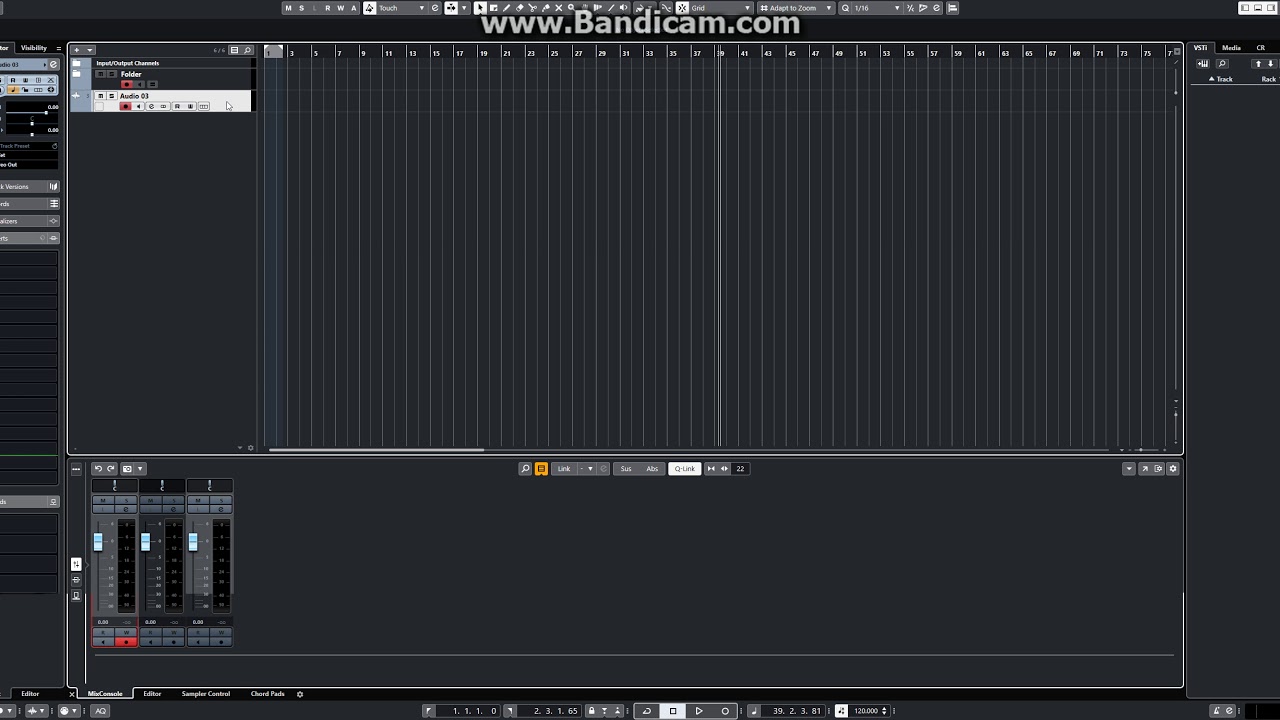
once again
Steps to reproduce
01 create 3 audio tracks
02 place two of them into the folder and close it (folder)
03 on the Mixer Console select (click) on the any of the tracks within a folder
04 on the timeline view click on the track outside the folder
= both tracks are being selected. and if you have Quick Link enabled you gonna be screwing your project by making changes to both these tracks (or any numbers of tracks that are highlighted.
Just downloading now and noticed the rev level is 10.0.5. Maybe an early update?
Hi – i didn’t realize Cubase worked with Mojave. I had a problem selecting my soundcard – cubase kept giving me a message something like “sorry that asio device could not be found”. even with built in audio. so i assumed it was Mojave and downgraded to Sierra. But – it works? No ASIO issues? Thanks…
Well I am a bit pissed off already, as now I have to use the Download assistant and there is only one 21 gig download. It will take me a week to download this as my internet speed is so slow (Currently 0.15 of a meg). With 9 I could download the content separately. It doesn’t occur to Steinberg that not everyone lives in areas with good broadband. Can I download to a remote computer using the Download assistant??
Grrrr!
Hi, some nice features here in the audio editing section (but since I have melodyne it does not bring me anything).
I got Cubase back at Cubase 5 cause it was the best midi note editor at the time, but I am starting to doubt if that was a sound decision now when I see that 10 is another update without any new features in that area. I know you have a few suggestions in the forums, can you please stick some of them in the roadmap for version 11?
With the improvements that GA SE5 has (mainly browser and cleaner look) I don’t think I’ll even use the Sampler track much anymore. Finally GA SE seems usable.
+1. Thanks Matthias, very excited to hear this. Multitrack free warp is my most anticipated feature too.
And also, I truly appreciate all the hard work on Cubase 10… congratulations to you & your team on the new release!
Fantastic!!
Great update what I’ve found so far. Lots of meat and potatoes tools and less of the Himalayan salt stuff nobody actually uses. I like it.
Thanks to all of you for the positive spirit and the great feedback! All your requests and reports are noticed.
Have a great weekend,
Matthias
Nice new pic Matthias!
Thank you Matthias and the whole Steinberg team! Cubase 10 hits a lot of great notes in an excellent direction, and most importantly, I really appreciate that it feels like you and the team LISTENED to us – it is evident IMO in the choice of features you released. Please continue this listening philosophy. I would NOT have upgraded to Cubase 10 without it! Now please squash the bugs asap! 
When I first opened it crashed LOL and I thought that is a good start. Black and white made my eyes water in 10 minutes and that long transport bar yuk. The lettering looked sort of fuzzy checked it against 9.5 and 9.5 looked crisper, better. Can I send it back I thought nope you can’t. Why didn’t I wait for the trail version? etc etc.
Two days later and after activating the HiDPI, tweaking color options it now looks fabulous. Snapshot my VST Instruments and now just slide them across when I want an instrument track. Love the new FX and the new content.
Bottom line no I don’t want to send it back, no I will no longer be using 9.5 (Excellent as it is), It is in my humble opinion the best Cubase yet and I can only say thank you to all at Steinberg for producing such a fabulous DAW. Thank You.
re: Bezier Curves in Midi Editor this, How to Use the New Cubase Pro 9.5 Automation with MIDI CC | Cubase Q&A with Greg Ondo - YouTube seems to an okay workaround for now.
This is excellent! As a home recorder/hobbyist, there is one quick question. Since I really dohn’t need the Cubase 10 Pro version, I will be seriously looking at upgrading to the Artist version. Can I do real time mixdowns with Cubase 10 Artist? I have 7.5 Artist right now and this is one of the things that I wish I could do.
Thanks!
Jeremy Thornton
This may help Compare the Versions of Cubase | Steinberg
Thank you. I’ve already looked at the comparison chart though and it doesn’t tell me whether I can do a real time audio export or not. At least as far as I can see it doesn’t. I’m really hoping it does though as I’m in a budget crunch right now.
Thanks again!